23 Practical Uses Of Artificial Intelligence in Our Daily Life
AI now runs quietly behind face unlock, spam filtering, GPS rerouting, and dozens of other daily tasks — the technology that once needed a headline now just needs a Tuesday morning.
In this guide:
Voice assistants now handle multi-step commands without a rephrase
Smart home devices learn a household’s routine after roughly one to two weeks of observed behavior
Recommendation engines re-rank content by predicted engagement, not chronology
Navigation apps recalculate routes in real time using live incident data
Spam filters catch the majority of phishing attempts, but a well-crafted one still slips through
Smart rings and wearables grew shipments 49% in 2025 — the fastest-growing wearable category, according to IDC
AI data centers saw electricity demand jump 50% in 2025, 16 times faster than global electricity demand overall
Generative assistants draft, summarize, and code — but a first draft still needs a fact check before anyone relies on it
Two-thirds of Americans didn’t wake up and decide to “use AI” this morning. They unlocked a phone with their face, skipped a rerouted traffic jam, and never saw the three phishing emails a filter caught before breakfast. That’s the pattern worth noticing: the more AI works, the less it announces itself.
Verasight’s 2026 tracking found that 64% of Americans report using artificial intelligence tools in their work or personal life at least once over the past month. Pew Research’s parallel data shows the habit going deeper for younger users specifically — around half of adults under 50 say they interact with AI about once a day or more often, a rate that drops off sharply for those 50 and older. This guide breaks down where that interaction actually happens, sector by sector, plus where each system still gets it wrong.
Quick-Answer Matrix
#
Use of AI
Where You See It
Tool / Platform Example
1
Voice assistants
Phone, home, car
Siri, Alexa, Google Assistant
2
Smart home automation
Thermostats, lights, cameras
Nest, Ring
3
Personalized recommendations
Streaming, shopping, social feeds
Netflix, Spotify, Amazon
4
Navigation & traffic prediction
Driving apps
Google Maps, Waze
5
Email & spam filtering
Inbox
Gmail, Outlook
6
AI wearables & health tracking
Rings, watches, glasses
Oura, Galaxy Ring, Whoop
7
Fraud detection & digital banking
Banking apps
Card issuers, mobile banking
8
Camera & photo enhancement
Smartphone cameras
iOS/Android camera AI
9
Translation & writing assistance
Travel, documents
Google Translate, Grammarly
10
Customer service chatbots
Retail, telecom, airlines
Brand support chat
11
Generative AI assistants
Writing, coding, planning
ChatGPT, Gemini, Claude
12
AI-powered search
Web search
Google AI Overviews, Perplexity
13
Facial recognition
Phone unlock, banking, airports
Face ID-style systems
14
Driver-assist & autonomous features
Cars, delivery robots
Lane-keeping, emergency braking
15
Predictive medicine & healthcare AI
Imaging, diagnostics
Radiology AI, wearable alerts
16
Weather forecasting
Weather apps
NOAA models, app alerts
17
Industrial & service robots
Factories, hotels, delivery
Warehouse robotics
18
On-device AI (NPUs)
Phones, laptops
Apple Intelligence, Snapdragon X
19
Agentic AI / background workflows
Scheduling, admin tasks
AI agents, auto-booking tools
20
AI for accessibility
Screen readers, captioning
Live captions, sign-language AI
21
Environmental cost of AI
Data centers, cloud infrastructure
IEA tracking, hyperscaler disclosures
22
AI for students
Study, tutoring, research
AI tutors, study tools
23
AI for online business & advertising
Ad targeting, marketing
Meta/Google Ads AI
Standard AI, machine learning, generative AI, and computer vision get used interchangeably online, but they’re not the same thing. The table below sorts out the difference before the guide gets into individual uses.
AI Vs. Machine Learning Vs. Generative AI
Technology
What It Does
Daily Example
AI (broad category)
Umbrella term for systems performing tasks that normally require human judgment
Fraud detection
Machine learning
Learns patterns from historical data to make predictions
Recommendation engines
Generative AI
Creates new text, images, code, or audio from a prompt
ChatGPT, Gemini, Claude
Computer vision
Interprets and classifies images or video
Face unlock, camera enhancement
Predictive AI
Forecasts a likely outcome from current data
Traffic and weather prediction
This guide uses “AI” as the general term for readability but names the specific technology where the distinction, especially the split between generative and predictive AI, actually matters.
Everyday Personal Applications
1. How Voice Assistants Handle Multi-Step Commands
Siri, Alexa, and Google Assistant take a spoken command, run it through natural language processing, and act on it. “Remind me to call the landlord after my 3 PM meeting” works on the first try now. It didn’t two years ago.
People reach for voice assistants to set timers hands-free while cooking, control smart home devices, get a quick factual answer instead of typing a search, and queue up music or a podcast on command. Background noise and strong regional accents still cause misreads — a quieter, slower repeat usually beats a louder one.
2. What Makes Smart Home Automation “Learn” a Household
Thermostats, lighting, cameras, and locks learn household patterns instead of waiting on manual input. A thermostat picks up that a household wants a cooler bedroom at night. A porch light triggers for a person, not a passing car.
Sensor data feeds a pattern-recognition model over days or weeks, and the model predicts a preference before automating the action. Most of the benefit shows up after one to two weeks of observed routine — not on day one, whatever the setup marketing implies.
3. Why Streaming and Shopping Feeds Feel So Accurate
Recommendation engines power every “For You” feed, “customers also bought” prompt, and autoplay suggestion. They re-rank content continuously based on what a user clicked, watched, or bought — probably the AI system people interact with most and think about least.
Netflix and Spotify surface content from viewing and listening history. Amazon suggests products from browsing patterns. Social feeds rank posts by predicted engagement instead of strict chronology. A repetitive or oddly persuasive feed usually reflects an engagement loop, not genuine interest — clearing watch or listen history resets the model’s inputs and often diversifies results within days.
4. How Google Maps and Waze Predict Traffic Before It Happens
Google Maps and Waze combine real-time GPS data, historical traffic patterns, and live incident reports to recalculate routes for large numbers of drivers simultaneously. Navigation delivers one of the best time-saved-per-effort ratios of any AI application in daily use.
Live rerouting kicks in around accidents or closures. ETA predictions factor in typical traffic for that hour. Transit suggestions weigh the fastest or cheapest combination available in a given city. One catch: apps occasionally route drivers down closed, private, or restricted roads without accounting for local rules, so an unfamiliar “shortcut” deserves a second look before anyone follows it blind.
5. The Spam Filter Job Nobody Notices Until It Fails
AI-based spam and phishing filters scan incoming mail and flag or block anything resembling a threat. This is one of the highest-stakes, lowest-visibility jobs AI performs daily — most inboxes would become unusable within days without it.
Gmail and Outlook sort spam and phishing automatically. Smart replies and auto-categorization split mail into “Promotions,” “Social,” and “Updates.” Banking apps flag suspicious login attempts in real time. These filters stay effective but imperfect — a well-crafted phishing email still slips through occasionally, so checking the actual sender address before acting on a money or credentials request remains a manual step worth keeping.
6. Why Smart Rings Are the Fastest-Growing Wearable Category
Wearable devices — smart rings, watches, and glasses — combine embedded sensors with AI models to turn raw data (heart rate, sleep quality, movement) into a readable output: a sleep score, a recovery number, an activity nudge. According to IDC data reported by Bloomberg, smart ring shipments were on track for a 49% jump in 2025, far outpacing an estimated 6% gain by smartwatches — the fastest acceleration of any mainstream wearable sub-segment tracked. Oura, the Galaxy Ring, and Whoop lead the category.
Sleep and recovery scores combine heart rate variability, temperature, and movement data. Continuous tracking runs without daily charging. Some newer wearables even transcribe and summarize meetings automatically. None of this makes a low “readiness” score a medical finding, though — these devices measure physiological proxies, not clinical markers, so a low number is a prompt to pay attention, not a diagnosis.
7. How Banks Catch Fraud Before a Human Reviews It
Fraud-detection models compare each transaction against a user’s normal spending pattern and flag outliers in real time. That’s why a card sometimes declines for “suspicious activity” mid-trip — the system caught an anomaly before anyone looked at it.
Real-time alerts catch unusual purchase locations or amounts. AI-driven models power credit scoring and loan approval. Chatbots inside banking apps handle balance checks and disputes. A false decline doesn’t mean anything is wrong with the account — banks deliberately tune these systems to over-flag, because missing real fraud costs far more than confirming a legitimate purchase.
8. Where “AI Enhance” Camera Modes Get Photography Wrong
Smartphone cameras use computer vision to recognize a scene and adjust exposure, lighting, and focus automatically. That closes the gap between an average shot and a professionally edited one, with zero manual work required.
Portrait mode blurs backgrounds based on subject detection. Night mode brightens low-light shots without touching a setting. Automatic tools remove objects and rebuild backgrounds. Default “AI enhance” processing can distort skin tones or over sharpen images, particularly on darker skin tones, where camera AI models have historically underperformed — turning off automatic enhancement gives more reliable colour accuracy where that matters.
9. Translation Apps vs. Human Translators: Where the Line Sits
AI translation tools convert text or speech between languages. Writing assistants check grammar, tone, and clarity in real time. Both are low-drama, high-frequency uses that rarely make headlines but run constantly.
Phone-camera translation helps with menus and signage while traveling. Grammar and tone checkers like Grammarly sit inside email and document apps. Live captioning and translation run during video calls. For legal, medical, or otherwise high-stakes text, machine translation alone isn’t reliable enough — idiom and legal nuance still get lost, and a human reviewer earns their keep when the stakes are real. For medical, legal translations, or otherwise high-stakes text, machine translation alone isn’t reliable enough — idiom and legal nuance still get lost, and a human reviewer earns their keep when the stakes are real.
10. When a Chatbot Can’t Solve It — and How to Skip the Loop
AI chatbots handle a substantial share of routine customer inquiries — order tracking, returns, basic troubleshooting — using natural language processing to interpret a request, escalating to a human only when the situation calls for it. That single-exchange model is also what separates a chatbot from an AIagent, a distinction that matters more as agentic tools spread into everyday apps.
Retail chatbots handle order status and returns. Airline and telecom virtual agents resolve basic account issues. AI-assisted live chat drafts responses for human agents to approve. If a chatbot’s first answer doesn’t resolve an unusual issue, typing “talk to a human” or “agent” routes to a person faster than rephrasing the same question five different ways.
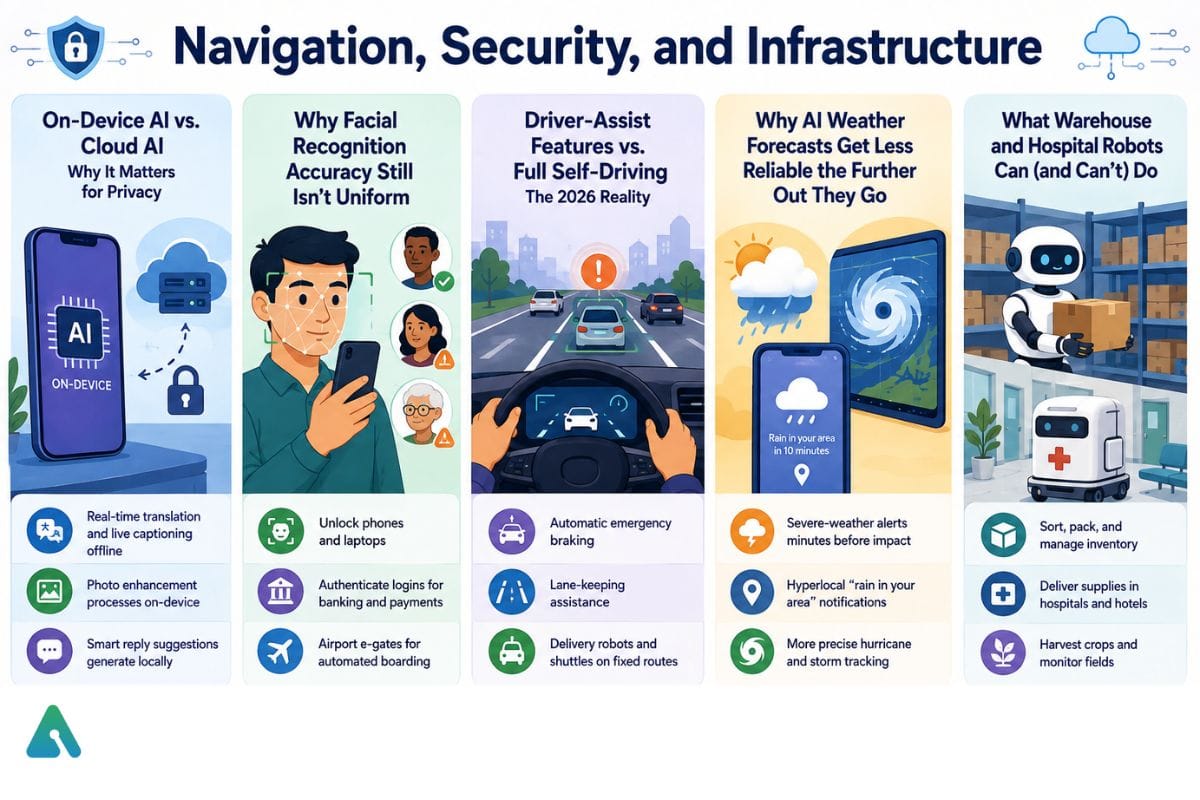
Navigation, Security, and Infrastructure 11. On-Device AI vs. Cloud AI: Why It Matters for Privacy
A growing share of everyday AI tasks now run locally on Neural Processing Units and other edge AIhardware built into phones, watches, and laptops — Apple Intelligence and Snapdragon X-class chips are two widely used examples — instead of traveling to a remote server.
Real-time translation and live captioning work offline. Photo enhancement processes on-device instead of uploading to the cloud. Smart reply suggestions generate locally inside messaging apps. The main advantage isn’t speed. It’s that on-device processing keeps sensitive personal data — photos, voice, messages — off external servers for that specific task, and it runs a smaller energy footprint per task than routing the same request to a cloud data center.
12. Why Facial Recognition Accuracy Still Isn’t Uniform
Facial recognition used to live almost exclusively in high-security systems. Now it unlocks phones by default. Computer vision algorithms map facial features and compare them against a stored reference to authenticate a user — the same underlying technology as older surveillance systems, tuned for convenience instead.
Face ID-style systems unlock smartphones and laptops. Facial recognition authenticates logins for banking and payment apps. Airport e-gates use it for automated boarding. Accuracy isn’t uniform across every user group: NIST’s ongoing Face Recognition Vendor Test evaluations have repeatedly found that most algorithms are more likely to misidentify people with darker skin, women, and the elderly, though the top-performing systems show far smaller gaps than weaker ones. Keeping a backup PIN enabled, rather than relying on face unlock alone, is a reasonable precaution rather than an overreaction.
13. Driver-Assist Features vs. Full Self-Driving: The 2026 Reality
Full self-driving stays limited to specific cities and operating conditions as of 2026. Driver-assist features — automatic braking, lane-keeping, adaptive cruise control — now come standard on many new vehicles, combining cameras, radar, and sometimes lidar with AI models that interpret the road in real time.
Automatic emergency braking triggers on detected collision risk. Lane-keeping assistance runs on highways. Delivery robots and shuttles operate fixed routes in a growing number of cities. Driver-assist isn’t full autonomy, and taking hands fully off the wheel is the most common way people misuse these systems — manufacturer guidance is explicit that a human driver stays responsible at all times.
14. Why AI Weather Forecasts Get Less Reliable the Further Out They Go
Modern forecasting pairs AI models trained on satellite, radar, and ground-station data with traditional physics-based simulation, sharpening short-term (0–48 hour) accuracy in particular. Forecasters run AI-driven models alongside, not instead of, traditional numerical weather prediction.
Short-term precipitation and severe-weather alerts reach phones minutes before impact. Personalized “rain in your area in 10 minutes” notifications use hyperlocal models. Hurricane and storm-track modeling has grown more precise. A “70% chance of rain” reflects the model’s confidence, not a guarantee — reliability drops the further out the prediction window extends.
15. What Warehouse and Hospital Robots Can (and Can’t) Do
Industrial and service robots use AI-driven computer vision and motion planning to navigate physical spaces and handle repetitive or physically demanding tasks.
Warehouse and factory robots sort, pack, and manage inventory. Hotel and hospital delivery robots navigate hallways autonomously. Agricultural robots harvest crops and monitor field conditions. Current robots don’t replace human staff in most settings — they handle narrow, repetitive tasks well and struggle with unstructured environments or exceptions that need judgment.
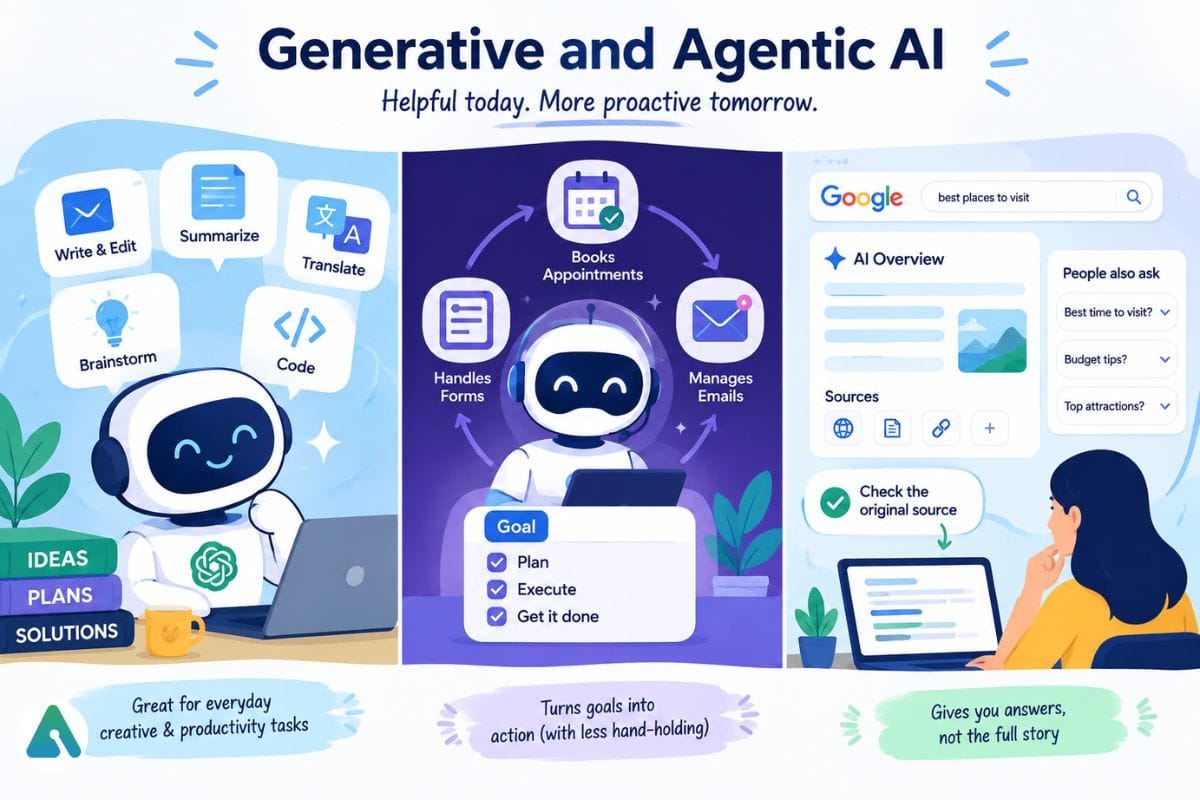
Generative and Agentic AI Tools
16. What Generative AI Assistants Actually Do Well — and Where They Don’t
Generative AI assistants like ChatGPT, Gemini, and Claude write, summarize, translate, plan, and code in response to a plain-language prompt. The category grew fast after the 2022–2023 wave of consumer chatbot launches and now works as a general-purpose daily tool for many users, similar to how search engines became a default utility a generation earlier.
Common uses: drafting and editing emails, cover letters, and social posts; summarizing long articles, PDFs, and meeting notes; brainstorming and outlining a project plan; explaining a difficult topic in simpler language on request. The most common mistake is treating a first draft as finished — specific numbers, citations, or factual claims deserve an independent check before anyone relies on them for something that matters.
17. Agentic AI: What Happens When an Assistant Acts on Its Own
Agentic AI systems carry out multi-step tasks with limited step-by-step supervision instead of stopping after a single prompt-and-response exchange. A user states a goal; the system plans and executes a sequence of actions toward it, often coordinated through an AI orchestration layer that manages the individual steps behind the scenes.
AI agents book appointments or reservations based on stated preferences. Automated workflows fill out forms and handle administrative sequences. Email tools draft, schedule, and follow up on messages with minimal supervision. This category is newer and less mature than single-prompt tools, and it carries a different risk profile — an agent that takes a wrong multi-step action, like booking the wrong date, is harder to catch and undo than one bad chatbot response. Reviewing a proposed action before it executes, where that option exists, is generally worth the extra step.
18. How AI Overviews Changed What “Searching Google” Means
Search is shifting from a keyword lookup toward a conversational format. Google’s AI Overviews summarize information from multiple sources into a direct answer placed above the traditional results list, with the underlying sources still listed underneath for anyone who wants to verify them.
Google AI Overviews summarize an answer above traditional results. Conversational search tools like Perplexity answer multi-part questions directly. Expanding “people also ask” panels predict likely follow-up questions. The common trap is treating an AI-generated summary as a final answer instead of a starting point — clicking through to the original source before citing or acting on a claim stays good practice, especially for anything time-sensitive or numerical. Readers who’d rather skip the summary entirely can turn off Google’s AI Overview and go straight to the traditional results list.
Health, Accessibility, and Environmental Considerations
19. How Radiologists Use AI to Catch What They Might Miss
AI models trained on large medical imaging datasets help radiologists flag potential abnormalities — tumors, fractures, early-stage disease markers — for human review. Most current clinical deployments use these models to assist a clinician, not to issue an independent diagnosis.
AI-assisted analysis reviews X-rays, MRIs, and CT scans. Predictive models flag patients at elevated risk for certain conditions. AI supports drug discovery and clinical trial matching. In current clinical use, AI functions as a second-opinion or triage tool for a licensed clinician, not a replacement — and regulatory approval for these tools varies significantly by country and use case, so availability differs by healthcare system.
20. How AI Is Closing Accessibility Gaps — and Where It Still Falls Short
AI-powered accessibility tools convert one sensory format into another — sound to text, image to speech, gesture to text — making digital and physical environments more usable for people with disabilities.
Screen readers describe on-screen content aloud. Live, real-time closed captioning serves video and phone calls. AI-assisted sign language interpretation tools remain in early deployment. This ranks among the more consistently positive-consensus applications of AI in daily use, since it expands access rather than optimizing for engagement or profit — though caption and transcription accuracy still varies with accents, background noise, and specialized vocabulary.
21. The Real Electricity Cost Behind Every AI Query
Every AI query — a chatbot response, a photo enhancement, a search summary — runs on computation that consumes electricity and, for large data- center-based models, water for cooling. The IEA’s April 2026 report found that electricity consumption from AI-focused data centres grew 50% in 2025, while overall data centre electricity demand grew by 17% — both well outpacing growth in global electricity demand of 3%.
Metric
2025 Figure
IEA Projection to 2030
Global data center electricity demand
~485 TWh
~950 TWh (roughly doubling)
AI-focused data center demand growth
+50% year-over-year
Triples over the period
Overall global electricity demand growth (same period)
+3%
—
Energy demand varies widely by task — a short chatbot reply uses far less than generating an image or video. Cloud providers report improving efficiency per query, but total AI energy demand keeps climbing with usage volume. On-device AI reduces this cost for tasks that can run locally, which is one reason chipmakers keep pushing NPU capability into consumer hardware rather than routing every request to the cloud.
AI for Students and Online Business
22. How Students Actually Use AI Tools in 2026
Students use generative AI assistants and specialized study tools across nearly every stage of coursework, from research to review. AI tutoring tools walk through problem sets step by step instead of just supplying answers. Summarization tools organize lecture notes and long reading assignments. Practice quizzes and flashcards are generated automatically from course material, and research assistants find and summarize academic sources.
Academic policies on AI use vary significantly by school, instructor, and even assignment within the same class — no single universal standard exists as of 2026. Checking a specific course’s policy before using AI on a graded assignment is the safest move, since many institutions treat unauthorized use as an academic integrity violation.
23. How Small Businesses Compete Using AI Marketing Tools
Small and online businesses use AI across marketing, customer service, and operations, often to compete with larger competitors on a limited budget. Ad-targeting platforms automate audience targeting and bid optimization through tools like Meta Ads and Google Ads AI. Generative tools write product descriptions and marketing copy. Customer service chatbots handle routine order and support questions, and analytics tools flag sales and traffic trends a human might miss.
A small business testing AI tools for the first time gains more from starting with one function — ad targeting or customer service, not both simultaneously. That focus makes it easier to measure whether the tool actually improves results before expanding its use elsewhere.
Common Traps and Human Oversight
Three patterns repeat across nearly every category above:
Confidence doesn’t equal accuracy. Generative AI, chatbots, and AI search summaries all present answers in a fluent, confident tone regardless of whether the underlying information holds up. Specific facts, numbers, and citations deserve an independent check before anyone relies on them, and a handful of critical thinking exercises built around exactly this habit can make the check second nature.
A flag or score is a signal, not a verdict. Fraud alerts, health “readiness” scores, and AI content-moderation flags are probabilistic outputs tuned to over-flag rather than under-flag. Treating them as a prompt to look closer, rather than a final answer, is generally the right calibration.
Default settings optimize for the platform, not always for the user. Recommendation feeds, ad targeting, and “AI enhance” camera settings tune themselves for engagement, conversion, or a generically pleasing result — not necessarily for what an individual user actually wants. Adjusting or disabling these defaults is usually possible, and often worth doing.
Frequently Asked Questions
Q. What are the most common uses of AI in daily life?
The most common everyday uses of AI are voice assistants, smart home automation, personalized streaming and shopping recommendations, GPS traffic prediction, email spam filtering, mobile banking fraud detection, and smartphone camera enhancement. Most of these run in the background without requiring the user to open a dedicated “AI app.”
Q. What is the difference between standard AI and generative AI?
Standard AI analyzes data to classify, recommend, or predict outcomes, such as fraud detection or route optimization. Generative AI creates new content — text, images, code, or audio — from a plain-language prompt, which is the category ChatGPT, Gemini, and Claude fall into.
Q. Is AI safe to use for everyday tasks?
Most consumer AI tools covered in this guide — navigation, spam filtering, recommendations — carry low individual risk. Higher-stakes uses, like medical decisions, legal or financial advice, or academic work under an integrity policy, warrant more caution and human review before anyone acts on the output.
Q. Do I need to pay for AI tools to benefit from them?
No. Many of the most-used AI applications in daily life — voice assistants, spam filters, navigation apps, camera enhancement, smart home features — already ship free inside widely used products. Paid tiers of generative AI assistants add capability, like longer context and more requests, but most everyday use cases don’t require them.
Q. How many Americans actually use AI daily?
Verasight’s 2026 tracking put monthly AI tool usage at 64% of Americans, while Pew Research found that roughly half of adults under 50 specifically interact with AI about once a day or more. The rate drops meaningfully for adults 50 and older, so “daily AI use” looks very different depending on the age group being measured.
Q. Does using AI tools cost the environment more than a regular search?
Generally, yes, for cloud-based generative queries — a chatbot response or an AI-generated image both run on more compute than a traditional keyword search, and AI-focused data centers saw electricity demand jump 50% in 2025 alone. On-device AI narrows that gap for tasks that can run locally on a phone or laptop instead of a remote server.
Q. Is facial recognition accurate for everyone?
Not equally. NIST’s ongoing testing has repeatedly found that most facial recognition algorithms are more likely to misidentify people with darker skin, women, and older adults, though the most accurate systems show far smaller gaps than weaker ones. Keeping a backup PIN or password enabled alongside face unlock is a reasonable precaution.
Q. Can AI actually replace a human doctor or radiologist?
No, not in current clinical practice. AI imaging tools function as a second-opinion or triage layer that flags potential issues for a licensed clinician to review — regulatory approval and real-world deployment for these tools still vary by country and specific use case.
Disclaimer: This article is for general informational and educational purposes only. AI technologies, tools, and best practices change quickly and may sometimes provide inaccurate or outdated information. Readers should verify important information with official sources before relying on it. This article does not constitute medical, legal, financial, academic, or other professional advice. References to third-party tools, companies, or studies are provided for informational purposes only and do not imply endorsement or affiliation.
Tags:
Sara Hayes
Sara Hayes covers AI, business technology, and the companies building the next generation of software. She is particularly interested in how artificial intelligence changes the way businesses operate—from boosting efficiency and revenue to creating new challenges around trust, privacy, and adoption. Her reporting combines product analysis, market trends, and practical insights for business leaders and everyday users alike.