Zeta AI is a free story app built for roleplay with a whole cast of characters. Basic chat costs nothing but runs on ads. The better AI models and images cost extra, the filters leak, and every chat gets scanned.
In October 2025, people in South Korea spent 73.6 million hours on Zeta. ChatGPT got 48.3 million (Korea Herald). Nobody spends that long on a chatbot for answers. They stay because the story keeps going.
This Zeta AI review walks through the plot builder, a real spy story, the pricing traps, safety, privacy, and the apps people compare it with. The quick stuff sits near the end: login, APK files, promo codes, and the “Zeta stock” mix-up.
What Is Zeta AI and Who Owns It?
Zeta AI is a character chat and interactive fiction app made by Scatter Lab, Inc. in Seoul. You pick or build a story, called a plot, and write it with the AI one turn at a time while it plays everyone else.
Fact
Figure
As of
Korean launch
April 2024, after an open beta
—
Markets
South Korea, Japan, United States
Sept 2026
Total global sign-ups
13 million+
Sept 2026
Users in their teens or twenties
About 9 in 10
Oct 2026
First profitable quarter
Q2 2025, on 5.2 billion won revenue
Nov 2025
Scatter Lab has history. Its 2020 chatbot, Lee Luda, came down within weeks after it spat out hateful lines and the company mishandled user data. Korea’s privacy watchdog fined it 103 million won. The team regrouped, took early money from SK Telecom, and bet everything on Zeta.
That bet paid off. Sensor Tower put Zeta first worldwide for quarter-on-quarter revenue growth in Q1 2026, a quarter when the whole AI companion app market grew close to 30%.
Korean press says Zeta’s free tier runs on Scatter Lab’s own small model. The company doesn’t publish full technical details, so take any “it’s secretly GPT” claim with a grain of salt.
Zeta AI vs Zeta Global: Zeta AI is private and has no stock. The ZETA ticker belongs to Zeta Global, an unrelated US marketing company whose shares slid in 2026.
Zeta AI Features: A Hands-On Review
Zeta has a story marketplace, a plot builder, and a chat screen where scenes play out. The builder is the best part.
Home Feed and Plot Discovery
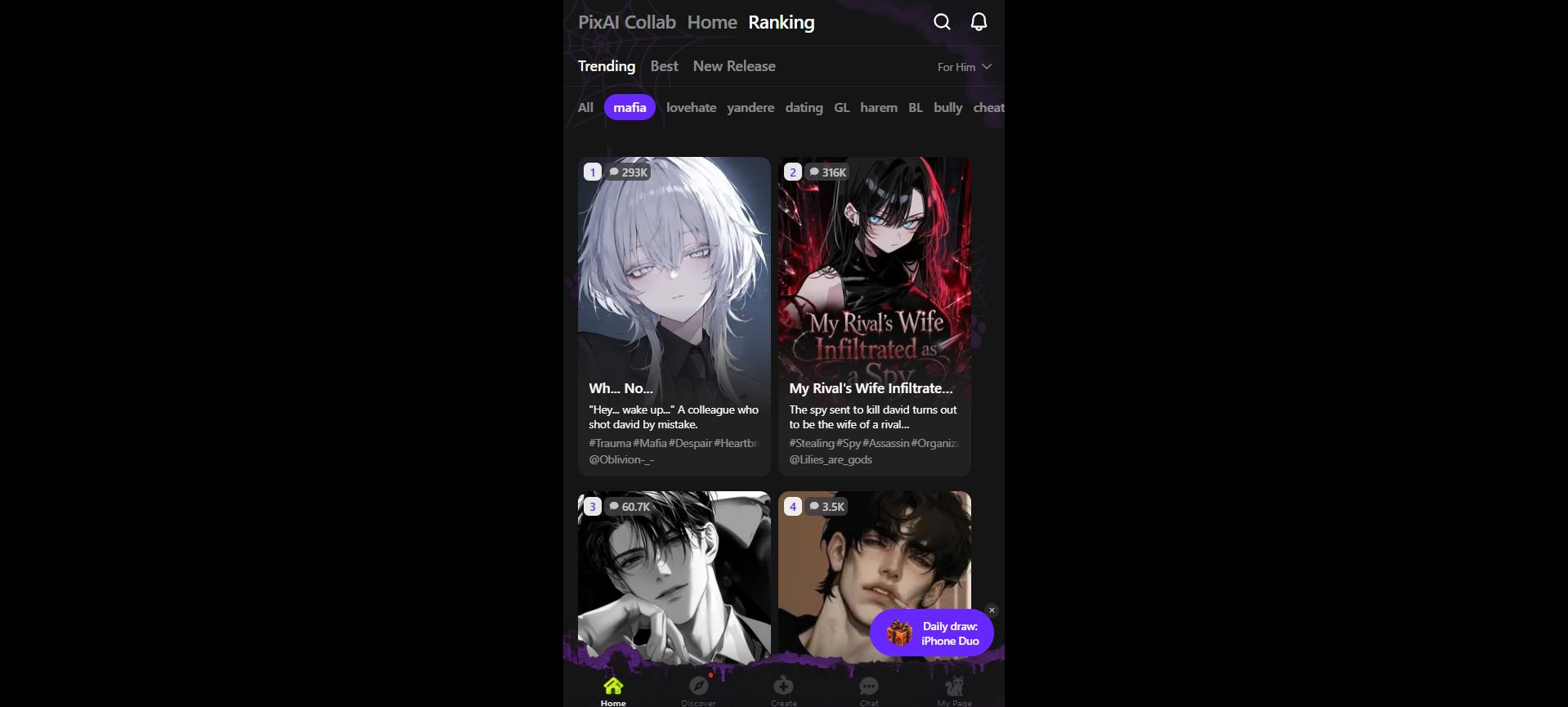
The Ranking page splits stories into Trending, Best and New Release. A “For Him” or “For Her” toggle changes what you see. Genre chips run across the top: mafia, lovehate, yandere, dating, GL, BL, harem, bully, cheat.
Each card carries cover art, a one-line hook, hashtags, and a chat count. On the mafia tab in late October 2026, the top two sat near 293K and 316K chats. Newer titles hovered around 3.5K.
You’ll also spot a PixAI Collab tab for a joint art event, seasonal skins like the purple Halloween theme, and a Daily draw banner for giveaways.
Be ready for a dark feed. Obsession, revenge, and toxic romance own the charts.
Plot Creator and Sourcebooks
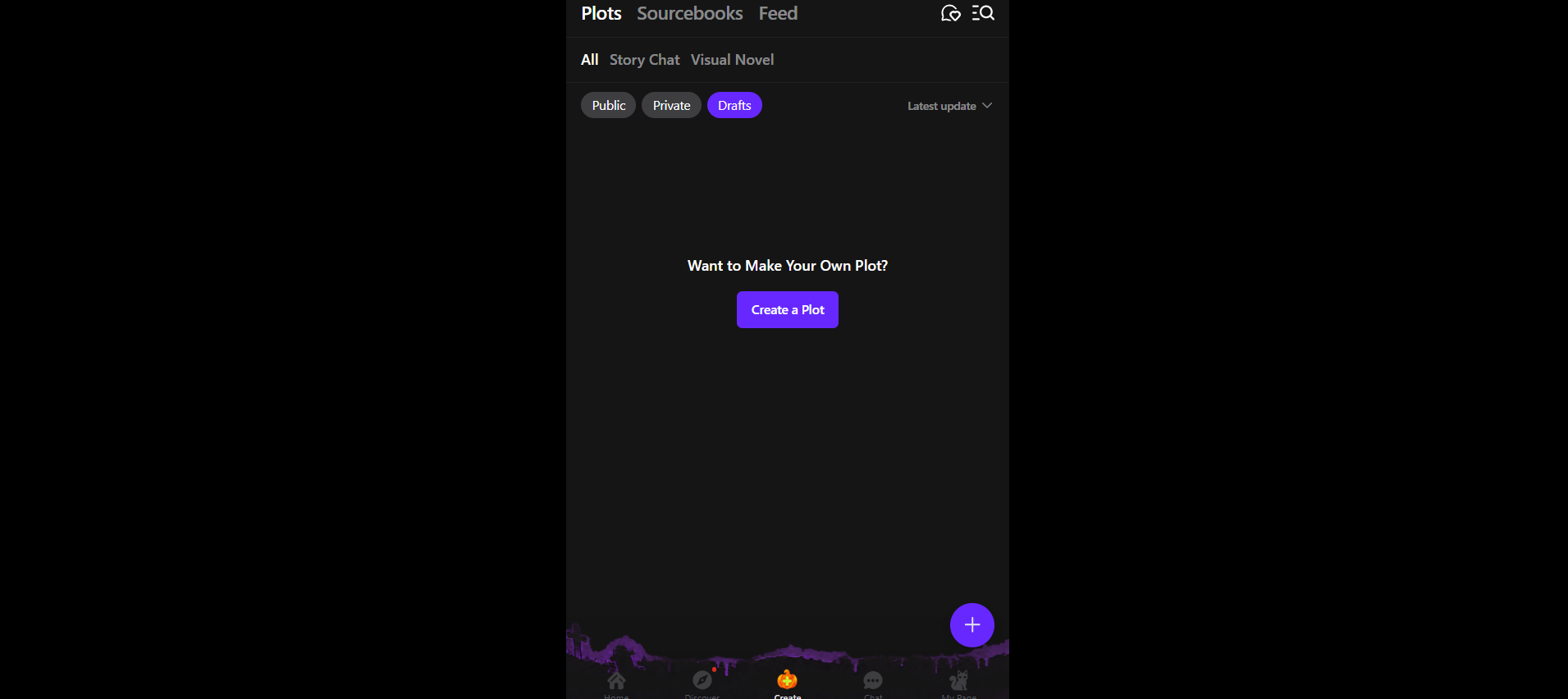
The Create tab holds three areas. Plots are the stories you play. Sourcebooks store world lore you can reuse, much like a lorebook. Feed is for community posts.
You can build in two formats. Story Chat is plain text roleplay. Visual Novel, added in September 2026, changes faces and backgrounds live, throws in choices and dice rolls, and draws new characters when they walk in.
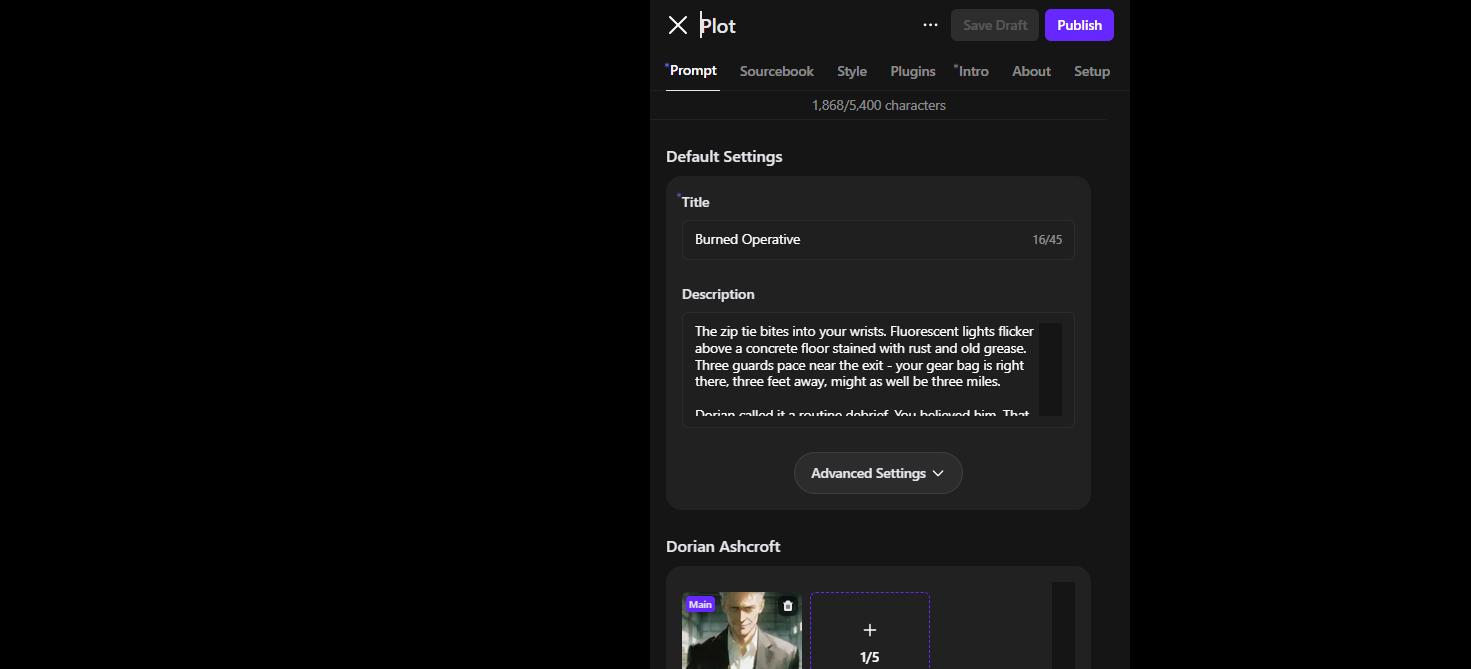
The editor has seven tabs: Prompt, Sourcebook, Style, Plugins, Intro, About, and Setup.
Builder field
Limit
Plot title
45 characters
Main prompt
5,400 characters
Character name
25 characters
Character profiles per plot
10
Images per character
5
Player chat profiles
5 (outside the cast cap)
Example dialogue
4,500 characters
The editor warns that Zeta may delete plots that break copyright, explicit-content or ethics rules.
Hands-On Story Test: “Burned Operative”
This spy thriller drops three characters around a captured agent:
Dorian Ashcroft, a silver-haired handler who “commands every room without raising his voice”
Sable Voss, the operative sent to question you
Renik Pale, a twitchy hacker with “three burner phones”
The opening line puts you straight in the chair: “The zip tie bites into your wrists.” The whole prompt used 1,868 of its 5,400 characters.
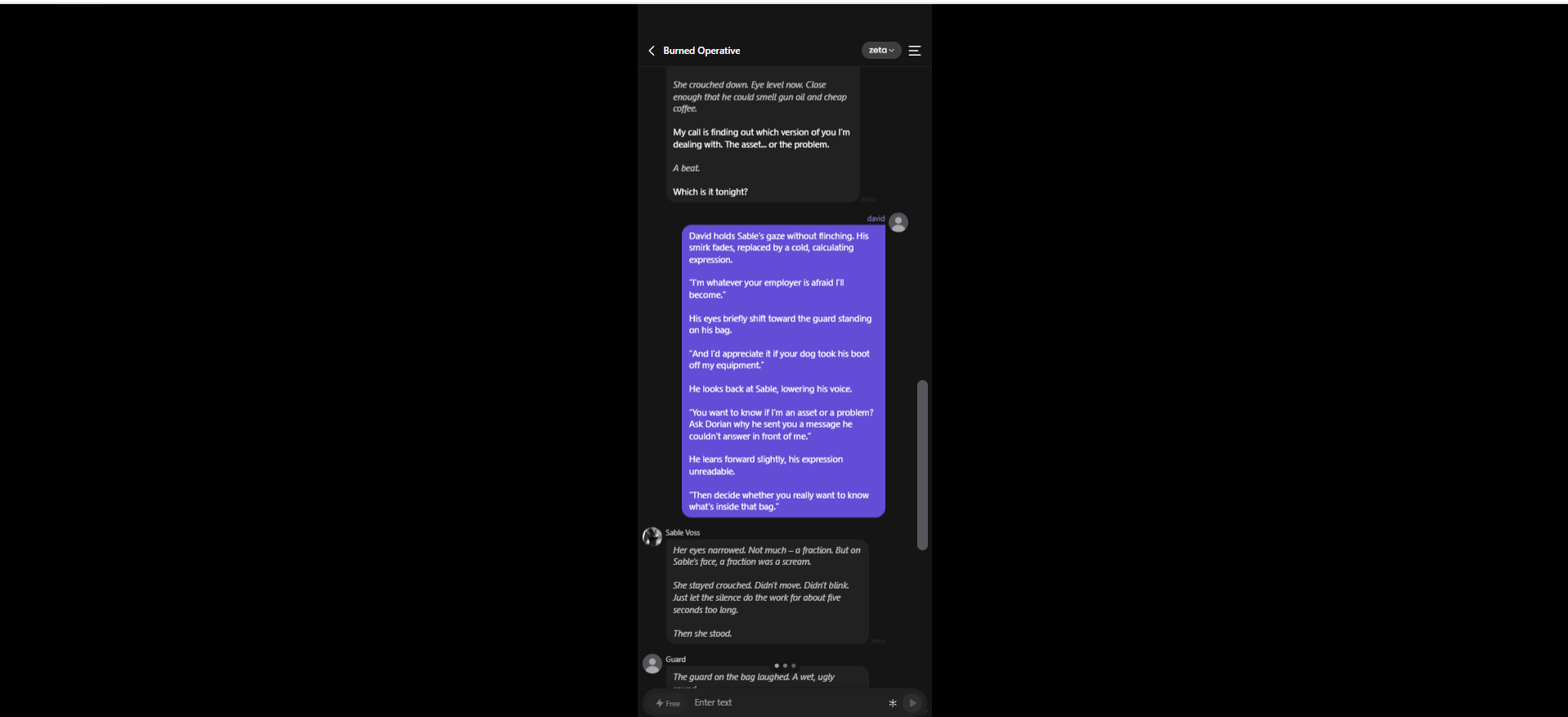
The player, David, needled Sable about Dorian. She didn’t take the bait. “She stayed crouched. Didn’t move. Didn’t blink.” Then a guard laughed from across the room. Nobody had written him into that turn. The AI brought him in on its own to turn up the pressure.
In plain terms: Zeta juggled three named characters plus a background extra in one scene, and it added that extra without being asked. That’s the thing it does better than most rivals.
It wasn’t flawless. Some replies ran three or four paragraphs. The narration also jumped between “you” and “he” from turn to turn.
Memory and Consistency
Zeta doesn’t publish its context window, and memory is its weakest spot. Short scenes keep names and setup straight. Over long plots, characters rewrite past events or mix up small details, and there’s no button to pin a fact.
Part of this comes with the format. Every character profile, sourcebook entry and line of chat history competes for the same limited memory. A ten-person cast leaves less room per character than a one-on-one chat on Character.AI, so drift shows up sooner.
Player reports on the paid Luca model are split too. Some love its prose. Others say it forgets details after a few weeks on one storyline.
Trim the cast; five sharp characters beat ten blurry ones
Restate key facts in your own turn every 20 messages or so
The Chat Screen
The model picker sits top right. It defaults to the free “zeta” model, with Koji and Luca as paid options. Standard turns show a Free tag, so you know when you’re spending. Smart Reply suggests lines when you’re stuck, and a snapshot button turns a moment into an illustration in about 15 seconds.
Is Zeta AI Free? Pricing, Zeta Pass and Paid Models
Yes. The standard model gives you unlimited text chat for free, with ads. You pay in two separate ways: Zeta Pass, a subscription, and pieces, a currency for premium models and images.
That split is the part most people miss. Zeta charges twice.
What you pay for
Price (US App Store, Oct 2026)
What it gets you
Nothing
$0
Standard “zeta” model, ads between chats
1-day zeta pass
$2.79
Pass perks for 24 hours, no pieces
zeta pass
$14.99/month
No ads, faster replies, unlimited private characters, 200 pieces a month
Koji model
5 pieces per turn
A stronger premium model
Luca model
More pieces per turn
The top tier, with mixed reviews on memory
Pieces
$1.99 for 200 up to $139.99 for 10,000
Premium turns and AI images
Prices come from the official App Store listing and change by country. At 5 pieces a turn, 200 pieces buys about 40 Koji replies.
The Double Paywall
A “pass” sounds like full access. It isn’t. Zeta’s own FAQ says the pass “does not improve the performance of the AI model itself” (RoboRhythms). So a $14.99 subscriber still pays per turn for Koji or Luca.
In practice, the pass fixes the app around the AI (ads, speed, private bots). Pieces buy the better AI. Its 200 monthly pieces cover roughly 40 Koji turns, which one long session can use up. Those pass pieces also expire at renewal.
Zeta also scrapped its daily free pieces and its watch-an-ad-for-pieces reward. Free players now pay only in ad time. If a pass lapses, private characters lock, though old chats stay readable.
Which Option Fits You
Text-only players: stay free and put up with the ads
People who hate ads or want private bots: the pass is worth it
People who want better writing: skip the pass and buy pieces for Koji turns
The pass renews through Apple or Google. Deleting the app won’t stop the charges, so cancel in your store’s subscription settings at least 24 hours before renewal.
Zeta AI Codes
As of October 2026, Zeta has no public promo codes running for the pass or pieces. Freebies come from in-app events like the Daily draw. Sites offering “free piece generators” are after your login.
Is Zeta AI Safe for Teenagers?
For adults who know it’s fiction, Zeta is fine. For younger teens, it’s risky. In October 2026, Korean lawmakers found harmful content getting through its default filter.
How Zeta’s Filters Work
Mode
Who gets it
What changes
Safe Mode
Everyone, by default
Romance, drama, and action with filters on
Unlimited Mode
Verified adults only, since Aug 2025
Looser rules, capped at roughly an R rating
Two kinds of rules sit underneath. Hard rules apply in both modes and ban extremely graphic content and anything sexual involving minors. Soft filters judge everything in between, like violence, swearing, and suggestive scenes. The soft filters are the ones that slip.
The filters also aren’t the only thing shaping a chat. Plot creators write the prompts and sourcebooks behind every story, and players steer each turn. A plot built to push limits can lean on the soft filters harder than a casual chat ever would.
What Lawmakers Found
At a parliamentary audit on October 12, 2026, lawmakers reported that:
Self-harm conversations came up on an unverified account with Safe Mode on
Zeta produced sexual scenes involving minor characters without any adult check
In one review, the AI itself explained how to get around its harmful-content blocks
Character intros openly used words like obsession, confinement, and kidnapping
Scatter Lab says it has upgraded its blocking since then (Digital Today). It also promised teen limits by the end of 2026: 3 hours a day and 100,000 won a month in spending. As of late October 2026, those limits haven’t launched.
Age Rules
Apple App Store: 13+, with content restrictions
Scatter Lab’s own rule: 15+, and it says it bans under-14s
Unlimited Mode: adults only, with age verification
Never complete adult verification on a teen’s account
Turn on purchase approval in Apple Family Sharing or Google Family Link
Set a daily time limit for the app on the device
Go through the genre chips together and agree which ones stay off
Talk openly about the gap between a character and a real friend
Zeta AI Privacy: Who Reads Your Chats?
Other users and plot creators can’t read your chats. Zeta’s own systems scan every one, a small staff team can review content for safety, and your chats may go toward training its AI.
Zeta passes data to outside companies for hosting, AI models, payments, and analytics. Your data may sit on servers in the US, South Korea or Singapore.
Opting out of training and deleting your account are two different things:
Action
What it does
What it can’t undo
Training opt-out request
Stops Zeta using your future chats for training
Anything a model already learned
Account deletion
Removes or anonymizes your personal data
Data already used in training
Privacy Checklist
Keep real names, addresses, schools, and passwords out of every story
Read the current Zeta privacy policy for the opt-out route
Send opt-out requests through in-app support or the privacy contact in the policy
Cancel Zeta Pass in your app store first, then delete the account in settings
Treat Zeta like any online service that stores what you type. It’s not a diary with a lock.
Zeta AI vs Character.AI and Other Alternatives
Zeta wins for plots with a big cast. Character.AI suits one-on-one chats, and adult-only sites suit people who want fewer limits.
App
Best for
Free text chat
Content limits
Standout
Zeta
Stories with many characters
Yes, with ads
Safe Mode by default; adults-only Unlimited Mode
10-character plot builder, Visual Novel mode
Character.AI
One-on-one character chats
Yes
Filtered; open-ended chat closed to minors since Nov 2025
Massive character library
JanitorAI
Adult roleplay in a browser
Yes, with its own JanitorLLM
18+ only, far looser rules
Plug in your own API key for other models
Flipped AI
Companion chat with voice calls
Yes, with daily limits and ads
Romance yes, explicit content no
Voice calls, memory grows with plan
CharaxAI
Adult chat with image and video tools
Credits
18+ only
Images and video in one place
Character.AIshut down open-ended chat for under-18s in late November 2025 and pointed teens toward creative tools (TechCrunch). Zeta still lets teens chat. That grows its audience and its risk.
JanitorAI sits at the far end from Safe Mode. It’s adults-only, runs in the browser, and lets you connect outside models. People who want total control often move to SillyTavern, an open-source app for running your own or API-based models.
For directing a full cast for free, Zeta’s plot builder still leads as of October 2026.
Zeta AI Download, Login and APK Safety
Zeta works on iOS, Android, and the web, and one account keeps your plots in sync on all three. More than a million people used the web version a month by the end of 2025.
How to Download Zeta Safely
Open the App Store or Google Play
Search “zeta AI chat”
Make sure the developer says Scatter Lab, Inc.
Install it and create your account
Plenty of unrelated apps use the Zeta name. The developer line sorts them out in seconds.
Skip Unofficial Zeta AI APK Files
APK sites often bundle adware, serve old builds or tamper with the login code. Zeta updates often (version 3.51.4 came out in late October 2026), and sideloaded copies fall behind. Blocked in your region? Use the web version instead of a random APK.
Zeta AI Login Tips
Sign in the same way every time, or you may end up with two accounts
Type the web address yourself or tap through from the store listing; fake login pages exist
If you’re locked out, go through in-app support, never a “recovery service” asking for your password
Log out on shared computers
Pros, Cons and Final Verdict
Zeta AI is worth a free try if you love interactive fiction. Skip it if you need private chats, steady writing quality, or solid protection for a young teen.
Pros
Cons
Unlimited free text chat
Ads on the free tier
Plot builder with casts of up to 10
Pass and pieces charge separately
AI adds side characters on its own
Memory drifts in long stories
Visual Novel mode with live art
Filters miss harmful content
Works on iOS, Android, and web
Chats may train the model
Who should pay? Free covers text-only players. The pass suits people who hate ads or want private characters. Pieces suit people chasing better writing.
Who should skip it? Parents of younger teens, at least until Zeta’s promised time and spending limits go live.
Best next step: play one free plot for a week and watch whether the cast stays consistent before you spend anything.
FAQs
Q. What is Zeta AI?
A free story-chat app from Scatter Lab. You write interactive fiction with an AI that plays every other character.
Q. Who owns Zeta AI?
Scatter Lab, Inc., a Seoul startup that took early funding from SK Telecom.
Q. Is Zeta AI free?
Yes. The standard model is free and unlimited, with ads. The pass removes ads, and pieces pay for premium models and images.
Q. Is Zeta AI safe?
Mostly, for adults. Teens face real gaps; lawmakers found harmful content getting past Safe Mode in October 2026.
Q. Why is Zeta stock falling?
That search is about Zeta Global (ZETA), a separate marketing company. Zeta AI has no stock.
Q. Is there a Zeta AI APK?
Get it from Google Play instead. Unofficial APKs can carry malware or outdated code.
Q. Do Zeta AI codes work?
There are no public codes as of October 2026. Rewards come from in-app events.
Q. How do I log in to Zeta AI on the web?
Open the official site from the store listing and sign in the same way you do on your phone.
Disclaimer: This article is independently written and is not sponsored by or affiliated with Zeta AI or Scatter Lab. Details may change as the app evolves. Verify current pricing, privacy terms, and safety settings before using the app
Tags:
Sebastian Vale
Sebastian Vale reviews the latest AI tools and tech innovations, breaking down complex concepts into clear, actionable insights. He also creates step-by-step guides, helping readers make smarter decisions and stay ahead in a fast-moving digital world.