

The Perchance AI character generator is a free, browser-based tool that uses Llama-based AI models to create fictional characters without requiring a login or subscription.
Most people try the Perchance AI character generator, click “generate” a few times, and leave, thinking it’s just another random tool.
I did the same thing.
My first serious attempt — a “serious cyberpunk hacker” — came back with a neon parrot and a sarcastic stand-up comedy tone. Nothing in my prompt suggested either of those things. My first instinct was that the generator was broken.
It isn’t. Perchance is just extremely sensitive to structure. Feed it chaos, and it returns chaos. Feed it a framework, and the outputs become genuinely usable.
In 2026, Perchance added Lore, NPC, and World boxes alongside a lightweight Llama-based AI inference layer. That quietly turned it into one of the most flexible free AI character creation systems available — no login, no subscription, no account. But the ceiling is only visible if you know how to push past the basic generation loop.
This guide is based on actual testing. You’ll learn how the system really works, what the 2026 features actually do, how to fix the consistency problems that make most users quit, and the power-user techniques that separate random generation from a complete character system.
What Perchance AI Character Generator Actually Is
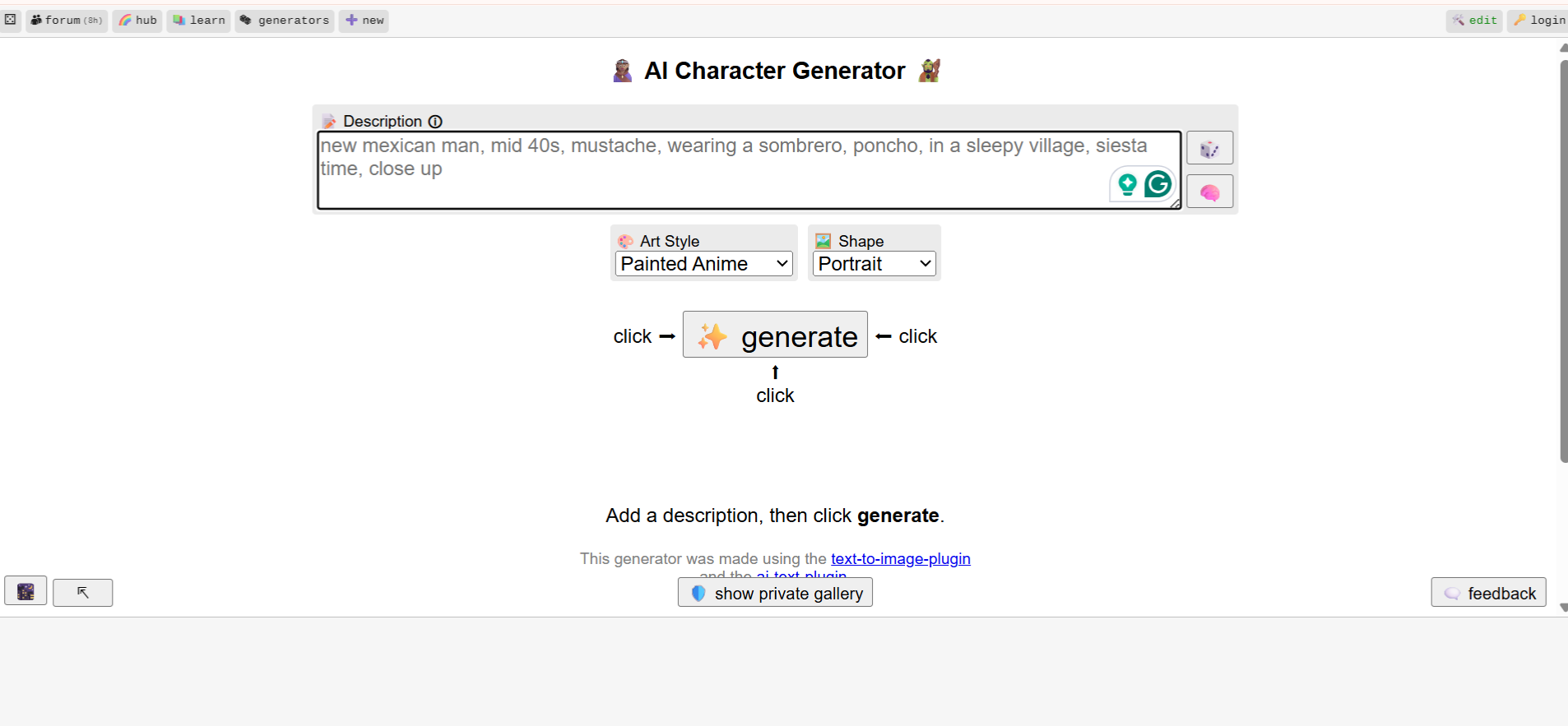
The Perchance AI character generator is a free, browser-based tool that creates fictional characters, personalities, and descriptions using modular prompt systems and Llama-based inference — without requiring login or subscription. It runs directly in your browser, funded partly by ad-supported GPU inference.
What makes it different from Character AI or similar platforms: no account, no centralized storage, minimal data retention, and full modular control. The trade-off is no persistent memory. Whatever you build exists only in your browser session until you save it manually.
For privacy-conscious users, that’s a feature, not a limitation. Compared to platforms that retain years of conversation data, Perchance’s architecture sits at the opposite end of the AI privacy spectrum.
2026 Updates in Perchance AI
The 2026 update introduced structured input fields — Lore, World, NPC, and Instruction boxes — to improve long-term consistency and prevent AI “context drift.” Most guides treat these as optional extras. They’re not. They’re the difference between outputs you can actually use and outputs that feel random.
Before using the Lore box in testing, characters changed tone mid-response, personality became inconsistent after a few exchanges, and the AI routinely forgot constraints defined earlier in the session. After adding Lore with structured fields, responses stayed aligned, behavior remained stable across multiple interactions, and the “neon parrot problem” disappeared entirely.
How to Build Consistent Characters in Perchance AI

Step 1 — Generate a base. Start simple. Don’t overload the prompt. One archetype, one tone, one setting. Complexity comes later.
Step 2 — Use the Description Generator. Refine personality, traits, and tone before adding any context fields.
Step 3 — Add the Lore Box (the critical step). Define backstory, rules, and constraints here. This is a permanent context — facts that never change, regardless of what happens in conversation.
Step 4 — Add World context. Cyberpunk city, fantasy kingdom, modern setting — whatever grounds the character physically.
Step 5 — Test in AI Chat. Run a few exchanges and check whether behavior stays consistent. If it drifts, the fix is rarely adding more content — it’s adding better structure.
Lore Box vs Instruction Box in Perchance AI: Key Difference for Stable Characters
The Lore Box stores permanent facts: things that are always true regardless of what the AI is doing right now. Character name, core traits, world rules, backstory, relationships. If it shouldn’t change, it goes here.
The Instruction Box (sometimes labeled “Short Writing Instruction” or “System Prompt,” depending on your Perchance build) controls how the AI writes right now. Use it for live steering: “Use 18th-century English,” “Keep replies under 50 words,” “Focus on sensory details this turn.”
Dumping everything into the Lore Box is the most common power-user mistake. When you put temporary mood or style instructions in a permanent context, the AI starts blending them with fixed character traits. The result is a character that shifts persona mid-session without apparent cause.
Separate these two fields deliberately:
- Lore Box: “Character is a former military surgeon turned underground medic. Emotionally detached. Does not discuss family.”
- Instruction Box: “This scene is tense. Short sentences. No metaphors.”
Perchance AI Lore Box Template (2026)
This template reduced randomness and improved consistency in testing. Paste it directly into the Lore Box and fill in the fields before generating.
Name: [Character Name]

Core Trait: [One word — e.g., Cynical, Loyal, Ruthless]

Speech Pattern: [Short sentences / Formal / Slang-heavy]

World Rule: [e.g., Magic drains physical energy]

Backstory: [2–3 sentences]

Relationships: [1 ally, 1 enemy]

Goal: [What they want]

Flaw: [What limits them]
The key is the Core Trait and Speech Pattern fields. In testing, adding just “Core Trait: emotionally detached” and “Speech Pattern: short, cold responses” stabilized the entire character across a long session. Not more prompts — better structure.
LORE+ Framework for Perchance AI Characters
For users who want to build characters with thematic depth rather than just consistent surface behavior:
- L — Location: Where are they physically and socially?
- O — Origins: What shaped them before the story started?
- R — Relationships: Who do they protect, fear, or owe something to?
- E — Events: What specific moment defines how they see the world now?
- + Traits: Personality, speech patterns, flaws, tone
This maps directly to Perchance’s box architecture and gives characters internal logic that survives long sessions.
Perchance Syntax: Controlled Randomness
Perchance uses a bracket-based syntax for controlled variation:
The character is a [cold|strategic|emotionless] hacker from a [cyberpunk city|underground network].This prevents repetitive outputs while keeping generation within defined parameters. Pure AI prompts can drift anywhere — syntax keeps variation inside intentional boundaries. Power users combine syntax with Lore Box constraints to get outputs that feel genuinely varied without losing character coherence.
Narrator Mode in Perchance AI: The Dungeon Master Hack
One of the most overlooked 2026 features is the Narrator Speaker Role.
Most users operate from the “User” role — everything you type gets interpreted as something your character said or did. Switching your role to “Narrator” for a single turn lets you inject world events without the AI treating them as character dialogue.
Instead of: “A dragon lands on the roof” (which the AI reads as your character saying or doing something)
As Narrator: “A shadow passes over the skylight. The impact shakes the building. Something enormous has just landed on the roof.”
The AI responds to this as a world event rather than a character action. For anyone building AI roleplay scenarios or tabletop-style narrative sessions, this is the difference between being a player and being a game master. It makes Perchance feel like a $20/month AI RPG system without costing anything.
Fix Perchance AI Memory Issues (Soft Reset Method)

Browser-based Llama models consume significant local RAM during long sessions. After 20–30 messages, the model starts to lag — outputs slow down, responses become less coherent, and the AI begins “hallucinating” details that contradict established Lore. This isn’t a bug. It’s RAM saturation in a browser context.
The fix is a Soft Reset every 20–30 messages:
- Copy your current Lore Box content and the last 2–3 messages of the conversation
- Hard refresh the page (Ctrl + Shift + R / Cmd + Shift + R)
- Re-paste the Lore Box content
- Add the last 2–3 messages as context
- Continue from there
This clears memory bloat while preserving continuity. The character won’t “remember” the full session, but the Lore Box re-establishes everything that matters — and the AI runs cleanly again. This is the number one fix for the sluggish “Slow Mode” feel that free browser-based tools develop over long sessions.
Advanced Plugin Chaining
Combining multiple Perchance tools turns a single character into a full system:
Character Generator → effective-character-summarizer → ai-text-plugin → text-to-image-plugin → roleplay-chat-generator
Each step builds on the previous one — summary locks consistency, text plugin expands narrative, image plugin adds visual grounding, and the roleplay generator creates an interactive character rather than a static description. For users building AI character cards for use in other platforms, this workflow produces export-ready output rather than raw generation.
2026 Power User Troubleshooting Table
| Symptom | The 2026 Fix |
|---|---|
| “Context Drift” (AI forgets name/traits) | Move Name and Core Trait to the very first line of the Lore Box |
| “Looping” (AI repeats the same phrase) | Delete last 3 messages, use Instruction Box: “Avoid repetitive descriptions.” |
| Personality shift mid-session | Separate permanent facts (Lore Box) from style instructions (Instruction Box) |
| Memory bloat / slow responses | Soft Reset every 20–30 messages (copy Lore + last 2 messages, hard refresh, repaste) |
| Mobile freeze/buttons unresponsive | Switch to Landscape Mode — scripts stack on vertical mobile views |
| Output too generic | Use Perchance Syntax: `[grim |
| Narrator events read as character dialogue | Switch Speaker Role to “Narrator” for that turn |
| Character contradicts its own backstory | Add a “World Rule” field to the Lore Box with the key constraint stated as an absolute fact |
Perchance vs. Character AI (2026 Comparison)
| Feature | Perchance AI | Character AI |
|---|---|---|
| Model Type | Llama-based | Proprietary |
| Cost | Free | Freemium |
| Login Required | No | Yes |
| Memory | No persistence | Strong |
| Customization | High | Medium |
| Content Flexibility | Moderate | Restricted |
| Data Retention | Minimal | Higher |
| Narrator/World Control | Yes (2026) | Limited |
The memory gap is real and matters. Perchance has no persistent memory between sessions — everything resets unless you export it. Character AI maintains a strong conversation history. For users building long-running characters or AI companions with consistent memory, that’s a meaningful difference. For users who prioritize privacy and customization over continuity, Perchance’s architecture is the better fit.
Mobile Issues and How to Fix Them
Heavy scripts and browser storage dependencies cause most mobile problems: buttons not responding, UI breaking, and inputs resetting mid-entry.
The fixes that work consistently: use Chrome instead of Safari, enable Desktop Mode before loading Perchance, avoid switching tabs during active sessions (tab switching triggers partial unloads in mobile browsers), and copy outputs immediately rather than trusting the session to persist. In testing, Desktop Mode resolved the majority of interface issues on both Android and iOS.
Landscape Mode specifically helps with button-stacking — Perchance’s scripts often render buttons underneath each other in vertical mobile views.
Privacy and Data Safety
Perchance operates with minimal data retention by design. No account required means no centralized user profile. No login means no long-term tracking tied to an identity. Sessions exist in browser memory and disappear on refresh unless you manually export.
In 2026, that architecture is increasingly rare. Most AI platforms moved toward persistent accounts, conversation history, and data retention for training purposes. Perchance’s no-login model sits at the opposite end of that spectrum.
Why Perchance Is Growing in 2026
Demand for free AI tools is rising. Platforms that require accounts and subscriptions are facing pushback from users who’ve hit paywall fatigue across multiple services. No-login, modular, browser-based tools fit the direction the independent creator community is moving — more control, less lock-in, lower cost.
For writers, worldbuilders, tabletop players, and local LLM users building offline roleplay environments, Perchance occupies a specific niche that larger commercial platforms don’t serve well: maximum customization with zero infrastructure cost.
FAQs
Q. Is the Perchance AI character generator free?
Yes, the Perchance AI character generator is completely free to use. It does not require sign-up, subscription, or payment, making it one of the few AI character generators with no login in 2026.
Q. Does Perchance AI save characters automatically?
No, Perchance AI does not save characters automatically. It relies on browser storage (localStorage), so your data can be lost if you refresh the page, clear cache, or switch devices.
To keep your work, you should copy, export, or save the generated content manually.
Q. What is the Lore Box in Perchance AI?
The Lore Box in Perchance AI is a structured input field used to store permanent character information, such as backstory, personality traits, and world rules.
It ensures that the AI maintains consistent behavior and identity across responses.
Q. What’s the difference between the Lore Box and the Instruction Box?
The Lore Box stores permanent facts, while the Instruction Box controls temporary writing style or behavior.
- Lore Box: fixed details (name, traits, backstory)
- Instruction Box: real-time guidance (tone, style, response length)
Separating these improves character consistency and output quality.
Q. What is the Narrator Role in Perchance AI?
The Narrator Role in Perchance AI allows users to introduce world events or story changes without the AI treating them as character dialogue.
This is especially useful for roleplay scenarios and storytelling control, similar to a game master in RPGs.
Q. Can Perchance AI be used for roleplay?
Yes, Perchance AI can be used for roleplay by combining character generation with tools like the Narrator Role, Lore Box, and chat modules.
It works well for AI roleplay, storytelling, and character interaction, especially when structured prompts are used.
Q. How do I fix memory issues or slow performance in Perchance AI?
To fix memory bloat or slow responses, use a Soft Reset:
- Copy your Lore Box content
- Save the last 2–3 messages
- Hard refresh the page
- Paste everything back and continue
This improves performance in long sessions and prevents AI inconsistency issues.
Q. Is Perchance AI safe to use?
Yes, Perchance AI is generally safe to use because it does not require an account or store personal data centrally.
Its no-login, minimal data retention model makes it more privacy-friendly than many AI platforms.
Q. How do I improve character consistency in Perchance AI?
To improve character consistency in Perchance AI:
- Use the Lore Box for permanent traits
- Use the Instruction Box for temporary style control
- Apply structured templates (like the LORE framework)
- Perform a soft reset in long sessions
These steps help prevent context drift and personality changes.
Conclusion
Perchance isn’t polished — and that’s exactly what makes it useful.
The tools are modular. The syntax gives you control. The Lore and Instruction boxes give you stability. The Narrator Role gives you world control. The Soft Reset gives you longevity.
Most users never go past random generation. They click, get chaos, and leave. The users who build structured templates, separate their Lore from their Instructions, and use the Narrator Role to steer the narrative, end up with a complete AI character system — not just a generator.
Related: Can You Get Banned From Character AI? Shadowban Signs & Fix (2026 Guide)
| Disclaimer: This article is for informational purposes only and is not affiliated with or endorsed by Perchance or its developers. The insights shared are based on independent testing and research. Features may change over time, so readers should double-check details on the official platform. |
