

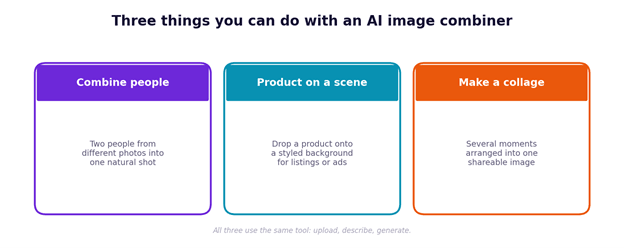
To combine photos with AI, upload two images to an AI image combiner, describe how you want them merged, and generate. The AI matches lighting and perspective and blends them into one seamless picture. It handles three common jobs — putting two people together, placing a product on a background, and building a collage. Here is how to do each.
The mechanics are the same every time: two photos in, a plain-English description, one image out. What changes is the prompt you write. Get the prompt right and the tool does the rest — no masking, no layers.
Three jobs, one workflow.
Write the prompt like this
A good merge prompt names three things: the subject, where it goes, and the background or mood. Keep it concrete and the first result usually lands close.
Name the subject, the placement and the background.
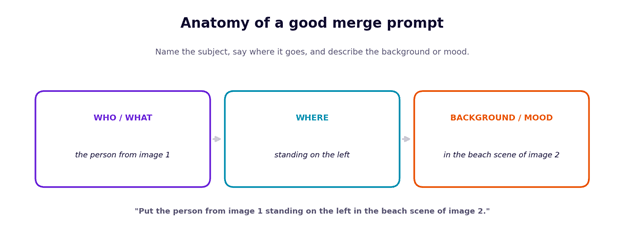
The difference between a great result and an obvious one is usually specificity. “Combine these photos” leaves the AI guessing; “place the person from image one on the right, in the garden from image two, in soft evening light” gives it everything it needs. If a first attempt misses, add detail rather than starting over — name the position, the background and the lighting, and regenerate.
Before you upload: three things that quietly wreck a merge
Most bad results trace back to the source photos, not the prompt:
- Mismatched light direction. If one photo is lit from the left and the other from the right, no amount of prompting fully fixes the shadow mismatch — pick photos with similar light angles when you can.
- Different focal lengths. A close-up face shot next to a wide, far-away body shot forces the AI to guess proportions. Similar framing gives it less to invent.
- Low resolution on either image. The output is only as sharp as the softer of the two inputs, so a blurry background photo will soften the whole result even if the subject photo is crisp.
Fixing these before you generate saves more retries than tweaking the wording does.
The three scenarios, step by step
We used Overchat’s combiner for these examples. To follow along, open this AI tool, upload your two photos, and use the prompts below as a starting point.
Scenario 1: Combine two people from different photos
This is the classic use: two people who were never in the same room, together in one shot. Upload a clear, well-lit photo of each person, and match the framing — two full-body photos, or two head-and-shoulders shots, so the AI is not forced to invent the parts it cannot see.
Prompt example: “Place the person from image one next to the person in image two, standing side by side, matching the lighting.” Choose a portrait or square ratio for social, and the tool aligns skin tones and shadows so they look like one candid photo.
Scenario 2: Put a product on a background
For sellers and marketers, dropping a product into a styled scene replaces a photoshoot. Upload a clean shot of the product and a photo of the background or surface you want it on. Clear, straight-on product photos work best.
Prompt example: “Place the product from image one on the wooden table in image two, with soft daylight from the left.” A 1:1 ratio suits marketplace listings, while 16:9 works for banners and ads.
Scenario 3: Build a collage from several moments
A collage is less about seamless blending and more about arranging photos into one frame. Upload your images and describe the layout you want, then pick a ratio to match where it is going.
Prompt example: “Combine these photos into a two-by-two collage with even spacing.” Use a square ratio for Instagram or a vertical one for a Story. For memory boards and cards, a portrait ratio prints cleanly.
Quick reference
| Scenario | What to upload | Example prompt | Best ratio |
|---|---|---|---|
| Combine people | Two clear, similarly framed portraits | “Put both people side by side, matching the lighting” | 1:1 or 3:4 |
| Product on a scene | A clean product shot + a background | “Place the product on the table with soft daylight” | 1:1 or 16:9 |
| Collage | Two or more photos | “Combine these into a two-by-two collage” | 1:1 or 9:16 |
One tool among several
Worth noting: the combiner sits inside Overchat AI, a platform that bundles image, video, audio and text tools — including options built on models from GPT, Claude, Gemini, Grok, Kimi and Qwen. It’s available on the web, iOS and Android. If you’re already picking between single-purpose editors, it’s one of the places where photo merging, editing and basic writing tasks live under one account rather than several.
If the result looks off
| Problem | Likely fix |
|---|---|
| Subject looks pasted on | Match the framing and lighting of both photos |
| Wrong placement | Be more specific: name left, right, front or background |
| Odd body or missing parts | Upload a photo that shows what the scene needs (full-body for full-body) |
| Colours clash | Use two photos shot in similar light, or ask to match the tone |
The takeaway
Once you see it as one workflow — upload, describe, generate — the scenarios stop feeling like separate skills. The same tool that puts two friends in a frame also stages a product for a listing or lays out a collage; only the prompt changes. Start with the examples above, get specific, and you will have a usable image in under a minute.
FAQs
Q. How do I combine two photos with AI?
Upload both photos to an AI image combiner, describe how they should merge, and generate. The AI matches lighting and perspective and blends them into one seamless image you can download.
Q. How do I put two people from different photos together?
Upload a clear, similarly framed photo of each person and prompt the tool to place them side by side, matching the lighting. Choose a portrait or square ratio for social.
Q. How do I place a product on a background with AI?
Upload a clean product photo and the background you want, then describe the placement — for example, on a table with soft daylight. Use a 1:1 ratio for listings.
Q. Can AI make a photo collage?
Yes. Upload your photos and describe the layout, such as a two-by-two grid, then pick an aspect ratio for where it will be posted or printed.
Q. Do combined photos have a watermark?
It depends on the tool — check before you commit to one. Overchat’s combiner exports an HD image without a watermark, usable commercially.
Q. How long does an AI photo merge take?
Usually 10 to 30 seconds once both photos are uploaded and you have written the prompt. Choosing good source photos takes most of the time.
Related: The AI Poster Prompt Formula: 5 Steps to Better Designs Every Time
| Disclosure: This guide reflects hands-on testing of Overchat AI at the time of publication. Author: Alex Mercer is a consumer AI writer who specializes in evaluating AI tools through independent testing and practical, experience-based reporting. |
