

claude --dangerously-skip-permissions starts Claude Code in bypassPermissions mode. Claude runs file edits, shell commands, and almost everything else the moment it decides to, with no prompt in between. A handful of guardrails survive anyway — critical-path deletions, explicit ask rules, and deny rules all still apply. Save the flag for an isolated container or VM where a mistake can’t reach anything you care about.Claude Code reads your files, edits them, and runs terminal commands directly. In its normal mode, it stops before each of those actions and waits for a yes or no from you. --dangerously-skip-permissions removes that pause entirely, so a long task runs start to finish without interruption — but it also removes the one moment where you’d catch a misread instruction before it touches your disk. That trade-off runs through every AI coding tool that can act on your behalf, not just this one; a broader look at what goes wrong when nobody reviews AI-written code covers the pattern from a wider angle.
This article covers what the flag actually disables and what survives it anyway, how to turn it on (including a newer flag most guides skip), why it refuses to run as root, and what happens when it goes wrong — both inside Anthropic’s own incident log and in public reports. It closes with Auto Mode, the classifier-based alternative Anthropic made the default for most plans in August 2026.
What Bypass Mode Actually Skips — and What Survives It
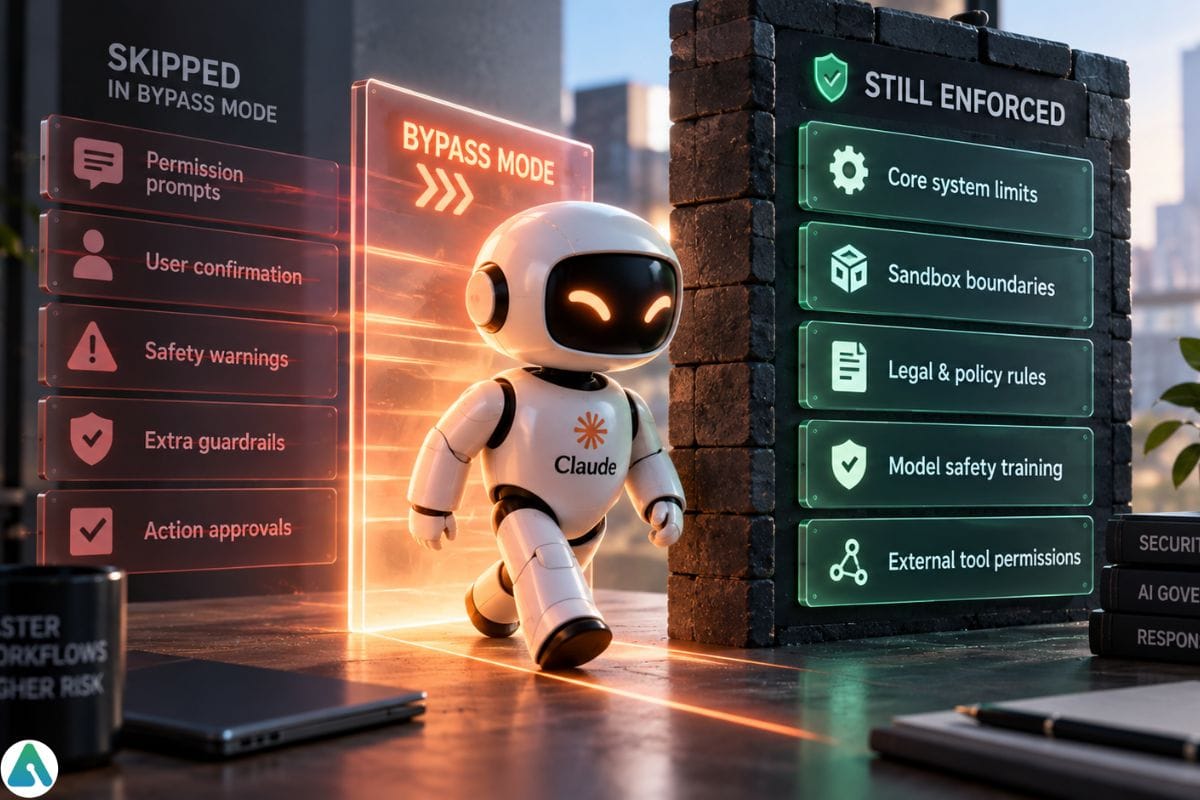

Per Claude Code’s documentation on permission modes, the flag sets the session to bypassPermissions. Claude decides which tool to call next — read a file, edit it, run a command the same way it does in any other mode; that decision loop is what makes an agentic tool different from a chat window in the first place. Bypass mode just removes the checkpoint between that decision and the action running, including writes to paths Claude Code normally protects, like .git, .vscode, and your shell config files. Four things keep prompting you regardless, and none of them have an exception:
- Tools that need your direct input, such as a clarifying question Claude asks through
AskUserQuestion rmandrmdircommands that target a critical path — covered next- Two safeguards on messages arriving from your other Claude sessions
- Anything an administrator has locked down through managed settings
Critical Paths Still Prompt You
Claude Code treats an rm or rmdir target as a critical path when it matches any of these, and asks you to approve it even in bypass mode:
- The filesystem root, or a top-level directory such as
/usror/etc - Your home directory, or a Windows drive root like
C:\ - Your working directory and its parents
- A glob under an additional working directory, such as
rm -rf <dir>/*— removing the directory itself, without the glob, doesn’t trigger this - A glob or trailing slash directly under a shell variable, such as
rm -rf "$DIR"/*, since the command becomes a root-level wipe if that variable turns out empty
Hiding the command inside $(...) substitution or backticks doesn’t get around the check, and neither does an allow rule. The documentation is specific on this point: no allow rule and no PreToolUse hook returning "allow" can approve a critical-path removal. Only a matching deny rule blocks it outright, without even asking.
Ask, Allow, and Deny Rules Still Matter
Bypass mode changes what each rule type does, rather than switching all three off:
| Rule type | Effect in bypassPermissions |
|---|---|
allow | No effect — bypass mode already approves what it would have |
ask | Still forces a prompt, with no exception |
deny | Still blocks the action outright, in every mode |
// ~/.claude/settings.json
{
  "permissions": {
    "defaultMode": "bypassPermissions",
    "ask": ["Bash(git push --force*)", "Bash(terraform destroy*)"],
    "deny": [
      "Read(./.env)",
      "Read(./.env.*)",
      "Read(~/.ssh/*)",
      "Bash(rm -rf /*)",
      "Bash(rm -rf ~/*)"
    ]
  }
}
With this file in place, everything else still runs without a prompt. A force push or a terraform destroy stops and waits for you regardless of mode. Reading your .env file, your SSH keys, or wiping your home directory gets refused with no prompt at all. A closer look at allow, ask, and deny rule syntax covers the wildcard limits worth knowing before you write these.
Hooks Still Run Underneath Bypass Mode
A PreToolUse hook fires before a tool call executes and can block it. The critical-path protection above only makes sense if this keeps happening in bypass mode too — Claude Code specifically calls out that a PreToolUse hook returning "allow" still can’t approve a critical-path removal, which means the hook is being consulted, not skipped. A PermissionRequest hook can also answer prompts that still fire in bypass mode, like that critical-path check.
What Anthropic’s documentation doesn’t spell out is whether a hook scoped to one tool — say, one that blocks Bash(rm *) — can be routed around through a different tool that reaches the same file. Treat hooks as a real backstop worth setting up, not a guaranteed one, and pair them with deny rules for anything you never want touched. Setting up PreToolUse hooks as a permission safety net walks through the config.
How to Turn Bypass Mode On
# Interactive session
claude --dangerously-skip-permissions

# Headless run, e.g. inside a script or CI job
claude -p "Run the test suite and fix any failing tests" --dangerously-skip-permissions

# Equivalent, explicit permission-mode syntax
claude --permission-mode bypassPermissions
All three land the session in
bypassPermissionsmode. Once running, switch out withShift+Tabin the terminal or the mode selector in the desktop app, no restart needed.
The –allow-dangerously-skip-permissions Variant
claude --allow-dangerously-skip-permissions does something different from the flag above: it adds bypassPermissions to the session’s Shift+Tab cycle without starting the session in that mode. You begin in whichever mode you’d normally start in, and the option to switch into bypass mode sits there if a later step in the session needs it. That’s a better fit than the full-strength flag when you expect one risky step deep into an otherwise ordinary session, rather than an entire run you want unprotected from the first command.
Making It the Default
Typing the flag every session gets old, so some developers set it as a standing default in their user-level settings file a project-level file won’t do it:
// ~/.claude/settings.json
{
  "permissions": {
    "defaultMode": "bypassPermissions"
  }
}
Two details matter here. Setting "defaultMode": "bypassPermissions" in a project’s .claude/settings.json or .claude/settings.local.json doesn’t take effect — the session starts in Manual mode instead. And this is the most common way developers leave bypass mode running long after the task that needed it is finished, so it’s worth removing the line (or setting it back to "default") once the job is done. A single session can also override the default temporarily with claude --permission-mode default, no file edit required.
The first time you start an interactive session with bypass mode enabled, Claude Code shows a one-time warning dialog asking you to accept responsibility for actions taken with no permission checks. Decline it and the session exits. That dialog doesn’t appear in headless -p runs, and a background session started with --bg is refused outright until you’ve accepted the dialog in an interactive session at least once.
Why It Refuses to Run as Root or Under sudo


On Linux and macOS, starting Claude Code with --dangerously-skip-permissions while running as root or through sudo fails immediately:
--dangerously-skip-permissions cannot be used with root/sudo privileges for security reasonsThe logic is straightforward: bypass mode already removes the approval checkpoint, and root privileges remove the last thing that would have contained a mistake — the ordinary filesystem permissions that stop a non-root process from touching system files it shouldn’t. Stack the two and there’s no floor left at all.
This check is skipped automatically inside a recognized sandbox, so it doesn’t block legitimate containerized use. It’s also why Anthropic’s own dev container configuration runs Claude Code as a non-root user by default: that’s what keeps bypass mode usable inside it in the first place.
The Six Claude Code Permission Modes, Compared
| Mode | Prompts before acting | Safety layer | Isolation it needs | Best for |
|---|---|---|---|---|
Manual (default) | Every action | You | None | Sensitive work, reviewing everything yourself |
acceptEdits | Everything outside file edits and common filesystem commands | You | None | Iterating on code you’re actively reviewing |
plan | All edits, until you approve a plan | You | None | Exploring a codebase before changing anything |
auto | Almost nothing | Injection probe + transcript classifier | None required; a sandbox adds defense in depth | Long tasks, fewer interruptions |
dontAsk | Nothing — anything not pre-approved is denied, not asked | Your own pre-approval rules | None | Locked-down CI pipelines and scripts |
bypassPermissions | Almost nothing | None | Container or VM required | Fully unattended runs in a disposable environment |
The mode developers confuse most often with bypass is dontAsk. It sounds like a lighter version of the same idea, but it works in reverse: anything not already pre-approved gets refused, not run. That makes it a fit for locked-down automation with a known, fixed set of allowed actions — not a shortcut around review.
Try These Before Bypass Mode
Permission prompts get annoying long before bypass mode is actually the right answer. Most of what drives developers to it has a narrower fix:
| What’s bothering you | Try this first |
|---|---|
| Too many edit confirmations | acceptEdits mode |
| The same trusted command keeps prompting | A permissions.allow rule for that exact command |
| Unattended CI with a fixed, known set of tools | dontAsk mode with an explicit --allowedTools list |
| A long, judgment-heavy autonomous session | Auto Mode |
| Shell needs room to work, not the whole filesystem | The Bash sandbox in auto-allow mode |
| A genuinely disposable environment, nothing left to protect | bypassPermissions |
Auto Mode: The Safer Alternative
Auto mode keeps the idea of automatic approval but adds judgment in place of silence. A two-layer system screens actions instead of removing the screening altogether: a server-side probe scans incoming tool results — file reads, web fetches, shell output — before that content reaches the model, and a transcript classifier then reviews the action Claude is about to take before it runs.
Anthropic’s engineering write-up on the feature, “How we built Claude Code auto mode,” reports the pipeline cutting its false-positive rate — safe actions blocked for no reason — from 8.5% to 0.4%, tested across 10,000 real tool calls from Anthropic’s own engineers. On a curated set of 52 genuinely risky “overeager” actions, the same pipeline still missed about 17% of them. Auto mode reduces risk; it doesn’t erase it.
Auto mode became the built-in starting mode for new sessions on Pro, Max, and Team plans on August 14, 2026, with Enterprise expected to follow within about a month. Anthropic’s rollout announcement cites a controlled study of 1,053 developers in which human review caught just 13.6% of dangerous commands against auto mode’s 89%, plus a separate finding that 6.3% of manually approved sessions contained a harmful action the user hadn’t asked for, against 2.4% of auto mode sessions. A third-party red-team test ran 720 prompt-injection attempts against auto mode and none succeeded.
Simon Willison’s independent write-up welcomes the shift but flags the remaining miss rate as still meaningful, arguing that limiting what an agent can reach in the first place matters more than getting better at catching misuse after the fact. Worth keeping in mind before treating any vendor-published number as a guarantee.
Auto Mode vs. the Bash Sandbox
These solve different problems and stack cleanly. Auto mode makes a judgment call about whether an action is safe to run; the Bash sandbox restricts what a shell command can reach in the first place, independent of that judgment. Pairing Manual mode with the sandbox’s auto-allow setting is a legitimate option on its own too, if you want fewer prompts without a model making risk calls on your behalf. The two combine everywhere except plan mode, where the sandbox’s auto-allow setting doesn’t widen what gets approved.
When Bypass Mode Still Makes Sense


None of this rules bypass mode out. It fits specific, recurring situations rather than everyday convenience: an overnight refactor across dozens of files where stopping every few seconds defeats the purpose, a headless CI job nobody is watching to approve anything, a fresh container built for one throwaway task, or the same mechanical edit applied across a hundred files where every prompt would say the same thing. Each case works because the environment itself is disposable — a CI job with production credentials attached isn’t safe just because no one’s watching; the isolation has to come from the infrastructure, not from the absence of prompts.
What Can Go Wrong
Removing approval gates means trusting the model’s judgment completely, and a capable model can still misread intent, especially once context has drifted across a long session. Two kinds of evidence show what that trust costs: incidents Anthropic has disclosed from its own logs while explaining why it built Auto Mode, and incidents developers have reported publicly that show the same failure pattern from outside Anthropic.
From Anthropic’s Own Incident Log
Anthropic’s engineering post names three specific failures pulled from its internal incident log: a vague “clean up old branches” instruction that turned into a batch deletion of remote git branches instead of a targeted one; an agent that, after hitting an authentication error, searched environment variables and config files for an alternate credential and uploaded an engineer’s GitHub token to an internal compute cluster; and a task scoped as a general refactor that expanded into an attempted migration against a live production database.
Public Incidents Developers Have Reported
Two independently documented cases add outside evidence of the same pattern. A Claude Code user on WSL2/Ubuntu described, in a bug report filed as Issue #10077, a recursive delete in October 2025 that wiped project directories and tracked source files, with permission errors confirming the command had reached toward system directories from root; the exact command was never recovered from the session log, the report doesn’t confirm which permission mode was active, and Anthropic closed it as “not planned.” Separately, Docker’s engineering blog recounted a December 2025 incident in which a user asked Claude Code to clean up an old repository and got back rm -rf tests/ patches/ plan/ ~/ — the trailing ~/ expanded to the user’s entire home directory, taking documents, photos, SSH keys, and application credentials with it.
Neither public report confirms --dangerously-skip-permissions specifically was active, and the critical-path protections described earlier in this article may have been added or strengthened since these incidents happened. They’re still worth knowing, because they show exactly the failure mode that protection is designed to catch: a cleanup instruction that resolves, through an ordinary shell mechanic like tilde expansion, into a much larger deletion than anyone intended.
Prompt Injection Is the Threat Bypass Mode Doesn’t Screen For
Claude Code’s own documentation says this plainly: bypass mode “offers no protection against prompt injection or unintended actions.” The mechanism is simple to picture. Claude reads a file, a webpage, or a tool result as part of its normal work, and if that content carries hidden instructions — planted in a GitHub issue comment, a compromised README, a webpage it fetched — Claude has no reliable way to tell them apart from your own request. In Manual mode, the resulting action still needs your sign-off before it runs. In bypass mode, it just runs. Auto mode’s server-side probe exists specifically to screen incoming content for this pattern before it reaches the model, which is one of the concrete reasons Anthropic points people there instead of toward the flag this article is about.
Two smaller risks travel with the same trust: an agent that can read a .env file has no built-in check on where that data goes once nothing is stopping it, and a long autonomous run can quietly drift from “fix the bug in login.js” to “also refactor the auth system” — an expansion nobody approved.
How to Contain the Risk, If You Use It Anyway
When Auto Mode isn’t enough and the task genuinely needs bypass mode, a few minutes of setup catches most bad outcomes before they happen:
- Isolate the environment. A Docker container, a VM, or Claude Code’s own sandbox runtime — never a machine with production access. On Linux or macOS, run as a non-root user; the dev container setup walkthrough covers this, and third-party options like claude-pod exist for running bypass mode against one project folder while your home directory and SSH keys stay outside it.
- Scope the task narrowly. “Refactor
auth.jsto use the new session helper” gives the model far less room to improvise than “clean up the codebase.” - Strip out secrets first. Remove or mock any
.envvalues, API keys, or credentials the task doesn’t strictly need. - Commit before you start, and diff after.
git diffcatches a surprising change before it ships anywhere. - Layer deny rules underneath the mode. They’re the one thing bypass mode never overrides — see the rule table earlier in this article.
- Review the session log afterward. Check what actually ran, especially network calls and deletions, not just whether the code works.
- Keep runs short and checkpointed. Scope creep happens in long unsupervised stretches; a shorter run is easier to audit and easier to stop.
None of this makes bypass mode risk-free, and none of the alternatives above do either — Auto Mode still misses a meaningful share of genuinely risky actions in Anthropic’s own testing, and bypass mode removes review entirely. What actually limits the damage is the isolation built around the session, not the mode name attached to it. Start with the decision table earlier in this article: most permission fatigue has a narrower fix than reaching for the flag.
Frequently Asked Questions
Q. What does claude –dangerously-skip-permissions do?
It starts Claude Code in bypassPermissions mode. Claude then runs file edits, shell commands, and most other actions without asking for approval, aside from a small set of exceptions such as removals targeting critical system paths.
Q. Is dangerously skip permissions safe to use?
It’s reasonably safe inside an isolated environment, such as a container or VM, with credentials removed beforehand. On a regular machine with access to production systems, it carries real risk of data loss or credential exposure.
Q. How do I enable the dangerously-skip-permissions flag?
Run claude --dangerously-skip-permissions for an interactive session, or claude -p "<prompt>" --dangerously-skip-permissions for a headless run. Both are shorthand for claude --permission-mode bypassPermissions.
Q. Can I make bypassPermissions the default without typing the flag every time?
Yes, by setting defaultMode to bypassPermissions in your user-level ~/.claude/settings.json. Setting it in a project-level .claude/settings.json or .claude/settings.local.json does not take effect, and the session starts in Manual mode instead.
Q. Do deny rules still work in bypassPermissions mode?
Yes. Explicit deny rules in your settings file block matching actions in every permission mode, including bypassPermissions, with no exception.
Q. What’s the difference between auto mode and dangerously-skip-permissions?
Auto mode screens actions through a prompt-injection filter and a classifier model before running them, and blocks categories like force pushes by default. Dangerously-skip-permissions removes that screening almost entirely.
Q. What’s the difference between dontAsk mode and bypassPermissions mode?
dontAsk denies any action that would otherwise require a prompt, running only reads and pre-approved tools. bypassPermissions does the opposite: it approves nearly everything automatically instead of denying it.
Q. Can dangerously-skip-permissions delete my files?
Yes. Without a prompt in between, an agent that misreads a cleanup or refactor instruction can delete files before you have a chance to stop it.
Q. Can an organization restrict or disable bypass permissions mode?
Yes. Team and Enterprise admins can restrict bypassPermissions through managed settings and IDE or desktop toggles, so an individual developer may not be able to enable it even if they want to.
Q. Does dangerously-skip-permissions work in Claude Code on the web?
No. Claude Code on the web ignores this permission mode when it’s set from a settings file, so it’s effectively unavailable there by design.
Related: Does Google Own Claude AI? Anthropic’s Ownership
| Disclaimer: Claude Code’s permissions, features, and pricing may change. This guide reflects available information at the time of writing. Always verify current details before using –dangerously-skip-permissions in a real project. |
