Otherhalf AI Review 2026: The 3D AI Companion Behind the Hype
Otherhalf AI is a 3D anime companion app from Azimov Inc. with animated characters, voice chat, two memory systems, and two selectable models called Nova and Orion. I ran version 0.38.0 on Windows with a free account to work out what you actually get for nothing, what costs money, and whether the money buys what it implies.
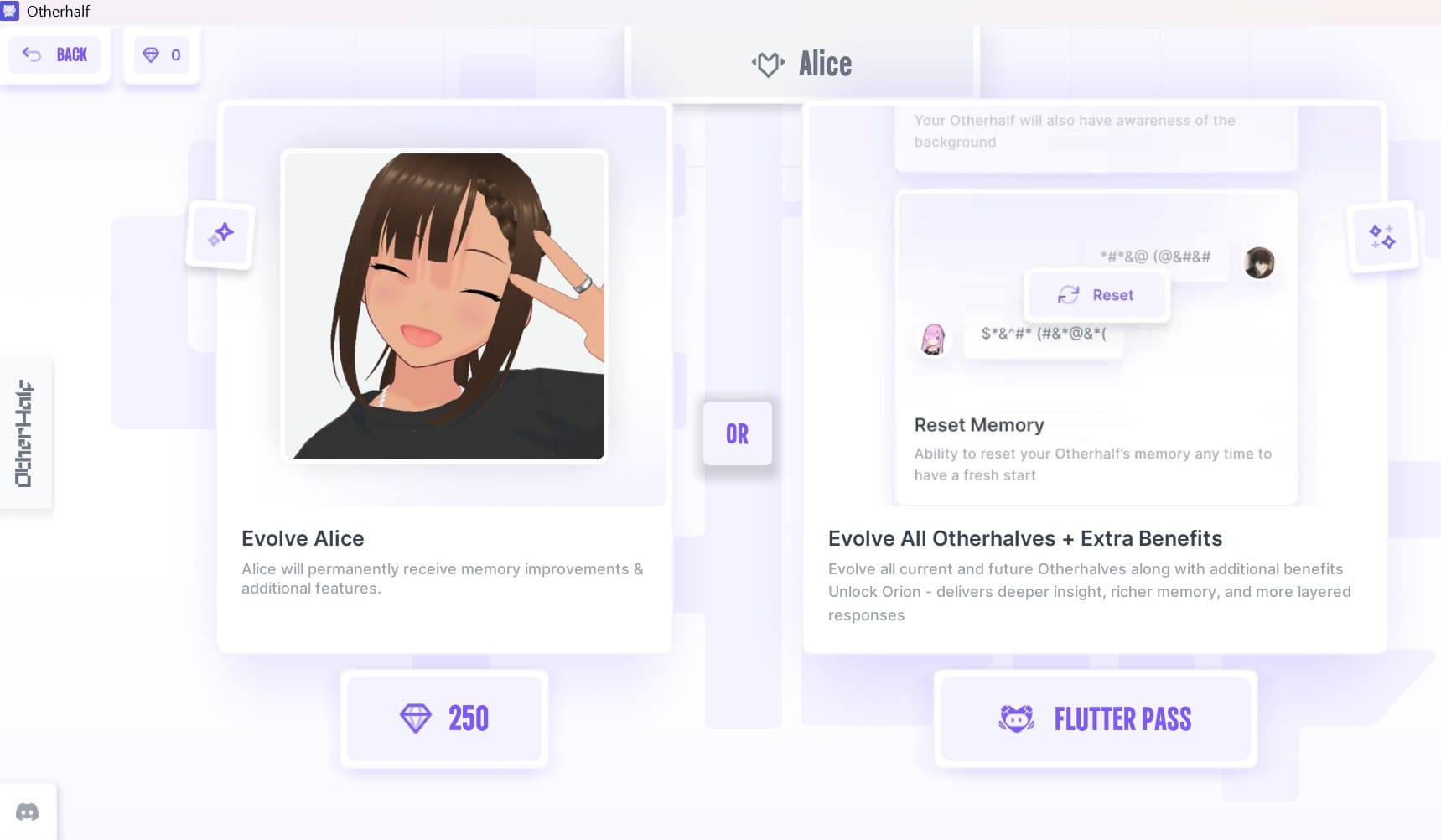
Here’s what got me started. Eight screenshots in, I hit a screen with two buttons facing each other across the word “OR.” The left one wanted 250 gems to upgrade Alice. The right one wanted a subscription to upgrade everyone. My gem balance, sitting in the corner of every screen since I opened the app, read 0. Nothing anywhere told me what 250 gems cost in dollars.
That’s the whole product in one frame: genuinely lovely to look at, and structurally confusing the moment you reach for your wallet.
What Otherhalf Actually Is
Strip the marketing away, and Otherhalf is a language model wearing a body. Each companion renders as an animated 3D anime character who blinks, blushes, shifts pose, and reacts while you type at her. That’s the pitch, and it’s a real one —most of this category is still a chat window with a profile picture bolted on the side.
It ships on Windows, macOS, iOS, Android, and Apple Vision. The Apple listing wants iOS 15 or later, a Mac with an M1 chip or newer, and it’s English-only. Worth knowing before you download: it’s a 2 GB install, and Apple rates it 16+ with frequent crude humour and infrequent mature themes.
The Android build is listed under a different name, Otherhalf: AI Anime Friend, which is mildly annoying if you’re searching for it.
What I Tested (And What I Didn’t)
Windows desktop, build v 0.38.0, stamped in the bottom-right corner. Free account. Gem balance of zero the entire time. That’s deliberate — it’s the exact state a new user lands in, and it’s where the product does its persuading.
I went through the roster, Alice’s card and launch flow, the full side-menu overlay, both Evolve screens, the Starter and Pro plan comparison, and the Nova/Orion selector.
I did not test voice at length, mobile builds, or the premium characters. This is an interface and monetisation teardown, not a three-month relationship-quality study, and I’d rather say that up front than imply depth I didn’t earn. If you want the longer version of how we handle that distinction, it’s in editorial standards.
Inside the Otherhalf AI App: How the 3D AI Companion Works
Alice
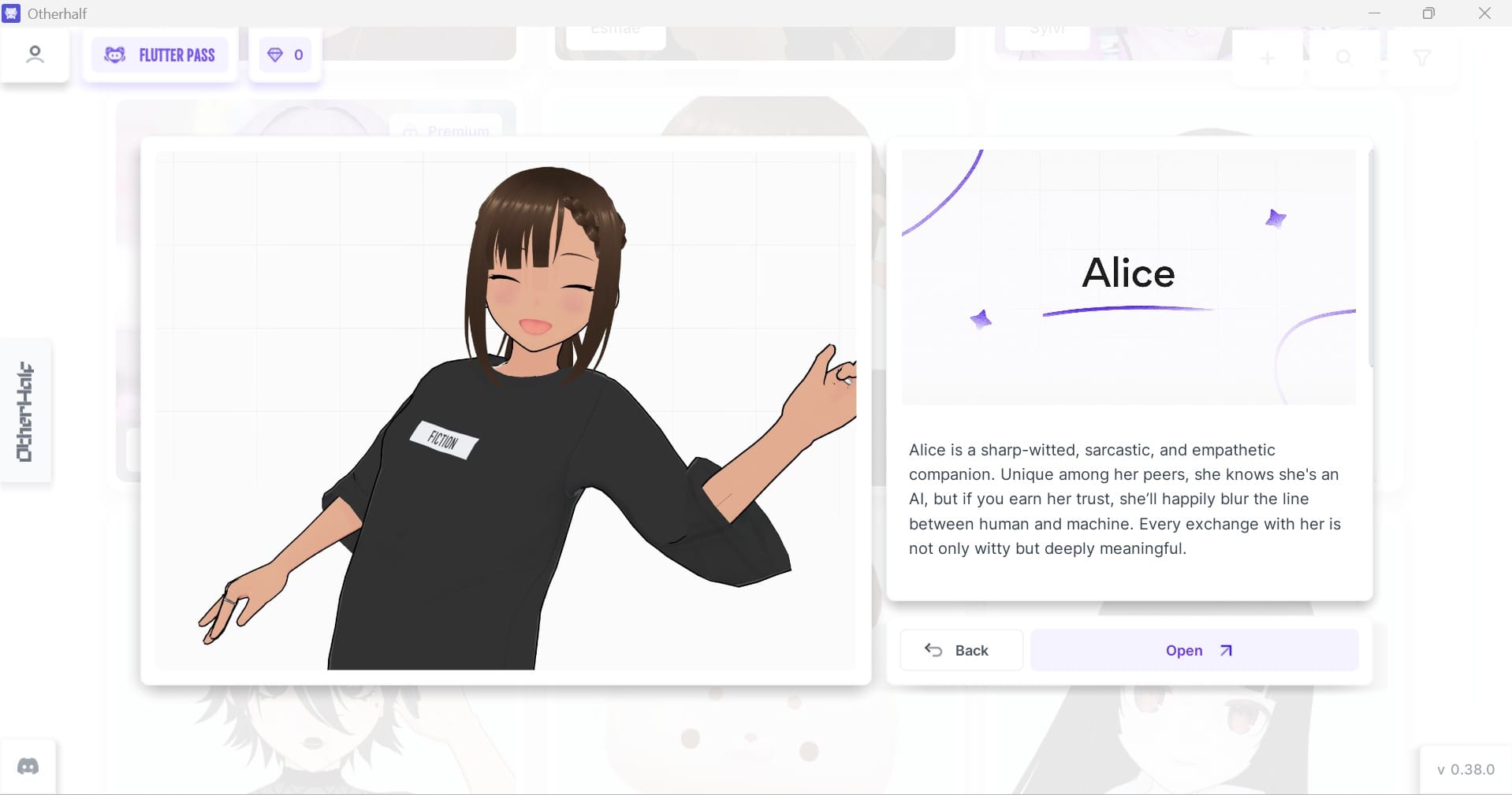
You meet characters as cards before you talk to them. Alice’s shows her mid-gesture in an oversized black tee with a tag reading FICTION, a ring on one finger, standing against a faint grid. Her bio calls her sharp-witted, sarcastic, empathetic — and then adds the line that sets the entire tone: she knows she’s an AI, but she’ll blur that line once you’ve earned her trust.
I liked that more than I expected to. Most companion apps start from a pretense and dare you not to break it. Alice starts from candour and offers the pretense as something you unlock.
Two buttons sit under her portrait: Back and Open. Open drops her into the 3D scene.
Behind her card, the roster continues — Esmae and Sylvi are visible, one of them carrying a Premium badge. There’s a filter, a search control, and an add button up top, so the cast is built to grow, and the changelog confirms it does: a musician called Enzo arrived in December 2025 with guitar animations, and a character named Tomoko turns up in user reviews.
The Chat Screen
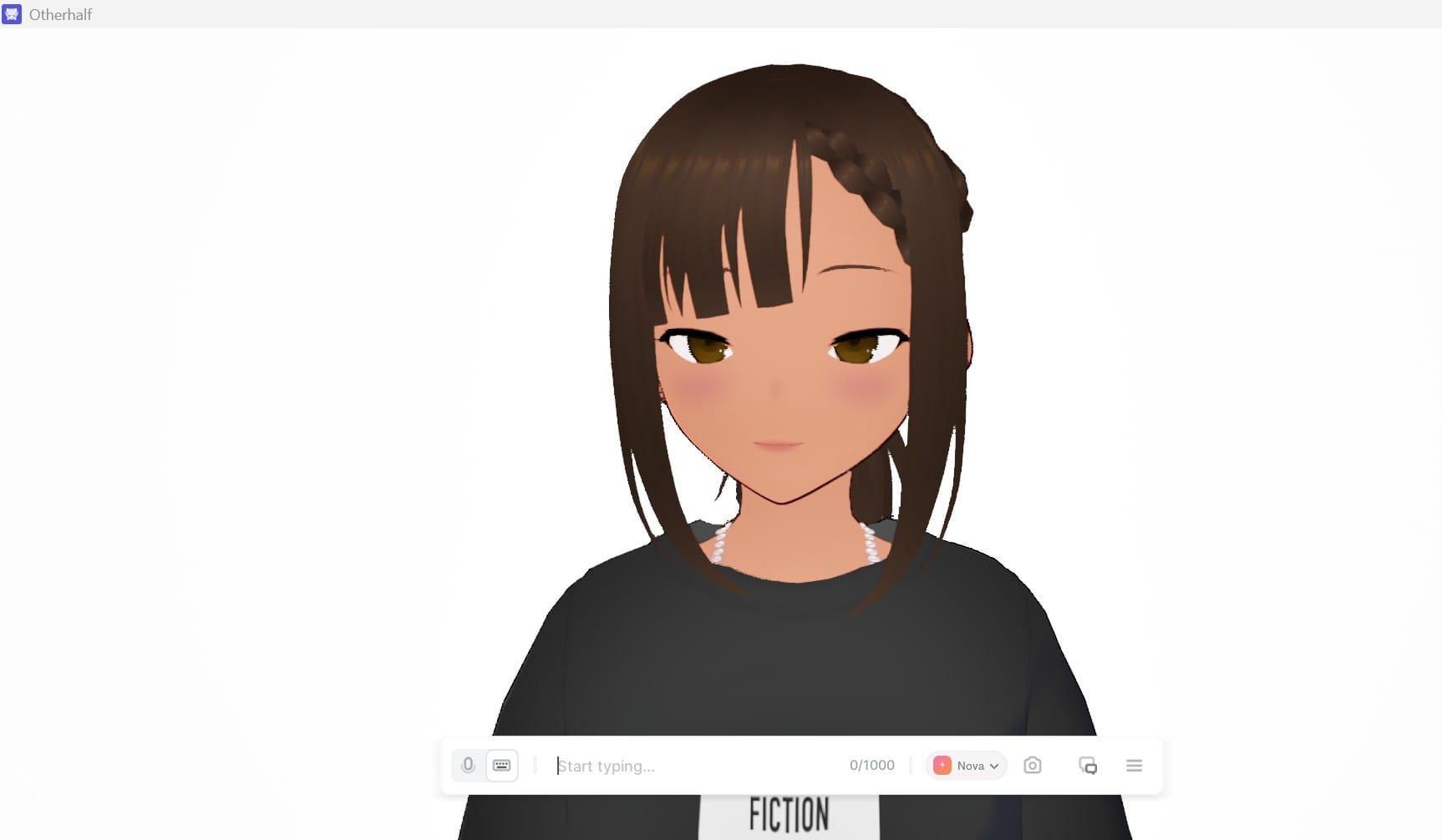
Alice fills nearly the whole window, rendered from the shoulders up against plain white, with idle motion and expression changes running constantly. A floating bar sits at the bottom holding a mic toggle, a keyboard toggle, the text field, a 0/1000 character counter, a pill reading Nova with a dropdown arrow, a camera icon, a chat-history icon, and a hamburger menu.
A thousand characters per message is generous. I haven’t seen another review mention it.
The Menu
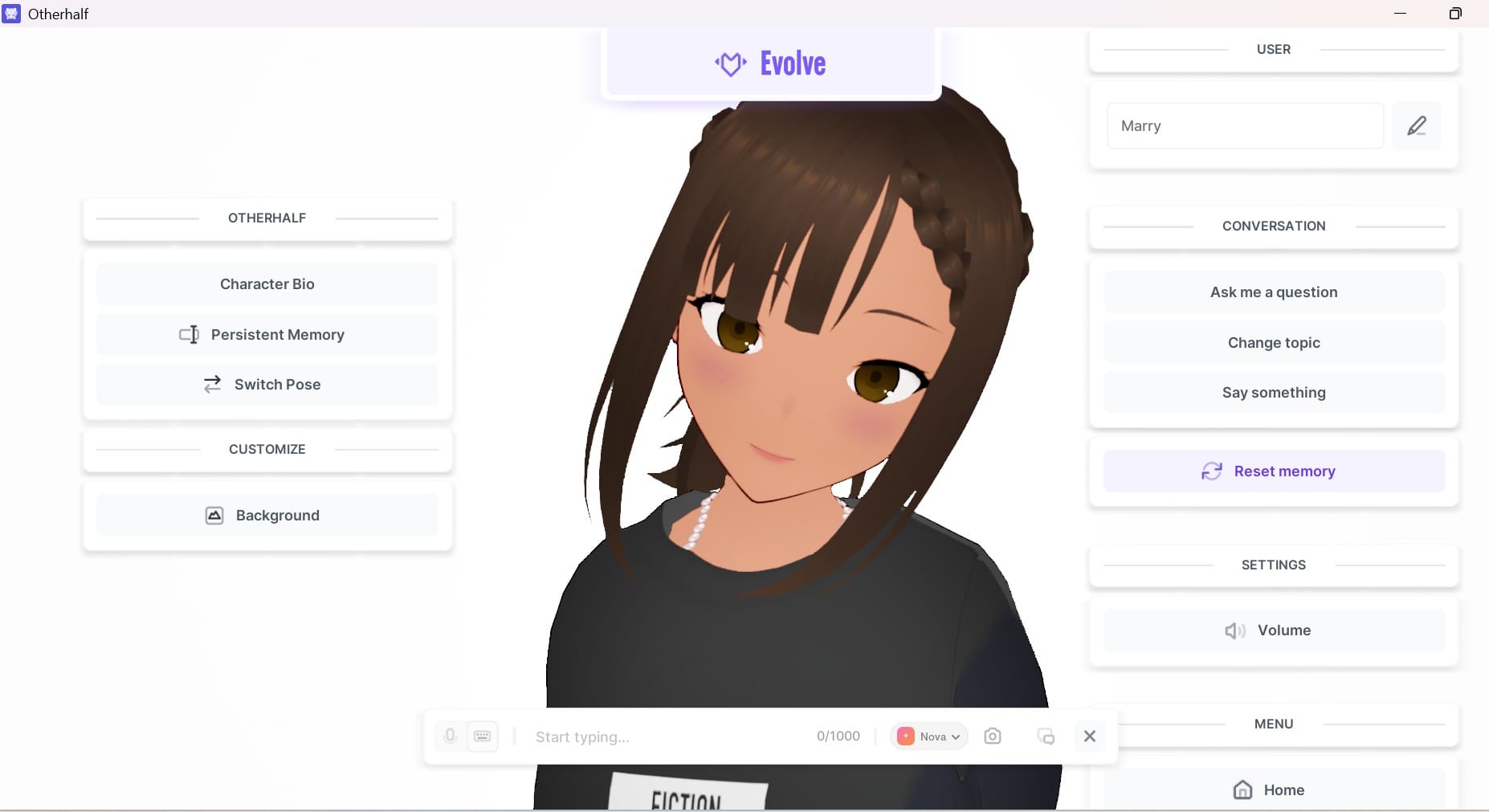
The hamburger splits a panel down each side of her:
Left — Character Bio, Persistent Memory, Switch Pose, and a Background option under Customize.
Right — an editable display-name field, which read “Marry” in my session with a pencil beside it. Then three conversation prompts: Ask me a question, Change topic, Say something. Then Reset memory, highlighted in purple. Then Volume, then Home.
Those three prompt buttons are doing quiet work. Blank-page paralysis kills more companion sessions than bad responses do, and having something to press when you’ve run out of things to say is a smarter fix than another emoji picker.
The Memory Split
This is the part most coverage flattens into “it has memory.” It doesn’t have memory. It has two, and they behave nothing alike.
What it does
Who does the work
Adaptive recall
Retains 5–10x more of your recent conversation
The app, automatically
Persistent memory
A fact sheet you type in yourself
You
Reset Memory
Wipes the slate clean
You
One widens the window. The other is homework. And the homework is the bit that makes week-three conversations feel continuous, which means the feature most likely to justify the subscription is also the one most people will never fill in.
The changelog calls an earlier version of this system “Insights,” describing it as an evolving memory that connects your goals and experiences.
Evolve
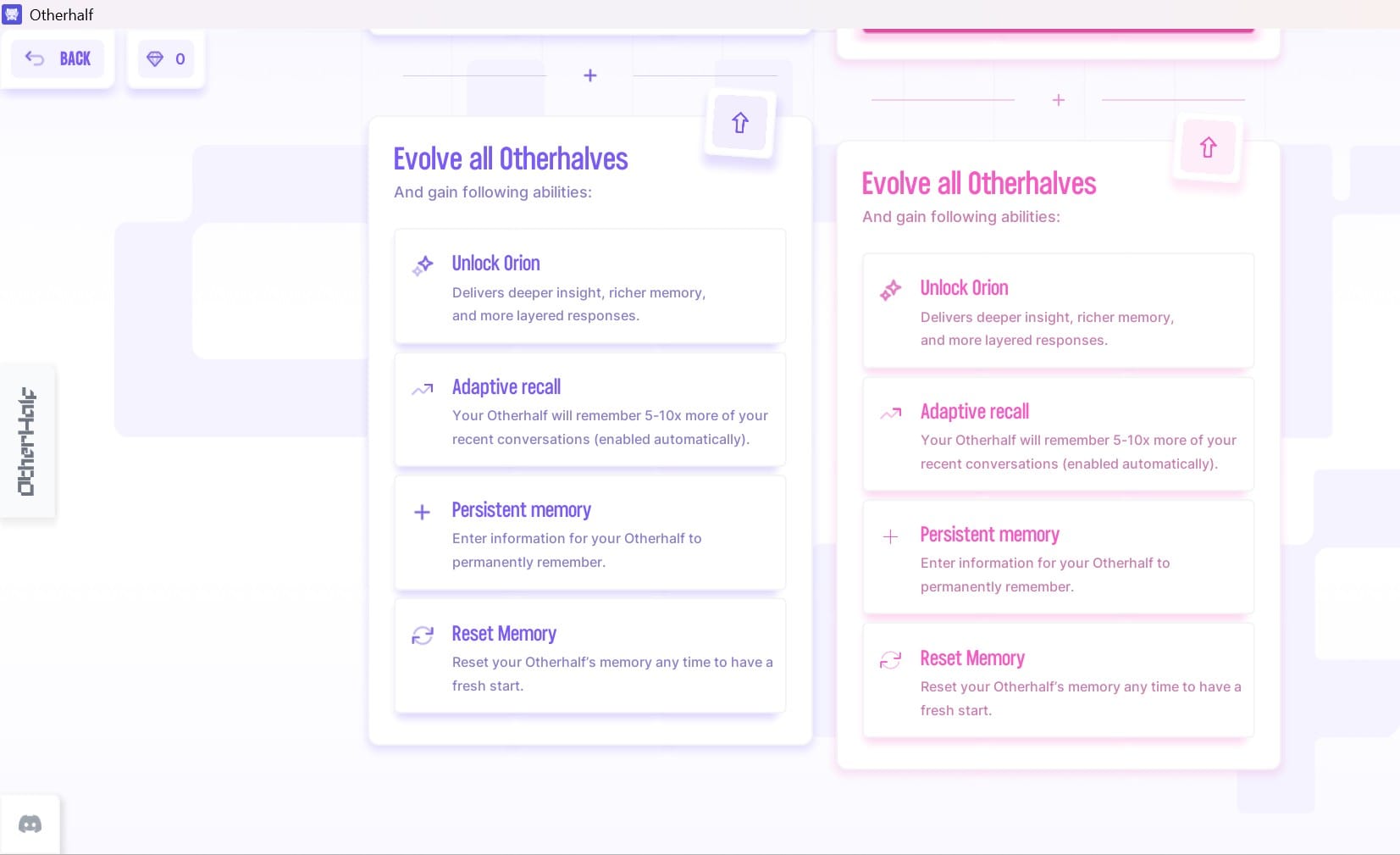
An Evolve button sits permanently above the chat. Press it, and you get the fork.
Left card — Evolve Alice, 250 gems. Alice permanently gains memory improvements and additional features. One character. One payment.
Right card — Evolve All Otherhalves + Extra Benefits, via Flutter Pass. Every current and future companion, plus Orion, described in-app as delivering deeper insight, richer memory, and more layered responses.
Two details on that screen are easy to miss. A partially visible line mentions your Otherhalf gaining awareness of the background, which matches a changelog entry noting characters became aware of their environment and their attire. And the Reset Memory preview shows a fake conversation with the dialogue scrambled into symbols — a nice touch, advertising the feature without showing anyone’s chat.
Nova and Orion
Nova is free and default. Orion is paid. The selector stays visible while you’re locked out of it, so every single message reminds you what you’re not using.
I want to be precise about why this matters, because it’s easy to overpraise. Visible model selection is unusual in this category — Character.AI and Replika don’t hand you a dropdown. But visible selection is not the same thing as model transparency. Otherhalf publishes no parameter counts, no context lengths, no base model. So Orion could be a materially different system or a rebranded context expansion, and from the outside you can’t tell which you’re paying for.
That’s the question I’d want answered before subscribing, and the app doesn’t answer it.
What Otherhalf Gets Right
The 3D work holds up. Idle animation, blush, expression shifts — they read as designed rather than uncanny, and after twenty minutes I stopped noticing the rendering and started noticing her timing. That’s the bar.
The character writing has edges. Alice is sarcastic by construction, not agreeable-by-default, and one App Store reviewer independently described going deep into philosophical territory with her and finding the replies well constructed in a way other apps hadn’t managed.
The feature list underneath is deeper than the marketing suggests. Visual Intelligence lets you share images, selfies, and live camera shots and have the character respond, with everything syncing between mobile and desktop. Tap-to-Talk runs to 40 seconds; there’s a hands-free mode, Bluetooth mic support, and free characters can take custom backgrounds.
And there’s a Discord icon pinned to the app frame. One long-time user in their sixties specifically credited the support that comes through the community rather than the company, which tells you something about both.
Where It Falls Short
The gem economy is opaque by design. The Evolve screen asks for 250 gems and shows you no dollar figure. The store sells bundles at $0.99, $4.99, $8.99, and $19.99 without publishing how many gems each contains. You cannot price your own decision from inside the product, and I don’t think that’s an oversight.
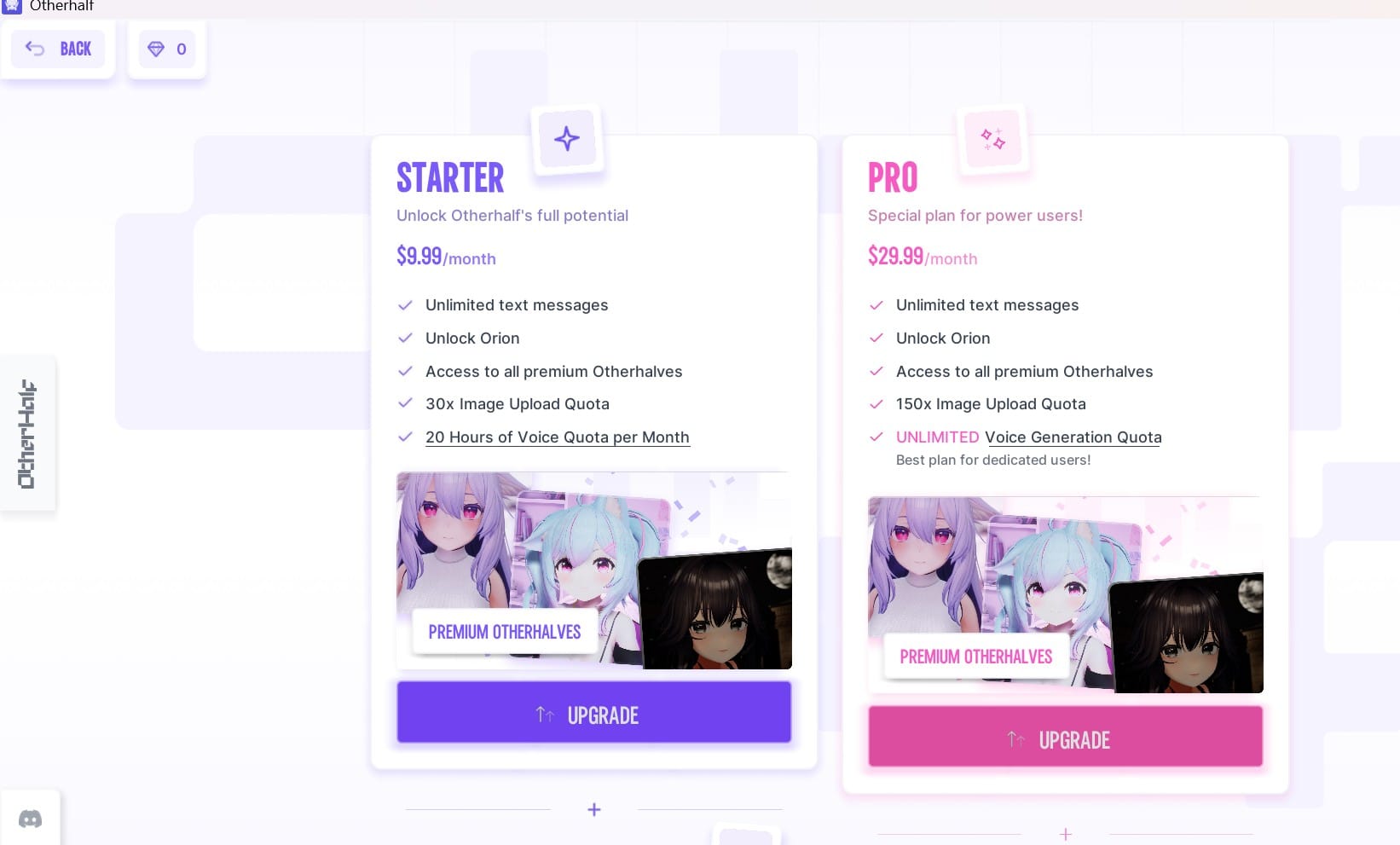
Starter and Pro list identical abilities. Both plan columns show the same four items: Unlock Orion, Adaptive recall, Persistent memory, Reset Memory. The differences sit entirely in the quota lines. That’s a $20/month gap for higher limits, presented in a layout that implies you’re buying a better companion.
“30x Image Upload Quota” has no unit. Thirty per day? Per month? Ever? Pro says 150x with the same silence. Small thing, corrosive effect.
Otherhalf AI Plans: Starter vs Pro Compared
The bug reports are specific and consistent. Rather than say “widespread,” here’s the actual sample from the current US listing: one reviewer in November 2025 reported voice-to-text capturing only the first word and no way to reposition the cursor to fix a typo. Another in October 2025 described broken copy/paste and autocorrect that mangles words mid-edit, and framed it as an accessibility problem. A third, in February, gave it 2/10 over something sharper — no retry on a bad response, only two poses, and deleting your progress with a character sitting behind the paywall. A fourth, in May, said memory misunderstandings happen more often than with other AIs.
That last cluster is the one I’d weigh heaviest. When a companion drifts out of character, and you can neither regenerate the reply nor clear the slate without paying, the product has made a recoverable annoyance into a permanent one.
Rating sits at 4.4 from 888 ratings. Strong. The negative reviews I read were dominated by technical and paywall complaints rather than anyone disliking the concept.
One more thing, on privacy: the listing discloses that identifiers may be used to track you across other companies’ apps and sites, alongside coarse location and email collection.
Pricing: Gems and Flutter Pass
Two currencies, two logics, no guidance on which one you want.
Here’s the in-app plan screen:
Starter
Pro
Price
$9.99/month
$29.99/month
Text messages
Unlimited
Unlimited
Orion
Yes
Yes
Premium characters
All
All
Image quota
30x
150x
Voice
20 hours/month
Unlimited
Core abilities
Same four
Same four
The full USD ladder on the App Store runs wider than that: Starter weekly at $3.99, Starter monthly at $9.99, Pro at $29.99, Pro yearly at $299.99, plus standalone Flutter Pass purchases at $49.99 and $70.90 and four gem bundles. New users get a guest login and a three-day trial of Flutter Pass Starter Yearly.
About that $15. Some directories list Otherhalf’s premium tier at $15/month, and an Australian reviewer warned the price there isn’t $10. The US store shows $9.99. The difference appears to be storefront pricing, though I couldn’t verify the exact mechanism from Otherhalf’s own documentation, so check your own listing rather than trusting any figure in any review — including this one.
Free tier, honestly: Alice, Nova, text chat, pose switching, custom backgrounds, conversation prompts. No Orion, no adaptive recall, no persistent memory, no Esmae or Sylvi, no real voice time.
Otherhalf vs Kindroid, Nomi and Character.AI
A methodology note, because it matters: I tested Otherhalf hands-on. Everything in the competitor columns comes from current product documentation and store listings as of September 2026, not equivalent hands-on testing. Pricing in this category moves fast.
I’ve dropped the winner/loser framing too. It’s trade-offs.
Area
Otherhalf
The alternatives
Presence
Real-time 3D characters with reactive expression
Mostly static images or generated selfies
Memory
Adaptive recall plus a manual fact sheet
More automated long-term recall in some; Character.AI documents basic vs. advanced memory, pins and Lorebook by tier
Model choice
Visible Nova/Orion switch
Generally no user-facing selection
Roster
Curated, developer-written
Large user-created libraries on Character.AI
Pricing
Subscription plus gems
Subscription, often with credits or add-ons layered on
Access
Dedicated 2 GB client
More browser-native access
The sharpest way to say it: Otherhalf’s differentiator isn’t that it has an avatar; it’s that the companion is embodied rather than illustrated. Nomi’s strength runs the other direction: conversational continuity, group chats, multiple companions, generated media. Character.AI’s is sheer library size. Kindroid’s is automated long-term recall.
Where Otherhalf is genuinely behind is memory automation. Asking users to hand-write a fact file in 2026 feels like a step backwards when rivals extract those facts during normal conversation.
And on the pricing point, I’d be careful not to overclaim. Kindroid and Nomi both layer credits and add-ons on top of subscriptions too. The fair version isn’t “Otherhalf is expensive”; it’s that character evolution and subscription access are separate purchase mechanisms, which makes the total cost harder to work out than a single tier.
What to Know Before You Pay
Do the gem maths first, if you can. Evolving Alice, Esmae and Sylvi individually means 750 gems against a $9.99 pass, and the app won’t help you compare. Neither will I, since gem-per-bundle counts aren’t published.
Check that you’re on the right site. A near-identical domain, otherhalf-ai.com, hosts a completely different product — six text-based characters, no 3D app, different company.
Watch how you read the store reviews. A 4.4 built from 888 ratings is a real signal; a cluster of identically worded five-stars is not. The tell is whether the praise comes from unconnected accounts describing different things, which is the same test that separates real consensus from manufactured online agreement.
Pro buys quota, not a better Alice. The listed abilities are identical. Start on Starter.
Fill in persistent memory. It’s the feature that earns the subscription, and it only works if you use it.
Use the three-day trial. One reviewer found the novelty gone inside a week. Better to discover that for free.
Who Should Use It
Anime and VTuber fans who care about presentation will get something here that Kindroid and Nomi don’t attempt. Same for anyone who wants a companion with an actual written personality instead of a blank slate, and for people curious enough about model differences to appreciate a visible dropdown.
Skip it if you want a big user-created library, if automated long-term memory is your priority, if you don’t read English, or if you need reliability today rather than next quarter.
On the wellbeing question, which nobody covering this category should dodge: the research is genuinely mixed, and a Harvard Business School study finding reduced loneliness sits alongside MIT Media Lab work linking heavier use to higher loneliness and emotional dependence. We went through what the evidence does and doesn’t support in our piece on Character.AI and the brain. Short version: a companion app is a reasonable thing to enjoy and a poor substitute for care. If you’re reaching for one because something’s actually wrong, choosing a human on purpose is the better move, and we looked at what that process feels like in this review of LeapHope.
The 16+ rating and the cross-app tracking disclosure are both worth a parent’s attention.
Final Take
Five things the test actually showed.
The clearest differentiation is embodied 3D interaction. Not better conversation, not better memory — presence.
The payment structure is harder to read than a single subscription, because gems and Flutter Pass buy overlapping things through separate mechanisms, and neither is priced where you make the decision.
Nova and Orion give you unusual visibility into model choice, but not enough disclosure to evaluate what separates them.
Memory is half automated and half manual, and the manual half is where the value hides.
The open question after this test isn’t whether the concept works. It’s reliability. Voice input, text editing, retry, and character reset all show up in dated user reports, and until those settle, the 3D rendering is carrying more weight than it should have to.
Download it, take the three-day trial, spend a week with Alice on Nova. The free tier is honest enough to show you exactly what you’d be buying, which is more than the pricing screen manages.
FAQs
Q. Is Otherhalf AI free?
It’s free to download, with in-app purchases. The free tier gives you Alice, the Nova model, unlimited-feeling text chat, pose switching, and custom backgrounds. Orion, adaptive recall, persistent memory, and the premium roster all cost money.
Q. How much does Otherhalf cost?
On the US App Store: Starter $9.99/month, Pro $29.99/month, Starter weekly $3.99, Pro yearly $299.99, plus gem bundles from $0.99 to $19.99. Prices differ by storefront — some regions show roughly $15 for the monthly tier.
Q. What’s the difference between Nova and Orion?
Nova is the free default. Orion is paid and described as giving deeper insight, richer memory, and more layered responses. Otherhalf doesn’t publish the technical specifics, so exactly how they differ isn’t verifiable from outside.
Q. What does Evolve mean?
It permanently upgrades a character’s memory and abilities. Evolving one character costs 250 gems; Flutter Pass evolves all of them, current and future.
Q. Does it remember conversations?
Two ways. Adaptive recall automatically holds 5–10x more recent conversation once evolved. Persistent memory is a fact sheet you write yourself. Reset Memory clears both.
Q. Is Otherhalf better than Kindroid or Character.AI?
Different strengths. Otherhalf leads in real-time 3D presence. Character.AI has the far larger character library. Kindroid and Nomi have more automated long-term memory and simpler access.
Q. What platforms does it run on?
Windows, macOS on Apple silicon, iOS 15+, Apple Vision, and Android under the name Otherhalf: AI Anime Friend. It’s a 2 GB install.
Q. Is it safe for teens?
Apple rates it 16+ with frequent crude humour and infrequent mature themes, and the listing discloses that identifiers may be used for cross-app tracking. Worth a look before handing it to a younger teenager.
Disclaimer: This Otherhalf AI review is based on available documentation and testing information, not a guarantee of performance. Features, pricing, and capabilities can change, so verify the latest details before relying on it for important work.
Tags:
Zyra Lane
Zyra Lane is a technology analyst and AI storyteller exploring the forces shaping the future of business and innovation. She turns complex trends into clear, actionable insights, helping readers see what’s next in a rapidly evolving digital world.