Swerve AI Review 2026: Is It Safe, Free, and Worth Using?
Before reviewing Swerve AI, it’s important to distinguish between two unrelated services using the same name.
The official Swerve app, Swerve: AI Chat & Stories, is developed by MSPW Labs, Inc. and is available on iOS through the Apple App Store. The company identifies getswerve.com as its only official website.
In contrast, swerveai.app is a separate, browser-based character chat platform. I independently reviewed its website, features, pricing, and publicly available policies as a third-party service. It does not identify a legal company in its terms, and the official Swerve team explicitly states that browser-based Swerve AI services are not affiliated with its app.
Detail
Official Swerve app
swerveai.app
Operator
MSPW Labs, Inc. (YC W25)
“Swerve Team” (no company named)
Where it runs
iPhone, iOS 18.0 or later
Any browser, installable to a home screen
Character library
500,000+ community characters
80,000+ characters
Currency
Gems
Chat credits plus separate media credits
Payments handled by
Apple
The site’s own checkout
Age rule
18+
13+ with guardian consent
Image and video tools
None listed
Yes, on paid media plans
Every feature, price, and policy below carries one of these two labels. Specs from one service never apply to the other. Neither service names the AI models behind its chats or publishes context window sizes, so memory claims stay hard to compare.
This comparison is based on publicly available information and my independent review of the third-party website. The two services are not affiliated.
What Does swerveai.app Look Like Inside?
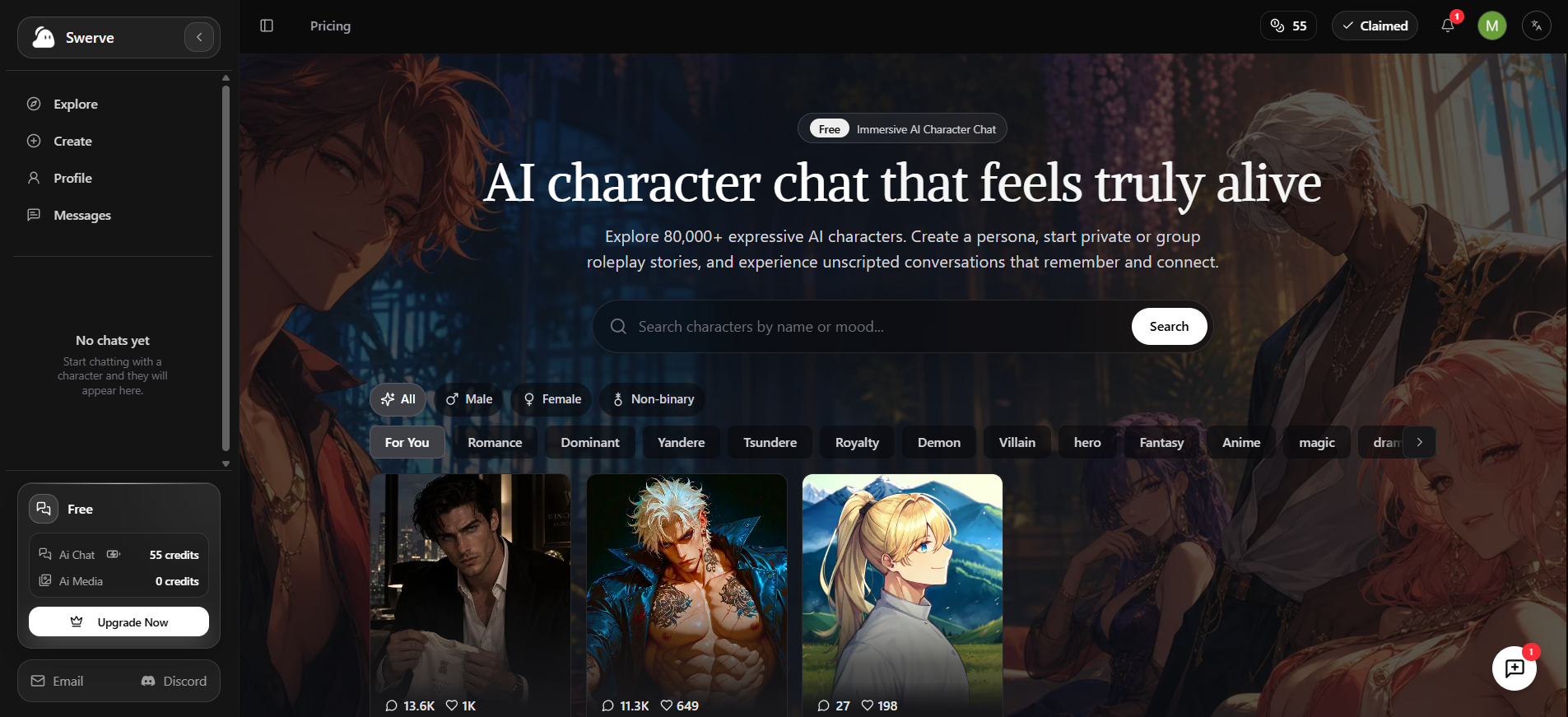
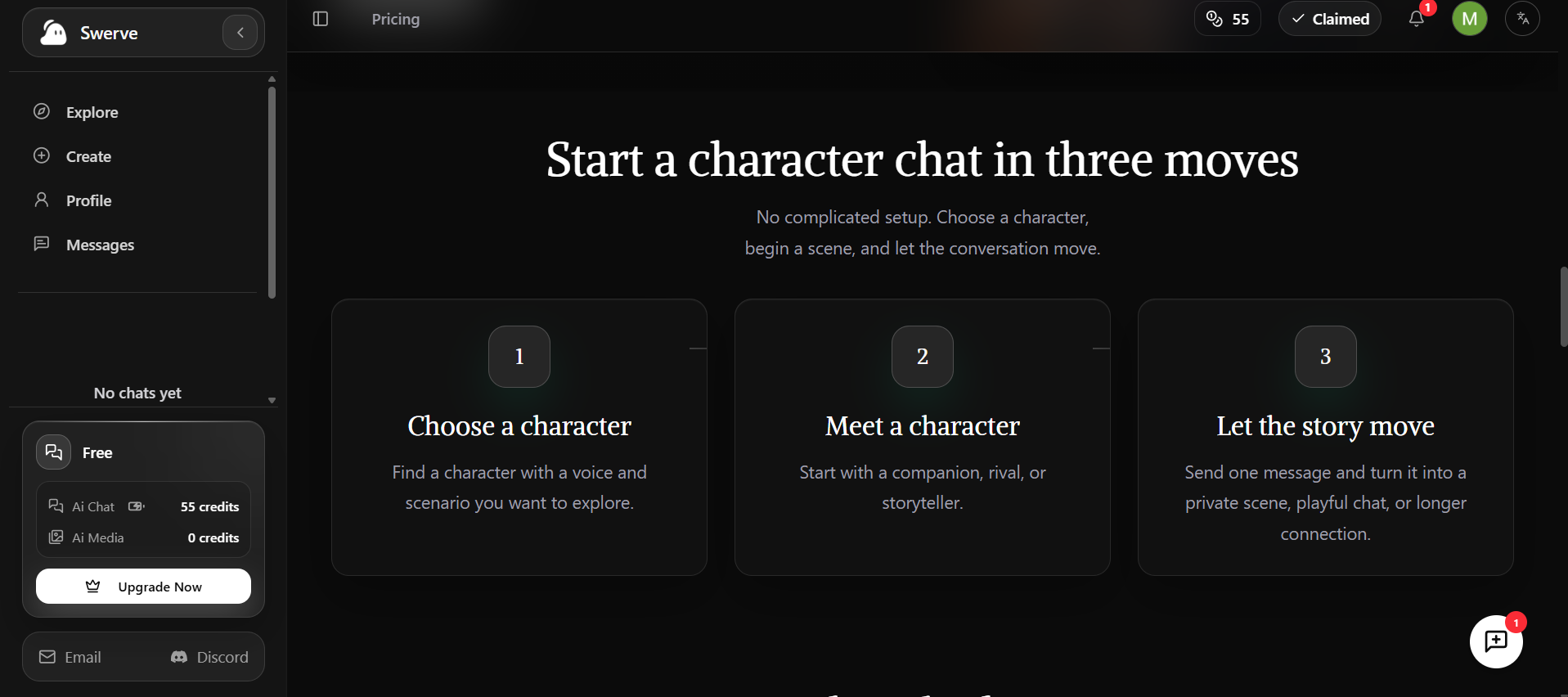
A free swerveai.app account opens on a dark homepage promising “AI character chat that feels truly alive” and 80,000+ characters. A left sidebar tracks two balances: AI Chat credits and AI Media credits. New accounts show 30 and 0.
The Explore page
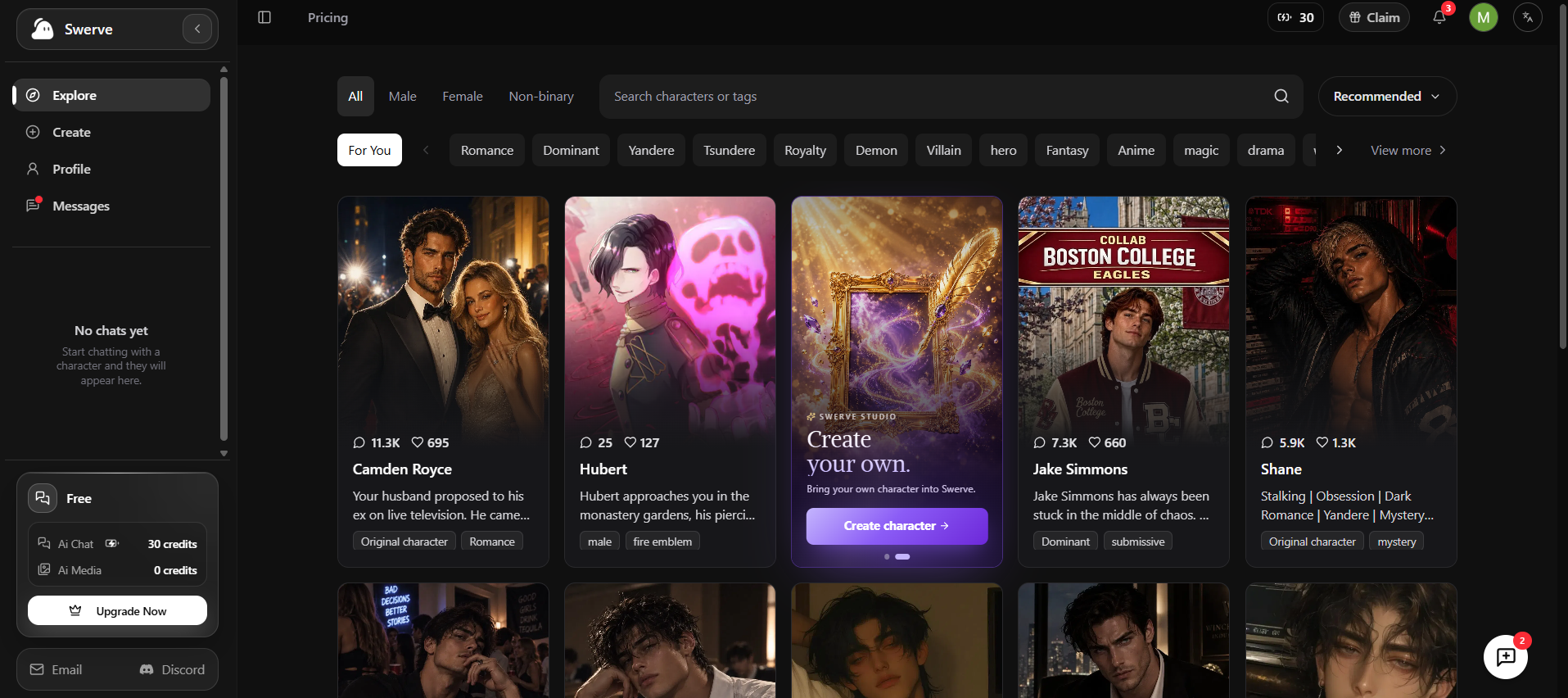
Explore filters characters by Male, Female, or Non-binary, then by tags like Romance, Dominant, Yandere, Tsundere, Royalty, Demon, Villain, Fantasy, and Anime. A “Recommended” menu changes the sort order. Each card shows a chat count and a like count.
The top cards tell you who the audience is. One drama card, Camden Royce, had 11.3K chats with a plot about a husband proposing to his ex on live television. Another card, Shane, carried the tags Stalking, Obsession, Dark Romance, and Yandere. That’s heavy material for a service whose terms describe it as built for general audiences.
The daily check-in
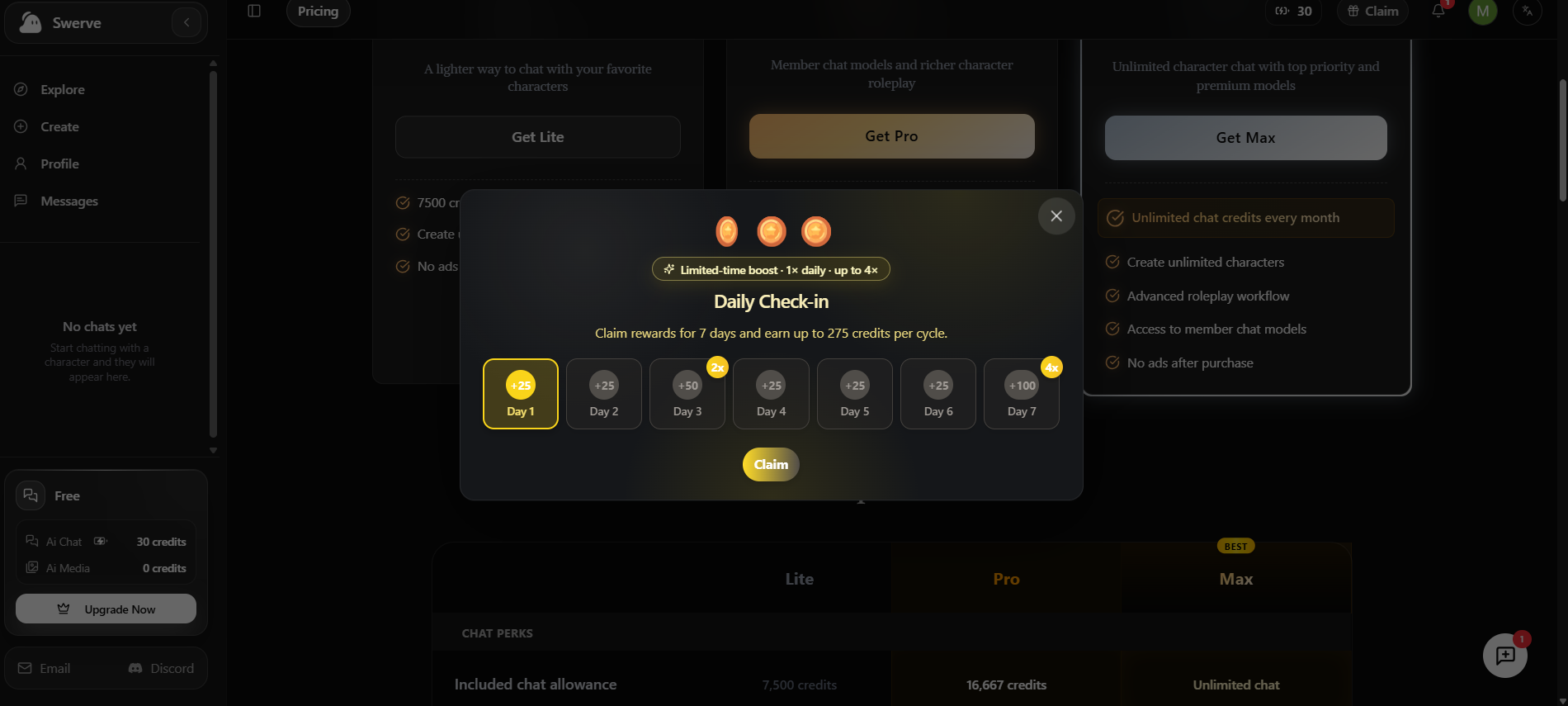
A “Daily Check-in” pop-up appears on a fresh visit. It runs a seven-day cycle worth up to 275 credits. Day 3 pays double (50) and day 7 pays quadruple (100); the other days pay 25. Claiming day 1 lifted the balance from 30 to 55 credits.
A first chat
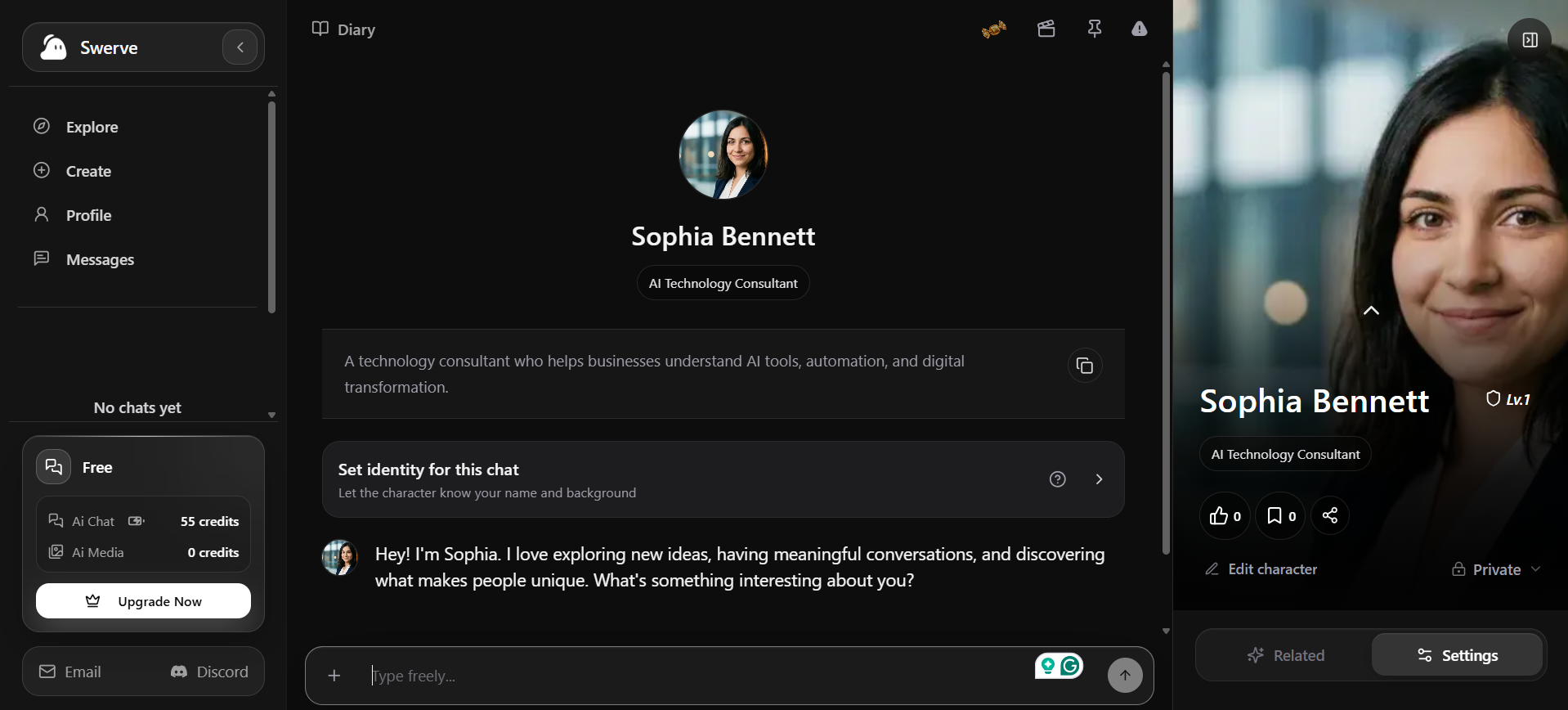
Opening a character shows its tagline, a short intro, and a “Set identity for this chat” option. That option tells the character your name and background, so fill it in before your first message.
Replies read like a novel. A test character, Sophia Bennett, came back with a line of italic action (“She leans forward slightly”), a block of dialogue, then another gesture. A Continue button lets her keep talking without a new prompt.
One exchange cost 3 credits, dropping the balance from 55 to 52. That lines up with the pricing page’s estimate of roughly 1,500 basic messages per 4,500 credits.
One small consistency check stood out. Sophia’s profile defines her as an AI technology consultant. Asked about her passions, she talked about psychology and human behavior instead of AI or automation. A single exchange proves nothing, but persona drift is worth watching in longer stories.
The side panel adds a level badge (Lv.1), like, bookmark, and share buttons, an Edit character link, and a Private or public toggle.
Can You Create Your Own Swerve AI Characters?
Yes, on both services. On swerveai.app, the Create button opens Swerve Studio with three builders: Character, Worldbook, and Ensemble story. Worldbook stores reusable settings for several characters. Ensemble story brings existing characters together with a shared background and an opening scene.
The character editor
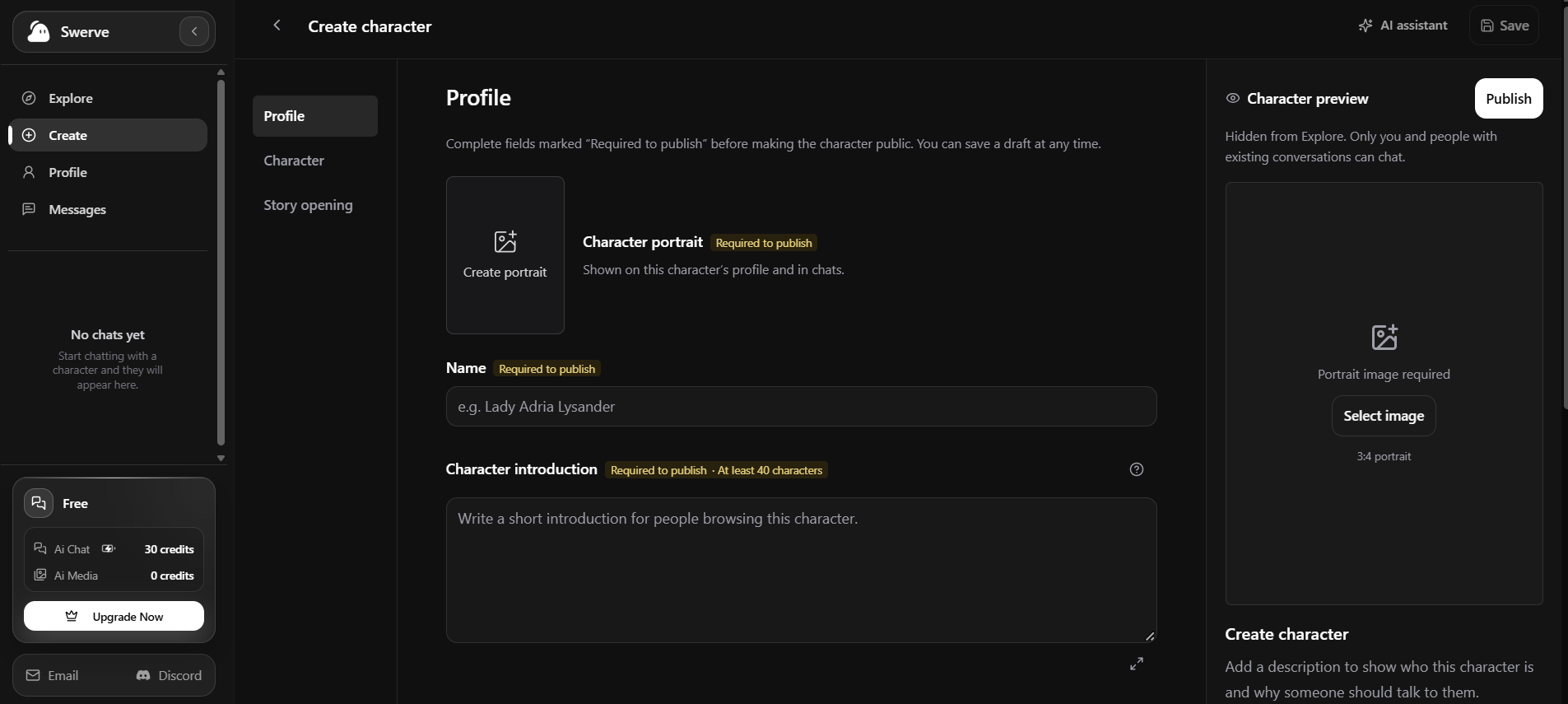
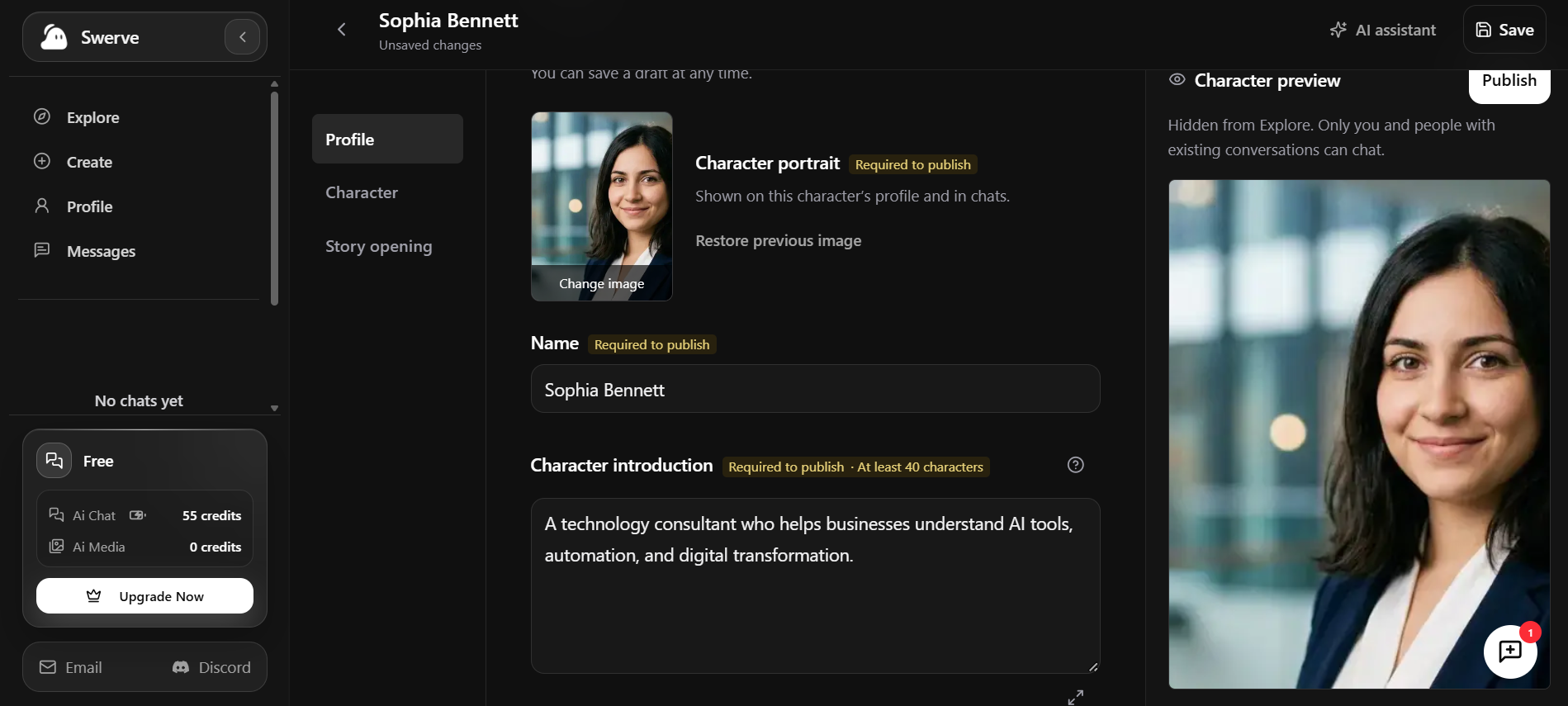
The editor splits into three tabs: Profile, Character and Story opening. Three fields carry a yellow “Required to publish” tag:
A character portrait in a 3:4 frame
A name
An introduction of at least 40 characters
An AI assistant button drafts text for you, and Save keeps a draft at any point. Until you publish, the preview panel says the character stays hidden from Explore. Only you and people with existing conversations can chat with it.
The portrait generator
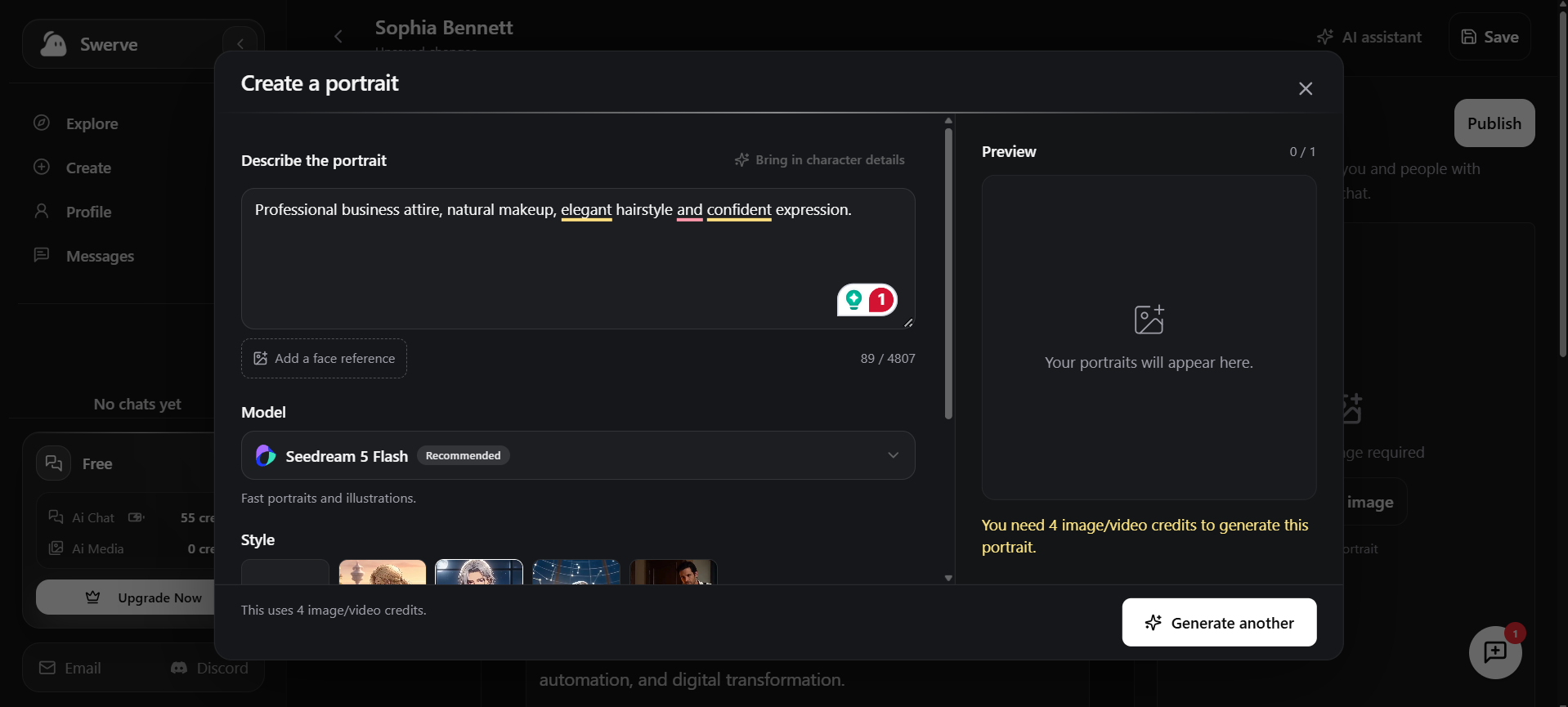
The “Create a portrait” window takes a written description of up to 4,807 characters. You can pull in details from the character sheet, add a face reference, pick a model, and choose a style. Seedream 5 Flash sits at the top as the recommended model for fast portraits.
Each portrait costs 4 image/video credits. A free account holds zero, so the generator shows a yellow “You need 4 image/video credits” warning. The free route is the Select image button, which lets you upload your own picture. Some rival portrait-focused character builders build daily image generations into their plans instead.
On the official Swerve app
The official app lets you build characters and share them with the community or keep them private. You can also create personas and play as anyone. (Documented, App Store listing.) Creators earn gems when others chat with their bots, though several App Store reviewers say those rewards sometimes go missing. (User-reported.)
Is Swerve AI Free?
Both services cost nothing to start. On swerveai.app, the starter credits plus a full week of check-ins fund roughly 100 basic messages. Miss a few days, and that number shrinks fast.
The official Swerve app runs on gems. You earn them by logging in daily and watching ads. One App Store reviewer said a login plus one ad paid 125 gems, though the app doesn’t publish its rates. (User-reported, June 2026.)
In practice, both free tiers suit a few short scenes a week. Daily roleplayers will feel the ceiling within days.
How Much Does Swerve AI Cost?
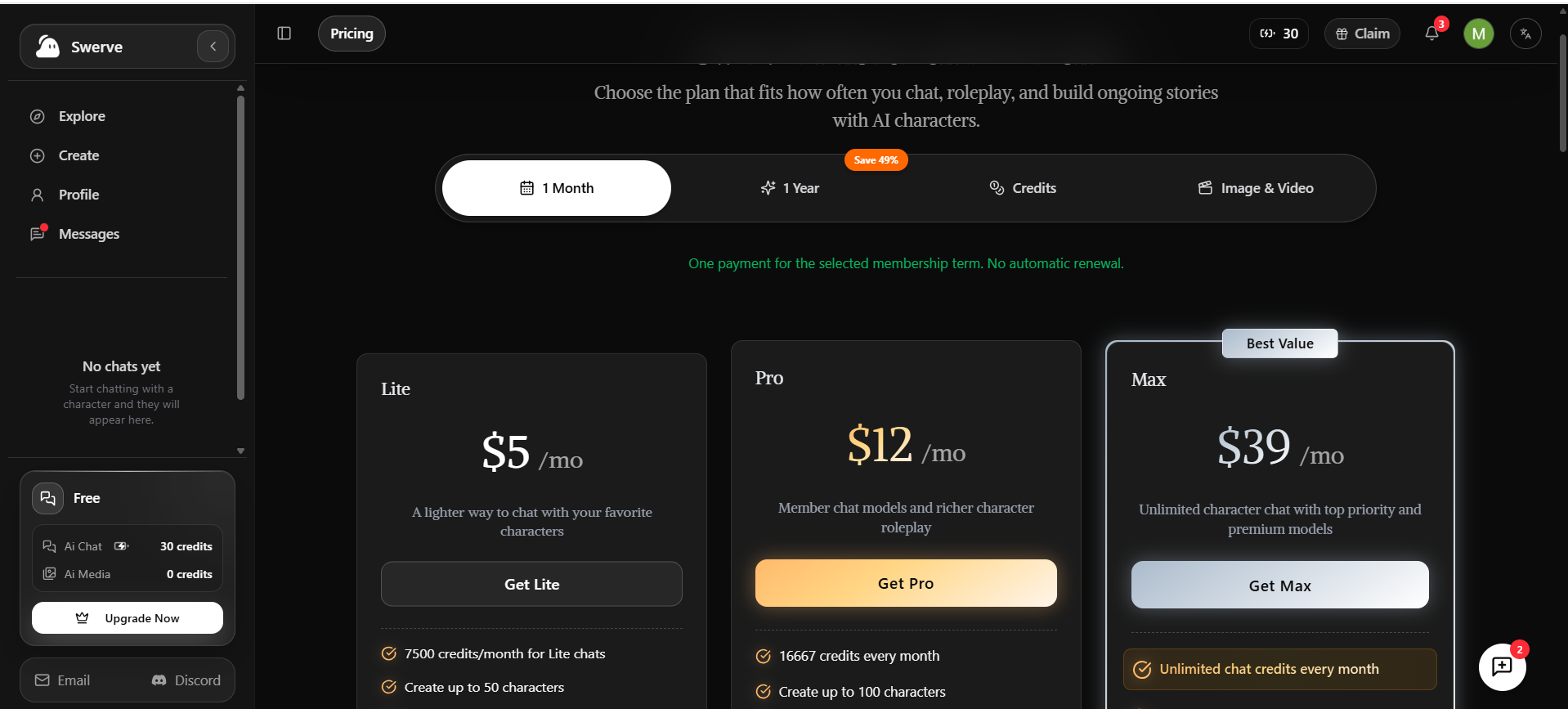
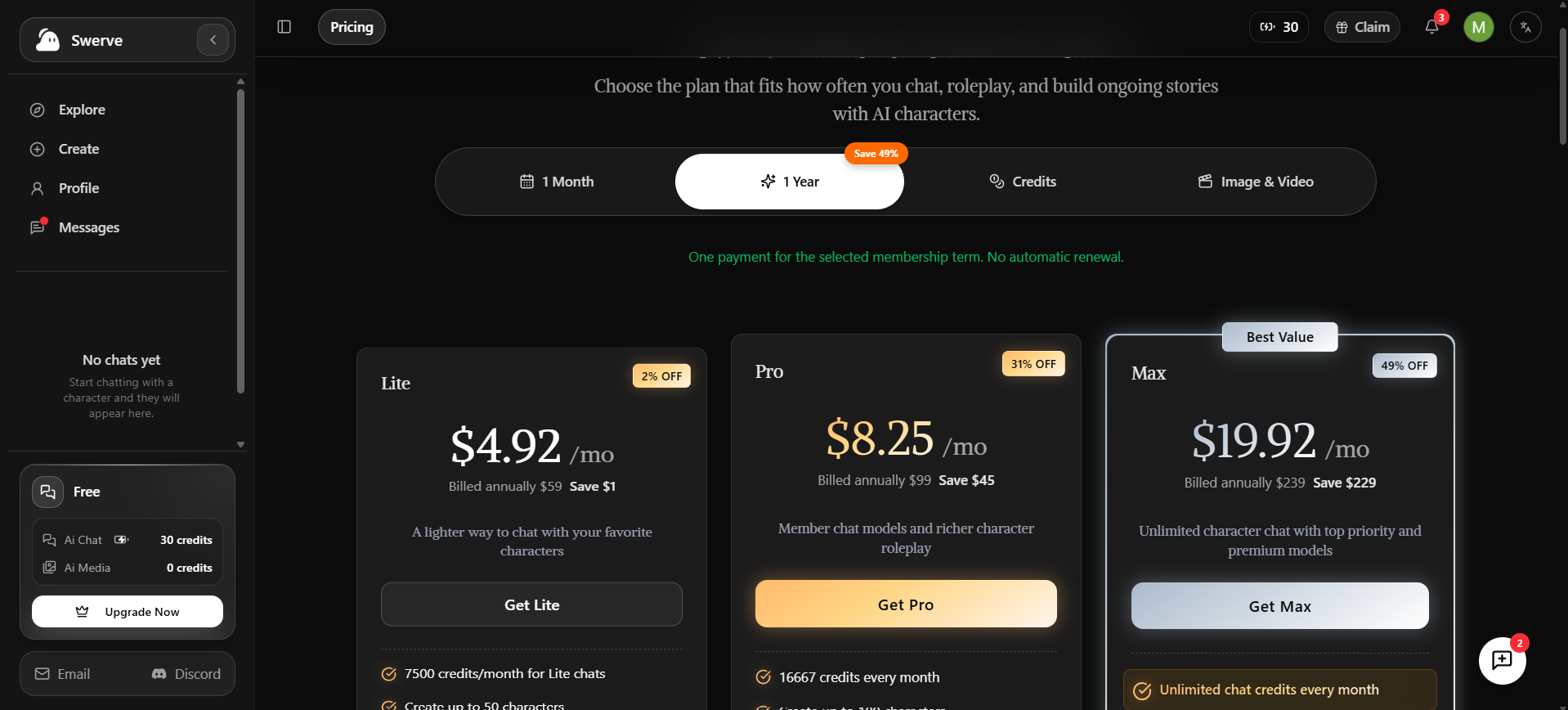
swerveai.app lists Lite at $5, Pro at $12, and Max at $39 for one month, with yearly prices of $59, $99, and $239. The official Swerve app lists Swerve Lite at $3.99 and Pro at $12.49 on the US App Store. The swerveai.app billing terms contradict each other, so read them closely before paying.
swerveai.app chat plans: published price
Plan
1 month
1 year (billed once)
Yearly discount shown
Lite
$5
$59
2% off
Pro
$12
$99
31% off
Max
$39
$239
49% off
The “Save 49%” badge on the 1 Year tab only applies to Max. Lite’s yearly plan saves you just $1.
swerveai.app chat plans: included usage
Lite: 7,500 chat credits a month, up to 50 characters, ad-free
Pro: 16,667 credits a month, up to 100 characters, member chat models, an “advanced roleplay workflow”
Max: unlimited chat credits, unlimited characters, premium models, top priority
The same site also contradicts itself on Pro usage. The plan card lists a monthly credit allowance, yet the pricing FAQ says Pro chats don’t consume credits. Treat Pro’s real message count as unconfirmed.
swerveai.app billing conditions
A green banner on the pricing page reads “One payment for the selected membership term. No automatic renewal.” The Terms of Service, updated October 21, 2026, say the opposite: paid subscriptions renew automatically until you cancel.
Given that contradiction, avoid yearly commitments. Pick one month and watch your card for repeat charges.
swerveai.app credit packs and media plans
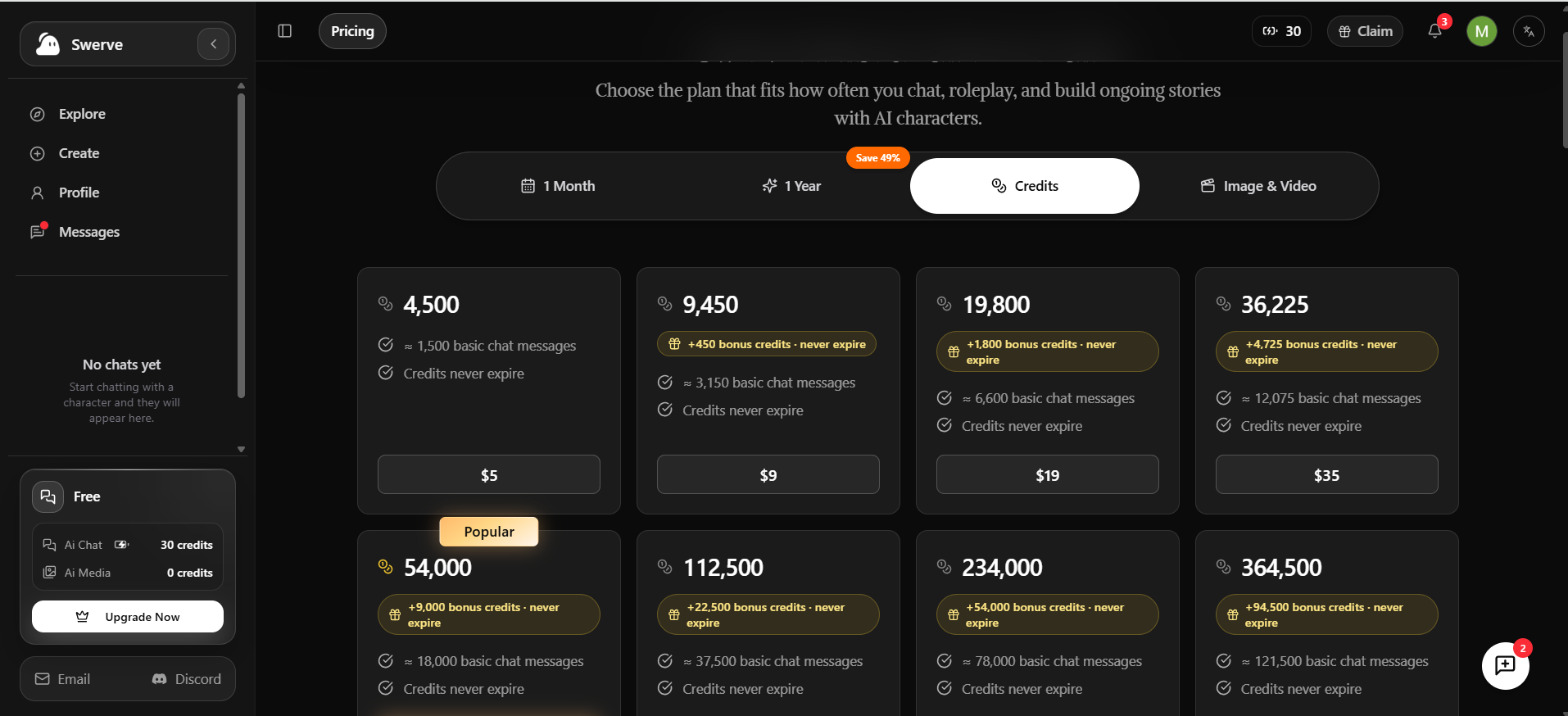
Credit packs never expire. $5 buys 4,500 credits, $9 buys 9,450, $19 buys 19,800, and $35 buys 36,225, with bonus credits on the bigger packs. Larger bundles go up to 364,500 credits.
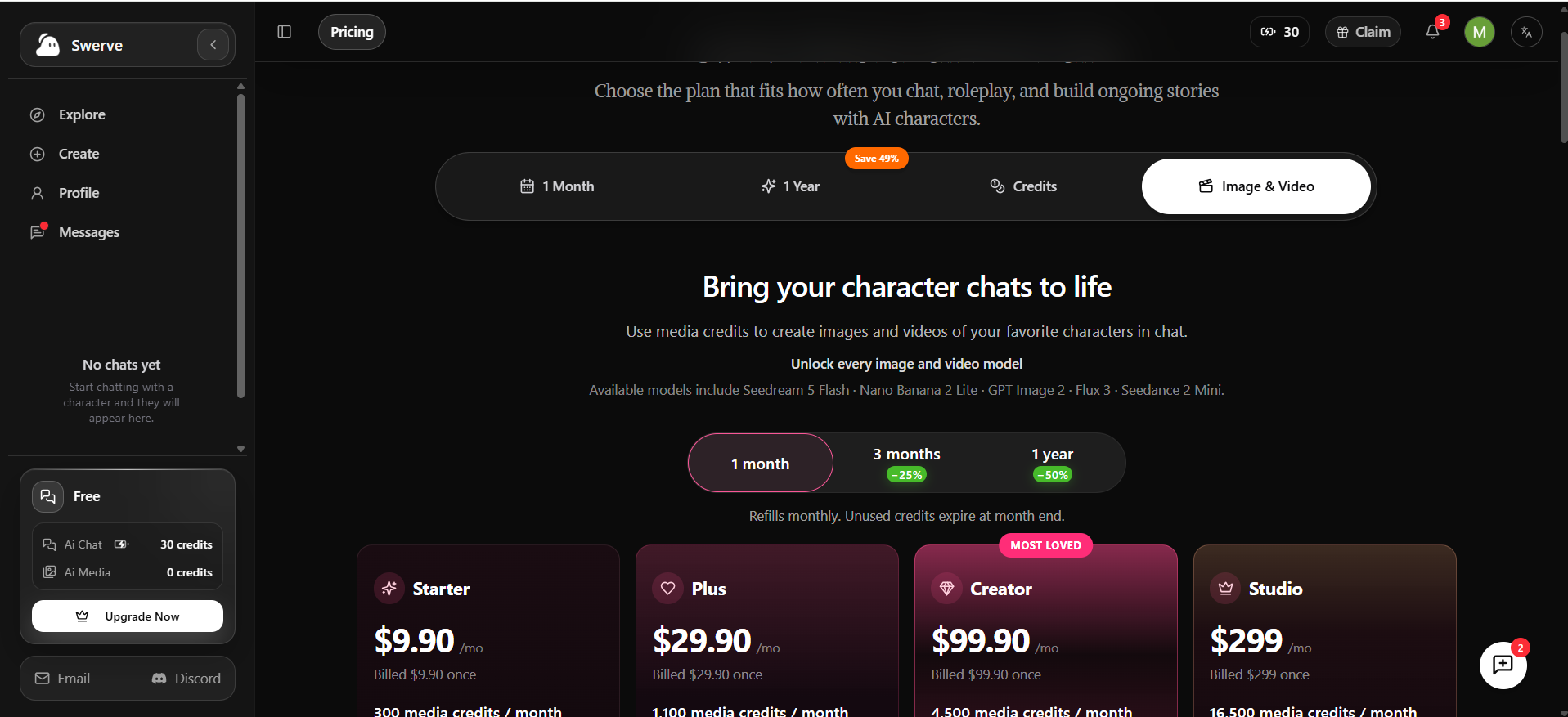
Image and video sit on a separate meter. The media plans run $9.90 (300 credits), $29.90 (1,100), $99.90 (4,500), and $299 (16,500), each billed once per month. Three months cut the price 25%, and a year cuts it 50%. Unused media credits expire at month end. The listed models include Seedream 5 Flash, Nano Banana 2 Lite, GPT Image 2, Flux 3, and Seedance 2 Mini.
Separate chat and media currencies make the total cost harder to judge, since images burn credits far faster than text. The same split shows up on other credit-based anime roleplay platforms.
Official Swerve app pricing
The Swerve App Store listing shows Swerve Lite at $3.99 and Pro at $12.49 in the US. Gem packs start at $2.49 for 3,000 gems and reach $39.99 for 57,600, with larger bundles above that. The listing doesn’t say what each tier unlocks, and Apple handles every charge.
Is There a Swerve AI App for Android?
No official one. The official Swerve team says it has no Android app or APK yet and keeps an Android waitlist. It also warns that any “Swerve AI” app outside the Apple App Store doesn’t come from them.
Android users who want SwerveAI can install it from the browser. The site itself says no APK or app store download is needed:
Android: open the site in Chrome or Edge and tap Install, or pick Add to Home screen from the menu.
iPhone or iPad: open it in Safari, tap Share, then Add to Home Screen.
Desktop: click the install icon in the Chrome or Edge address bar.
That install still connects you to the unaffiliated service described above.
What about the Swerve AI mod APK?
Avoid it entirely. Search results already surface from pages promising “free 1M gems” and “lifetime Pro” for Swerve. Gems and credits live on the company’s servers, so a modified app file has no way to create them. Pages like these usually harvest logins, card numbers, or device access.
Is Swerve AI Safe and Private?
Safety here comes down to two questions: who gets your money and identity, and what content you’ll run into. The official Swerve app scores better on the first. Neither service suits children.
Financial and identity risk
Check
Official Swerve app
swerveai.app
Who runs it
Named US company, YC-backed
No legal entity named
Who takes payment
Apple billing
The site’s own checkout
Renewal terms
Managed through Apple subscriptions
Pricing page and terms contradict each other
Data practices
App Store label lists identifiers used to track you across other companies’ apps
Says it stores chat data to run the service
Content and age risk
Check
Official Swerve app
swerveai.app
Age rule
18+
13+ with guardian consent
Content policy
App Store lists frequent sexual content or nudity
Terms ban sexually explicit content
What you’ll see
Creators mark bots SFW or NSFW (user-reported)
Explore promotes dark-romance and stalking-themed characters
Parental-control company Qustodio found that teens can bypass the official app’s age check with a fake birthday. It also notes the app offers no parental controls.
swerveai.app sends mixed signals of its own. Its terms ban sexual content, yet its Explore feed pushes obsession and stalking themes to a service open to 13-year-olds. Adults who want openly adult roleplay can find unfiltered adult companion apps that state their rules up front.
A few habits help on either service:
Keep passwords, addresses, and payment details out of every chat.
Remember that characters can’t replace a doctor, lawyer, or therapist.
Report a character that crosses a line through the service’s support email.
Parents should block these apps with device-level controls instead of trusting age gates.
What Do Real Users Say About Swerve AI?
Nearly all public feedback covers the official Swerve app. On November 10, 2026, its US App Store page showed a 4.7 average from about 38,000 ratings and a #75 spot in Entertainment. swerveai.app has almost no independent review trail yet. Everything below counts as opinion, so read it that way.
What fans praise(App Store reviews, June to September 2026):
Long, detailed replies, even on the free tier
A gem system that many call fairer than hard paywalls
Easy character building, with an SFW or NSFW choice for each bot
On Reddit’s r/CharacterAIrunaways in spring 2026, one user summed Swerve up as Character.AI “back in their prime days.” The same thread noted that some features sit behind a paywall.
What frustrates people:
Characters forget pinned facts or earlier context in long chats.
In group stories, bots sometimes stop voicing the other characters.
Creator gem rewards appear, then vanish a day later.
Memory complaints show up across this whole category. Some rival apps now sell paywalled AI character memory as their main upgrade, which tells you how hard the problem still is.
Swerve AI vs Character.AI and Zeta: Which Fits You?
The official Swerve app wins on story control: swipes, edits, branching, and pinned memories. swerveai.app wins on device reach and built-in images. Character.AI keeps the biggest brand with stricter content rules, and Zeta offers free text chat supported by ads. Pick by device first, then by how much control you want.
Criterion
Official Swerve app
swerveai.app
Character.AI
Zeta
Memory
Pinned memories
Memory depth rises with plan
Built-in memory tools
Drifts in long stories
User control
Swipe, edit, branch, rewind
Continue, regenerate, limited edits
Several chat styles
Multi-character plot builder
Character creation
Characters and personas, public or private
Character, Worldbook, Ensemble
Large community library
Casts of up to 10 characters
Content rules
18+, NSFW option per bot
Explicit content banned
Strict, no NSFW
Safe Mode by default, adults-only mode
Free usage
Gems from logins and ads
30 credits plus check-ins
Free tier
Unlimited text chat with ads
Paid entry point
Lite $3.99
Lite $5
c.ai+ $9.99/mo
Zeta Pass plus “pieces” currency
Reply quality stays out of this table on purpose. Judging it fairly needs the same prompts run across every app over many sessions.
Zeta deserves a closer look if you want a cast of characters without a credit meter. Its catch, as covered in Zeta’s ad-supported story chat review, is that better models and images cost extra through a separate currency.
Who Should Use Swerve AI?
The official Swerve app fits adult iPhone users who want long, narrative roleplay and fine control over where a story goes. swerveai.app fits Android or desktop users who accept an anonymous operator in exchange for browser access and AI portraits. Skip both if you’re under 18, need offline chat, or want strong privacy guarantees.
Good fit:
Former Character.AI users chasing longer, novel-style replies
Writers who like branching scenes and multi-character casts
Budget users happy to claim daily rewards
Poor fit:
Teens and parents looking for a kid-safe chatbot
Anyone who wants to know exactly who holds their card details (swerveai.app)
Heavy image makers on a tight budget, since media credits reset monthly
The official Swerve app earns its buzz with strong writing and real story tools. swerveai.app looks polished and works everywhere, but the unnamed operator and the clashing renewal terms keep it a try-free-first service. On iPhone, start with the official app. On any other device, test swerveai.app free and give a character a few dozen messages before you pay. Long chats reveal memory and persona problems that a first greeting never will.
FAQs
Q. Is Swerve AI legit?
The official Swerve app comes from MSPW Labs, Inc., a Y Combinator-backed US company. swerveai.app is a separate site that names no company, and the official team says browser services using its name aren’t affiliated.
Q. Is Swerve AI free?
Yes, both services start free. The official app pays gems for logins and ads, while swerveai.app gives 30 credits plus daily check-in rewards.
Q. Does Swerve AI have a web version?
Not an official one. The official team keeps a web waitlist. swerveai.app runs in browsers today as an unaffiliated service.
Q. Is Swerve AI available on Android?
The official app is iPhone-only, with an Android waitlist. No official APK exists.
Q. Is the Swerve AI mod APK safe?
No. Modded files can’t add server-side gems, and “free gems” pages mostly collect logins and payment details.
Q. Does Swerve AI allow NSFW?
The official app carries an 18+ rating and lets creators mark bots SFW or NSFW. swerveai.app bans sexually explicit content in its terms.
Q. Is Swerve AI better than Character.AI?
Many switchers prefer the official Swerve app for its longer replies and branching tools. Character.AI still offers the bigger, more established platform with stricter content rules.
Disclaimer: This review is based on my research and personal experience with Swerve AI. We are not affiliated with MSPW Labs or swerveai.app, and this article is not sponsored by either service. Features, pricing, and policies may change over time, so verify the latest details on the respective platforms before signing up or making a purchase.
Tags:
Maliha Irfan
Maliha Irfan is an AI and technology writer specializing in AI tools, AI agents, automation, and emerging software. Her work explores how AI technologies perform in real-world scenarios, what features they offer, and where their limitations lie. She focuses on practical reviews, hands-on testing, and evidence-based insights to help readers understand AI products, compare available solutions, and make informed decisions about adopting new technologies.