Can You Run Kilo AI Locally Without Paying API Fees?
Yes. Kilo Code, the MIT-licensed coding agent, runs on models that live on your own computer. Its provider directory lists Ollama, LM Studio, Atomic Chat, Anaconda Desktop, and generic OpenAI-compatible endpoints under Local & Self-Hosted. Prompts reach a model on your machine, and the hosted token bill disappears.
Two caveats decide whether that is enough.
First, the main model is only one inference path. A small background model, autocomplete, and cloud features can still reach Kilo’s servers while you stay signed in.
Second, a model that loads does not always edit a repository reliably. Tool calling and long agent runs demand more than chat does.
The sections below cover each runtime, a checklist for keeping every inference call local, hardware tiers, diagnostics, an electricity formula, and a comparison with Cline, Aider, and Zoo Code. Steps follow Kilo’s documentation as of 24 November 2026. The article contains no hands-on benchmarks, and every estimate carries a label.
Which Local Runtimes Does Kilo Code Support?
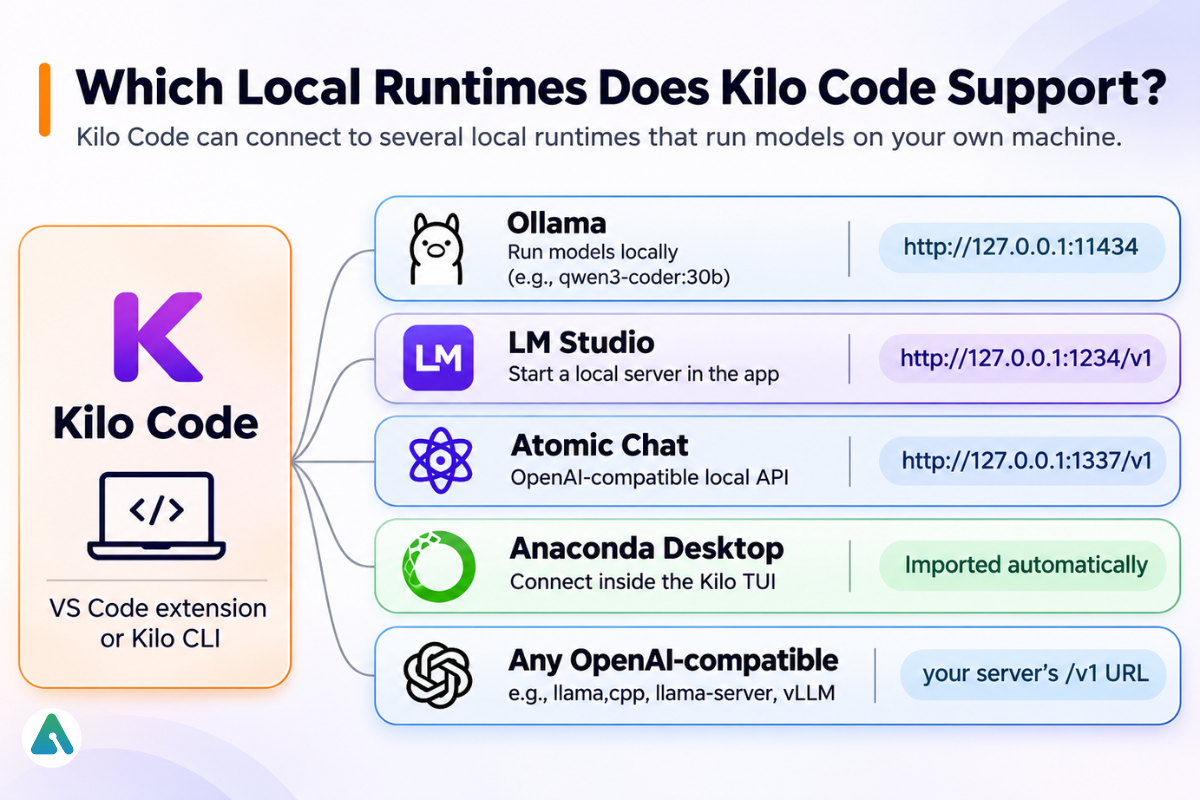
Kilo Code lists five local or self-hosted options: Ollama, LM Studio, Atomic Chat, Anaconda Desktop, and a generic OpenAI-compatible provider. Each runs, or connects to, a model server on hardware you control.
Choose Ollama for terminal workflows, LM Studio for a visual interface, and the generic provider for any other server that speaks the OpenAI API.
Runtime
Default address
What to know
Ollama
http://127.0.0.1:11434
No API key. Models use the ollama/<name> format.
LM Studio
http://127.0.0.1:1234/v1
GGUF models. Start its Local Server first.
Atomic Chat
http://127.0.0.1:1337/v1
TurboQuant-optimized inference. Kilo stays silent on localhost until you opt in.
Anaconda Desktop
Set by its model server
Must run on the same computer as Kilo.
OpenAI Compatible
Your own baseURL
Suits vLLM, SGLang, and other servers that expose the OpenAI API, including shared GPU boxes.
Ports come from Kilo’s local models documentation. Before you expose any server beyond localhost, apply the basics of locking down self-hosted model servers: private network interfaces, authentication, and quick patching.
Anaconda acquired Kilo Code in July 2026, when the project served more than 3 million developers, and said existing products and plans would not change. According to MorphLLM, the repository counted 27,748 GitHub stars on 25 October 2026.
How to Set Up Kilo Code With Ollama
Install Ollama, run ollama serve, Pull a model, then add Ollama under Providers in Kilo’s settings. Local use needs no API key. Set a base URL only when Ollama runs on another host. Kilo’s Ollama provider documentation covers the same steps.
Install Ollama, then run ollama serve.
In a second terminal, run ollama pull <model_name>.
In VS Code, open Kilo settings, go to Providers, and add Ollama.
Send one small task before anything bigger.
Two settings matter most.
Ollama truncates prompts by default. Kilo recommends at least 32k of context, set in the Context Window Size (num_ctx) field.
Requests also time out after 10 minutes, so slow models need a longer API Request Timeout.
Changing num_ctx has a cost. Ollama allocates the KV cache when it loads a model, so a new value forces a full reload, and the first request afterward can hang or run out of memory. Pick one value and keep it.
Kilo separates local Ollama from Ollama Cloud. Local models use ollama/<model_name>. Ollama Cloud is a hosted provider that never connects to localhost. CLI users have confused the two, and a March 2026 GitHub question reported seeing only Ollama Cloud in the CLI.
How to Use LM Studio With Kilo Code
Download a GGUF model in LM Studio, open the Local Server tab, select the model, and click Start Server. Then pick LM Studio in Kilo. The server must stay running, because Kilo talks to it through an OpenAI-compatible API.
LM Studio suits anyone who prefers menus to commands. Review its context and memory settings instead of trusting a model’s advertised maximum. For a model served under a custom name, register it under provider.lmstudio.models in the config file.
How to Connect Atomic Chat or Anaconda Desktop
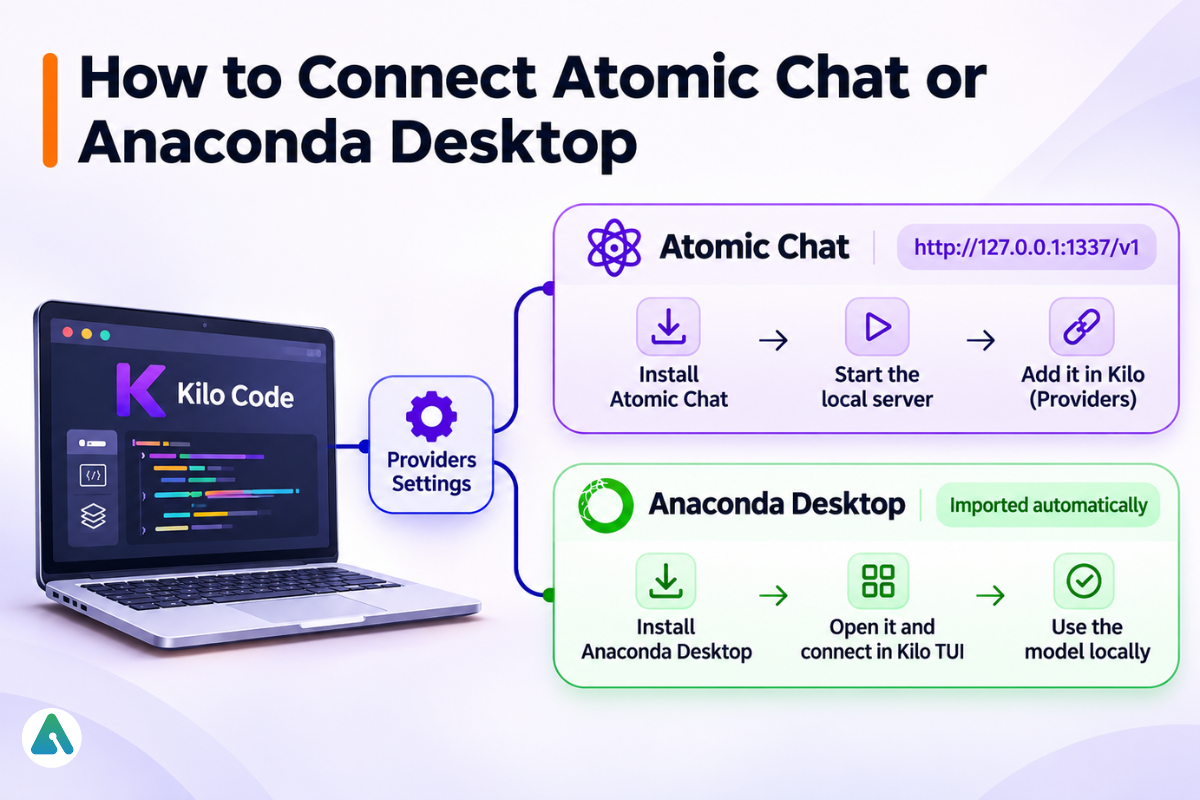
For Atomic Chat, load a model, enable its local API server on port 1337, and confirm it responds. For Anaconda Desktop, start a model server there, then connect from Kilo with /connect.
Atomic Chat. Kilo ships the plugin by default but makes no localhost calls until you opt in. Three triggers opt you in:
Configure provider.atomic-chat in Kilo. jsonc.
Set a model that starts with atomic-chat/.
Enable atomicChat.autoDetect, which probes ports 1337 and 1338.
Because nothing probes your network until you choose, the default suits privacy-minded setups.
Anaconda Desktop. Kilo only discovers and connects to a server that already runs. You download models and manage servers inside Anaconda Desktop. Supported systems are Windows 11 x86-64, macOS 13 or later on Apple Silicon, and Debian or Ubuntu. Remote backends and headless setups are unsupported.
Can the Kilo Code CLI Use a Local LLM?
Yes. Kilo supports Ollama as a local provider in the VS Code extension, the JetBrains plugin, and the CLI.
Install the CLI withnpm install -g @kilocode/cli, confirm it withkilo --version, then run kilo inside a project. Global config lives at ~/.config/kilo/kilo.jsonc. Project config lives at kilo.jsonc or .kilo/kilo.jsonc.
Other installers include Homebrew (brew install Kilo-Org/tap/kilo), pnpm, bun, a curl script and an Arch package. Kilo lists no Windows-specific CLI page, so npm is the safest Windows start.
This shape comes from Kilo’s custom models page. Two fields deserve care:
limit. context and limit. output: Match the model’s real capacity. Unset values resolve to zero, which switches off compaction and usage tracking.
tool_call: Set it to true only when the model and runtime support tool calling. The flag tells Kilo to send tool requests, but it cannot give an incompatible model agentic ability.
What Hardware Does a Local Kilo Setup Need?
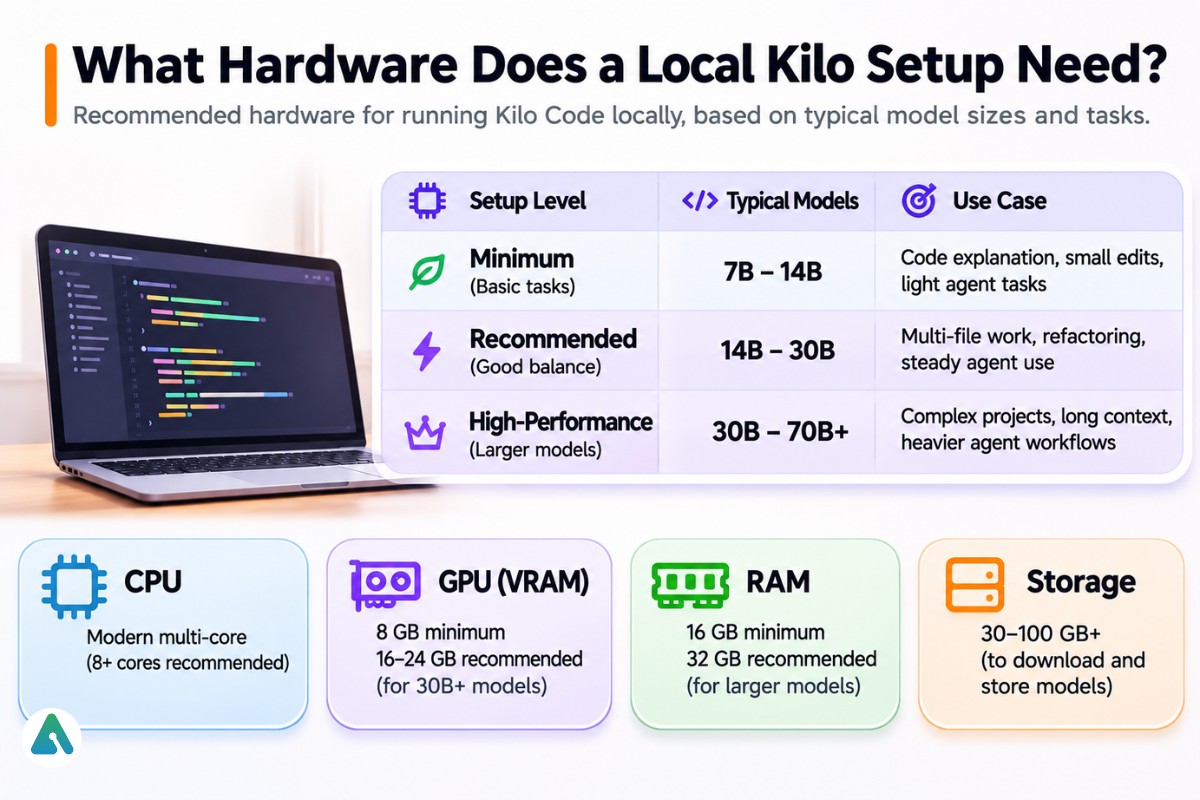
Kilo groups its advice by memory: 8 GB, 16 GB, 24 GB, and 48 GB+ of VRAM, plus Apple Silicon by unified memory. The 8 GB tier is the smallest Kilo lists, not a stated minimum.
Memory limits you most, because the model, the context window, and your editor share it.
Your hardware
Models Kilo suggests
8 GB VRAM
Falcon H1R 7B at Q4; Qwen 3.5 9B at Q4 with limited context
16 GB VRAM
Gemma 4 12B at Q4; Qwen 3.5 9B; Falcon H1R 7B
24 GB VRAM
Qwen 3.6 27B at Q4; Devstral Small 2; Qwen 3.6 35B-A3B
48 GB+ VRAM
Qwen3-Coder-Next
Apple Silicon, 16 GB
Qwen 3.5 9B, Gemma 4 12B or Falcon H1R 7B
Apple Silicon, 32 GB
Qwen 3.6 27B, Qwen 3.6 35B-A3B or Devstral Small 2
Kilo calls these picks practical estimates, not guarantees. The older Ollama page names qwen3-coder:30b and devstral:24b instead, and admits the first sometimes calls tools incorrectly. Treat the tier table as the newer advice.
Context length drives memory use as much as model size. Long windows and parallel agent tasks push the KV cache far past the weights, a pattern broken down in VRAM and KV cache math for agents.
Apple Silicon memory is unified, so macOS and your other apps draw on the same pool. Leave headroom beyond the model. Gemma 4 12B on a laptop needs around 16 GB, which matches the 16 GB tiers above.
CPU-only or integrated graphics. Kilo says local models can demand a powerful CPU and ideally a dedicated GPU. It publishes no CPU-only speed figures. Expect slower replies; choose a smaller model and raise the request timeout.
What Can a Local Model Do Inside Kilo?
Model size and tool-calling reliability decide it. A coding agent plans, edits files, and loops on results, so a model that answers questions well can still stumble in that loop.
The table below is a qualitative assessment based on tool-calling and context constraints, not benchmark data.
Coding task
Estimated suitability of a local model
Code explanation
Generally good
Commit message generation
Good
Writing individual functions
Good with a suitable model
Single-file bug fixing
Depends on the model
Autonomous debugging
Highly model dependent
Multi-file refactoring
Challenging
Large repository migration
Often better suited to stronger models
Long autonomous agent sessions
Limited by context and tool calling
When local models fit poorly. Skip them for wide refactors, parallel subagent loops, and long unattended sessions, where weak tool calling compounds with every step.
Kilo places its best overall pick, Qwen 3.6 27B, at 24 GB of VRAM, so smaller cards carry a real quality gap. Hosted frontier models still lead on the heaviest work, and the picture of which models lead in 2026 shows how wide that gap runs.
Smaller models still handle Enhance Prompt and Commit Message Generation well.
How to Keep All Kilo Inference Local
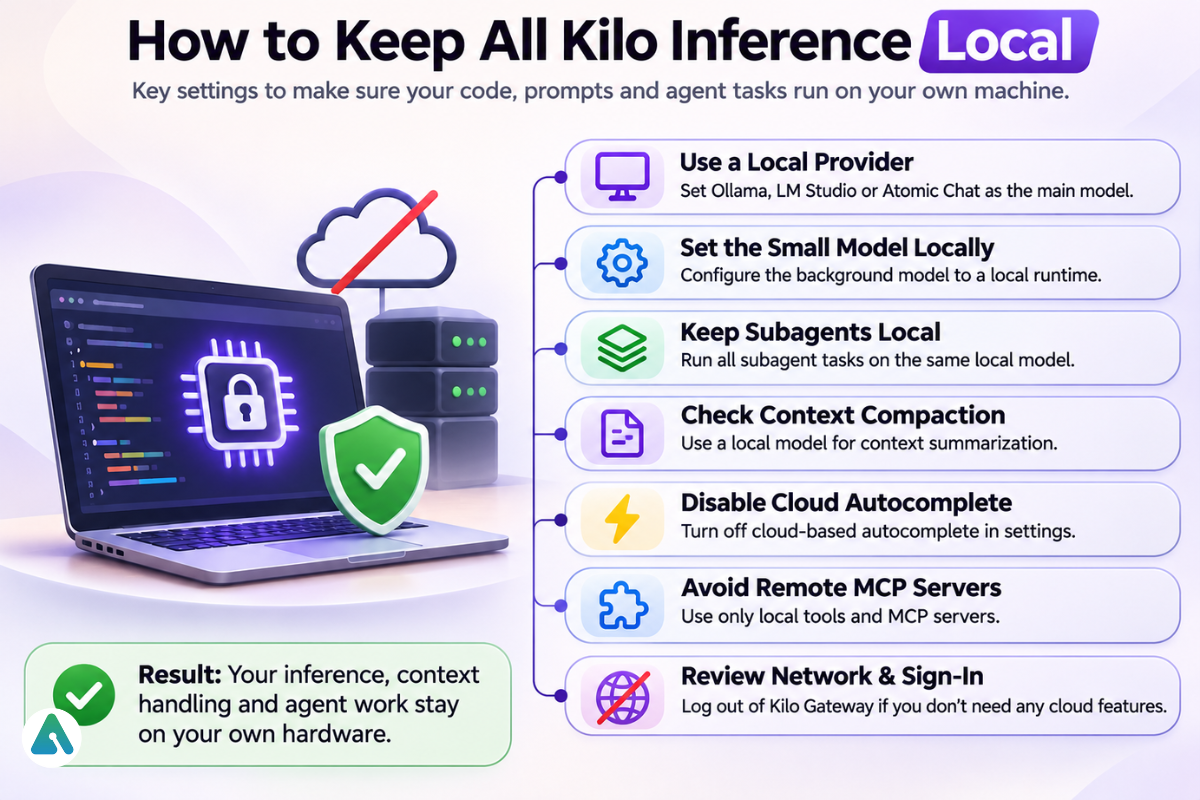
Set the main model to a local provider, then point every background model at a local one too. A signed-in session can send the small model to Kilo Gateway, and autocomplete follows a separate path. Local Ollama covers inference only.
[ ] Set the main model to a local provider such as Ollama or LM Studio.
[ ] Set small_model to a model on that provider. Left unset, it can fall back to kilo-auto/small while the Gateway is signed in.
[ ] Leave subagent_model unset, so subagents inherit the main model.
[ ] Snooze or disable autocomplete. The alternative, a Mistral key, still calls a cloud service.
[ ] Verify the compaction and memory models. Kilo gives no explicit local step, but both follow the session model by default.
[ ] Remove remote MCP servers you do not need and review telemetry choices.
[ ] Log out of Kilo Gateway when you do not need it. Kilo says this ensures no inference goes through the Gateway.
Cloud Agents and hosted code reviews run on remote compute, whatever your subagent setting says, so avoid them in a fully local workflow.
Privacy is the main reason to bother. Every cloud path adds another place where prompts and code can land, and the data privacy challenges in generative AI start with exactly that kind of exposure.
Kilo says enabled_providers allows only the listed providers. It does not say whether that blocks the Gateway fallback for the small model, so test it. Autocomplete and telemetry are separate toggles, not keys in this profile.
Avoid calling the setup air-gapped until you watch outbound traffic. A fully air-gapped setup means configuring or disabling every networked dependency, including sign-in and updates.
How to Test a Local Model Before Trusting It
Run three escalating tasks and stop at the first failure. Kilo advises starting with a bounded request and confirming responses and tool calls before longer workflows.
Single-file edit. Ask Kilo to rename one variable in one file. Confirm the diff matches the request and nothing else changed.
Multi-file change. Ask it to change a function signature and update two callers. Watch for malformed tool calls, loops, and truncated output.
Shell command. Ask it to run your test command and report the result. Confirm it executes the command and reads the output.
A model that passes step 1 but fails step 2 still works for explanations, commit messages, and single-file edits.
How to Troubleshoot a Local Model That Won’t Connect or Respond
Work through the layers in order: server running, model present, model responding, model loaded, memory free. Kilo’s most common error, a refused connection, means the server is off or sits on a different port than Kilo expects.
Question
Command
Is the Ollama server running?
curl http://localhost:11434/api/tags
Is the model downloaded?
ollama list
Does the model answer directly?
ollama run <model_name>
Which model sits in memory?
ollama ps
How much NVIDIA GPU memory is used?
nvidia-smi
Which Kilo CLI version runs?
kilo --version
Windows PowerShell can map curl to a different command, so type curl.exe there.
For slow replies, switch to a smaller model. For model-not-found errors, copy the exact name from ollama run. For cut-off prompts, raise the context setting and free memory.
What Does Local Inference Cost Compared With Free and Hosted Options?
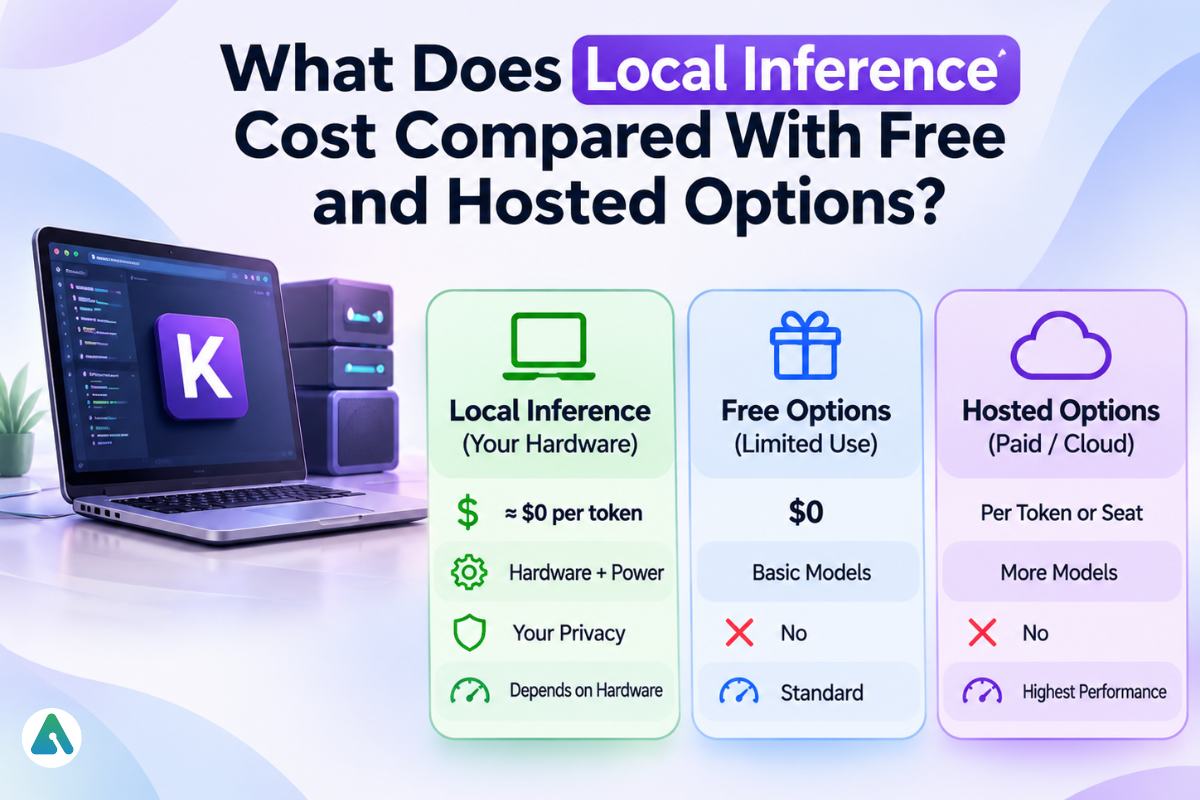
Local inference removes the hosted token bill and adds hardware and power costs. You supply the computer, memory, storage, electricity, and upkeep.
Route
You pay
Watch for
Local model
Hardware and electricity
Setup time, weaker tool calling
Free hosted models (Auto Free)
Nothing for inference
Rate limits; providers may log prompts
Bring your own key
The provider, directly
Cloud Agents and code reviews bill compute separately
Kilo Gateway credits
Provider rates, no markup
A 5% processing fee on credit purchases
Kilo warns against submitting personal or confidential data to Auto Free. Its optional Kilo Pass starts at $19 a month and adds bonus credits.
Background-model tip. Session titles, commit messages, and prompt enhancement use the small model, which draws credits while you are signed in. Autocomplete also draws credits by default and stops when they run out. Point the small model at a free or local option, and snooze autocomplete if you do not need it.
Electricity estimate. In the formula, W is system draw in watts, h is daily hours, and p is your price per kWh:
monthly cost = (W ÷ 1000) × h × 30 × p
A 250 W system running 4 hours a day uses 30 kWh a month. At an assumed $0.15 per kWh, that costs $4.50 a month, or $54 a year. Substitute your own rate. The estimate leaves out hardware purchase, upkeep, and idle power.
Where to Get a Kilo Gateway API Key
Sign in at app.kilo.ai, open Your Profile on a personal account (not an organization account), scroll to the bottom, and copy the key. You need it only for Gateway access outside the extension.
Store the key in an environment variable, because Kilo gives no storage advice.
How Does Kilo Compare With Cline, Aider and Zoo Code for Local Use?
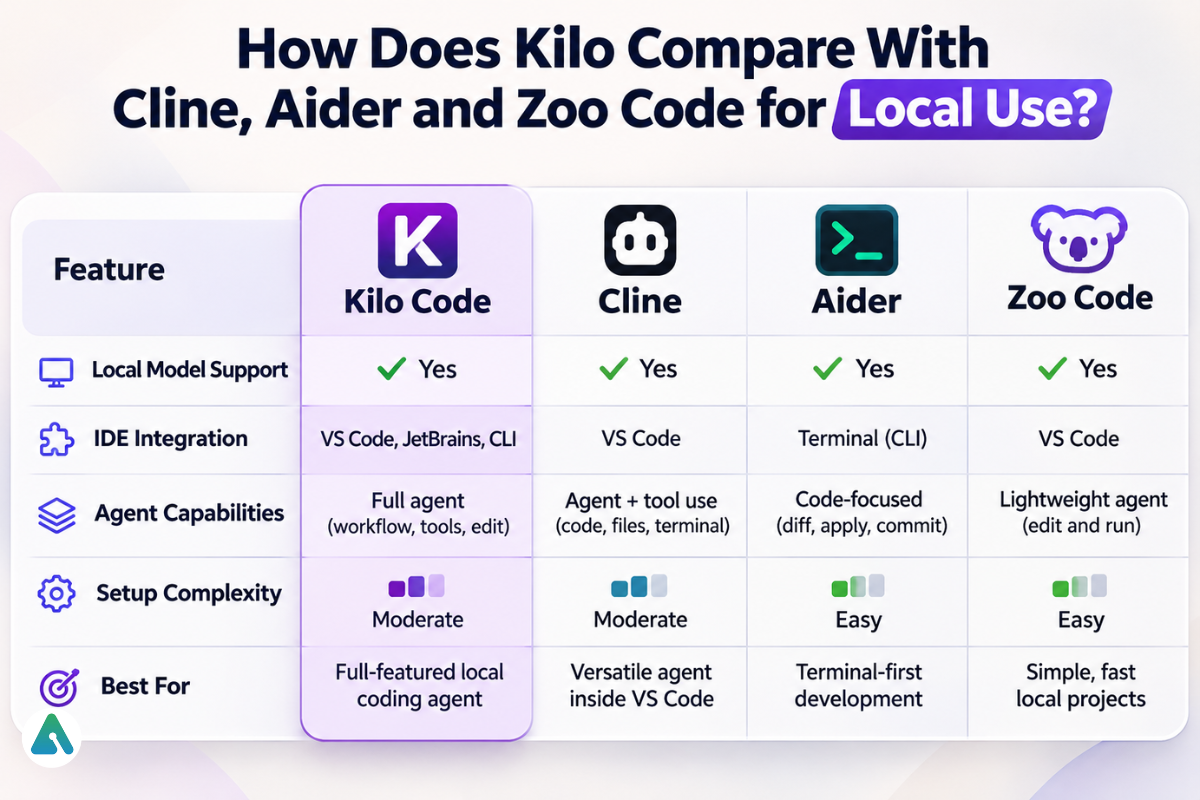
All three can drive a local Ollama model, and each documents different pitfalls. Match the agent to the runtime you already run. None of them publishes a head-to-head benchmark.
Set num_ctx to 32k or more; set limit. context for custom models
Cline
Ollama, LM Studio, Atomic Chat
Turn on Use Compact Prompt; size models by RAM
Aider
Ollama
Use ollama_chat/<model>, which its docs prefer over ollama/<model>; Ollama’s 2k default context is too small
Other names have shifted. Roo Code shut down on May 15, 2026. Zoo Code, a community continuation by former Roo contributors, and Cline remain active VS Code options. Continue stopped development after Cursor acquired it in June 2026. OpenCode stays off the table because no local-setup page was verified.
FAQs
Q. Can I use Kilo AI with local resources?
Yes, through Ollama, LM Studio, Atomic Chat, Anaconda Desktop, or any OpenAI-compatible server. The main model runs on your machine; background features need their own settings.
Q. Is it possible to run AI models locally?
Yes, when your memory fits the model. Kilo’s smallest listed tier pairs 8 GB of VRAM with a 7B to 9B model at Q4 quantization.
Q. Which AI can you run locally with Kilo?
Kilo names Falcon H1R 7B, Gemma 4 12B, Qwen 3.6 27B, and Qwen3-Coder-Next, matched to memory tiers.
Q. What is the best AI agent to run locally?
No source ranks agents on local performance, so any pick is an opinion. Match the agent to your runtime, then run the three-step test above.
Q. Is Kilo AI free?
The extension is free and MIT-licensed. Inference costs separately, and free hosted models, local models, or your own keys can all keep Kilo’s charges at zero.
Q. Do I need an API key for local models?
No. Ollama in Kilo needs none, and the generic provider takes a key only when your server demands one.
Q. How do I install the Kilo CLI?
Run npm install -g @kilocode/cli, then confirm with kilo --version.
Disclaimer: This article is based on publicly available documentation and does not include hands-on testing. We are not affiliated with or endorsed by Kilo AI. Features, pricing, and hardware recommendations may change. Verify current details through official documentation.
Tags:
Maliha Irfan
Maliha Irfan is an AI and technology writer specializing in AI tools, AI agents, automation, and emerging software. Her work explores how AI technologies perform in real-world scenarios, what features they offer, and where their limitations lie. She focuses on practical reviews, hands-on testing, and evidence-based insights to help readers understand AI products, compare available solutions, and make informed decisions about adopting new technologies.