

An AI agent skill is a reusable, folder-based package built around a SKILL.md file. It teaches a compatible AI agent how to perform a specific, repeatable task using step-by-step instructions, optional scripts, and reference assets.
Anthropic introduced Agent Skills for Claude in October 2025 and released the specification as an open standard by December 2025. Today, multiple platforms—Claude, GitHub Copilot, Cursor, and others—support the format, though exact features vary by implementation.
What Is an AI Agent Skill?
A skill is a directory containing at minimum one file: SKILL.md.
That file has two components:
- YAML frontmatter — metadata (name, description, optional fields)
- Markdown body — the actual instructions
A folder can also bundle extra resources: scripts, reference documents, and templates.
The Core Distinction
A skill supplies procedural knowledge, not general facts.
A model already knows what a pull request is. A code-review skill tells it the exact sequence your team actually follows — which checks run first, what counts as a blocker, how feedback should be phrased.
How Agent Skills Work: Four Stages
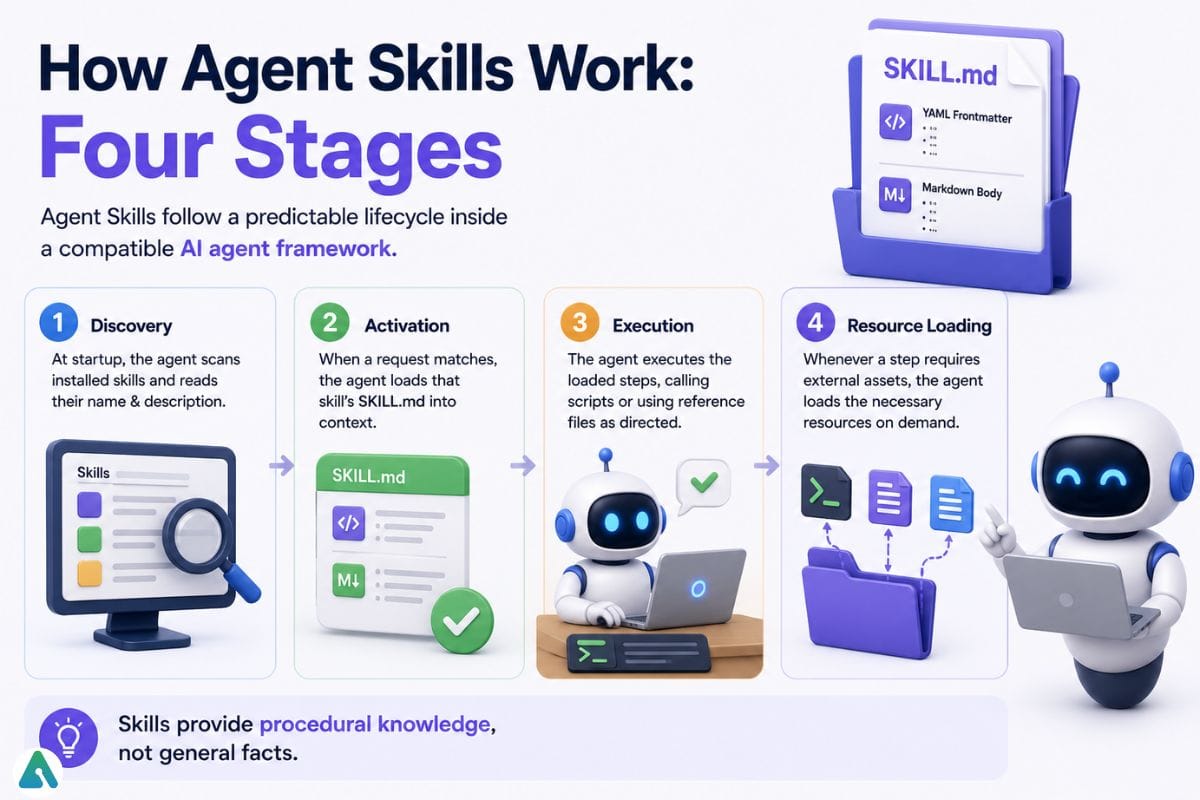

Agent Skills follow a predictable lifecycle inside a compatible AI agent framework:
1. Discovery (Startup) At startup, the agent scans the name and description of every installed skill package. This is lightweight—roughly 80–100 tokens per skill—regardless of how many packages are installed.
2. Activation (On Request) When your request matches a description closely enough, the agent loads that skill’s full SKILL.md body into context. This is where the actual instructions enter the reasoning window.
3. Execution (Following Steps) The agent executes the loaded steps, calling bundled scripts or pulling reference files as directed.
4. Resource Loading (On Demand) Extra files stored in /references, /scripts, or /assets load only when the instructions explicitly reference them. This keeps context overhead minimal.
Progressive Disclosure: Why It Matters
This three-tiered loading mechanism—called progressive disclosure—lets an agent carry many installed packages without bloating its context window. The specification defines three levels:
| Level | What Loads | When |
|---|---|---|
| 1. Metadata | Name and description | Always, at start up |
| 2. Instructions | Full Markdown body | On task activation |
| 3. Resources | Scripts, references, assets | On demand, when called |
Result: Each package costs minimal context overhead until it becomes relevant — which is why a large library doesn’t slow everyday responses.
What’s Inside SKILL.md?
Every skill folder must contain YAML frontmatter followed by Markdown instructions.
| Field | Required? | Purpose |
|---|---|---|
name | Yes | Lowercase, numbers, hyphens only; max 64 chars; must match folder name |
description | Yes | What it does + when to use it (max 1,024 chars) |
license | No | License name or reference file |
compatibility | No | Environment requirements, packages, platform notes |
metadata | No | Free-form key-value pairs (author, version, etc.) |
allowed-tools | No | Tools usable without per-use approval (experimental) |
Minimal Example
---
name: expense-report
description: File and validate employee expense reports according to company policy. Use when asked about expense submissions, reimbursement rules, or spending limits.
license: Apache-2.0
compatibility: Requires python3
metadata:
  author: finance-team
  version: "2.1"
---

# Expense Report Skill

1. Confirm the category against the approved list.
2. Check the amount against the per-category spending limit.
3. Flag any receipt missing a date or vendor name.
4. Summarize the validated report in the standard template.
Everything after the closing --- is plain Markdown — no special syntax required.
Quick-Start Template (Copy-Paste This)
Use this template to start your own skill:
---
name: your-skill-name
description: One clear sentence describing what this skill does. Mention when to invoke it (e.g., "Use when asked about...").
license: MIT
compatibility: Requires [language/platform if applicable]
metadata:
  author: your-name-or-team
  version: "1.0"
---

# [Your Skill Name]

## Purpose
[1-2 sentences on what this skill solves]

## When to Use
This skill activates when requests involve:
- Topic A
- Topic B
- Topic C

## When NOT to Use
Decline requests about:
- Out-of-scope Topic X
- Sensitive Topic Y

## Steps

1. [Action 1 — be specific]
2. [Action 2 — include judgment calls]
3. [Action 3 — specify output format]

## Example

**Input:** [Sample request]
**Output:** [Sample response showing expected format]

## Notes
- [Important caveat 1]
- [Important caveat 2]
Save this as SKILL.md in a folder named your-skill-name/ and you’re ready to test.
Skills vs. Everything Else in Your AI Toolkit
Understanding where a skill fits clarifies how to use it.
| Component | Purpose | Supplies Knowledge? | Supplies Capability? | Typical Role |
|---|---|---|---|---|
| Model | Reasoning and generation | Partial | — | The reasoning engine |
| Prompt | One-off instruction | Temporary | No | Tell it what to do, once |
| Custom instructions | Always-on guidance | Yes, broad | No | Default behavior for nearly every task |
| Agent skill | Reusable procedure | Yes, narrow | Sometimes | Teach one workflow well |
| Tool | Single callable action | No | Yes | Take one specific action |
| MCP server | Live external data | No | Yes | Reach something that changes |
| Memory | Persistent facts | Yes | No | Remember context over time |
| Plugin | Bundled functionality | Varies | Varies | Package several capabilities together |
Skills vs. Custom Instructions
Custom instructions apply to nearly every task — coding standards, project conventions — and stay loaded always. In contrast, a skill is reserved for detailed, task-specific guidance that enters context only when relevant. Therefore, use custom instructions for broad guidance; reserve packaged instructions for material an agent should access only when it applies.
Skills vs. MCP
MCP (Model Context Protocol) connects an agent to live systems—a database, API, ticketing system. It requires authentication and an active connection, and its data changes between invocations.
A packaged skill is static. No live connection needed. The same instructions work the same way every time.
The distinction matters:
| Aspect | Agent Skill | MCP |
|---|---|---|
| Data State | Static (fixed between runs) | Live (changes constantly) |
| Connection | None required | Active API/auth required |
| What It Provides | How to do something | Access to something |
| Use Case | “Review PRs the way our team does” | “Fetch PR #402 from GitHub” |
| When Combined | MCP provides the data; skill teaches how to use it |
In production, you often use both: MCP retrieves the GitHub PR, and a skill teaches the agent to apply your team’s specific code-review standards to it.
What Isn’t a Skill
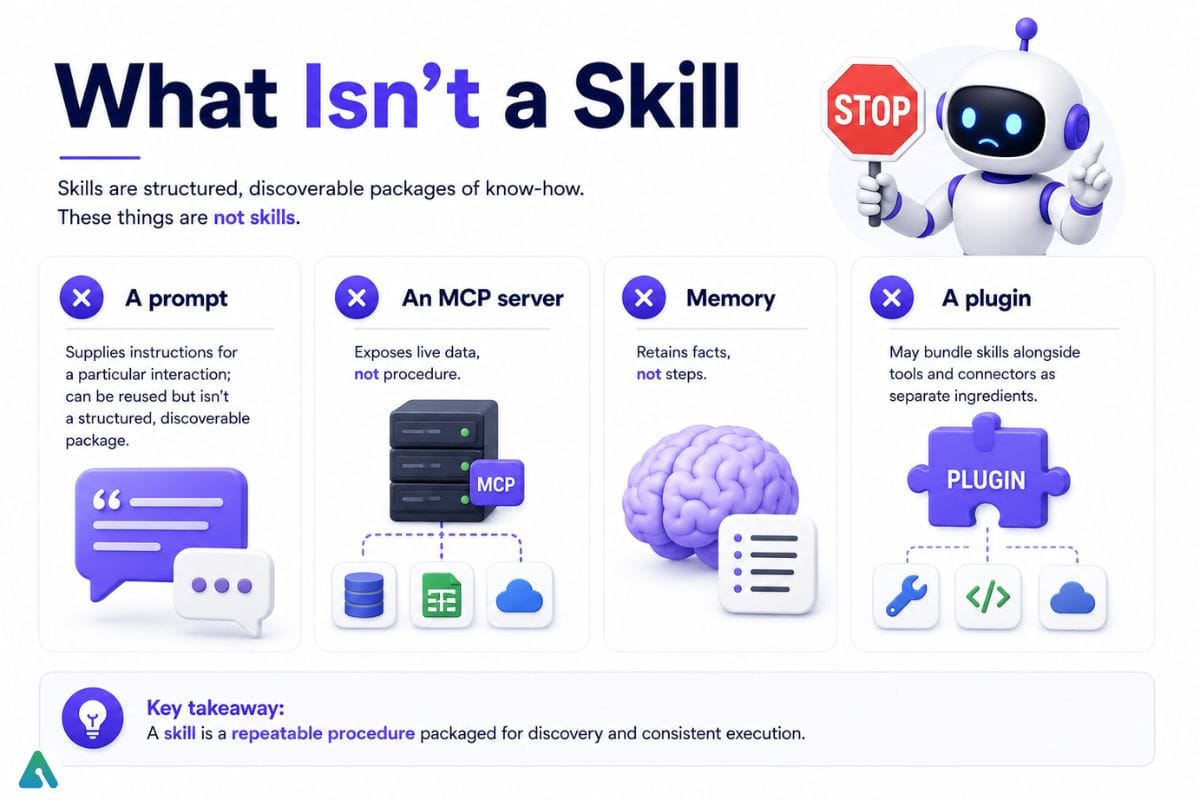

- A prompt — supplies instructions for a particular interaction; can be reused but isn’t a structured, discoverable package
- An MCP server — exposes live data, not procedure
- Memory — retains facts, not steps
- A plugin — may bundle skills alongside tools and connectors as separate ingredients
When Should You Use an Agent Skill?
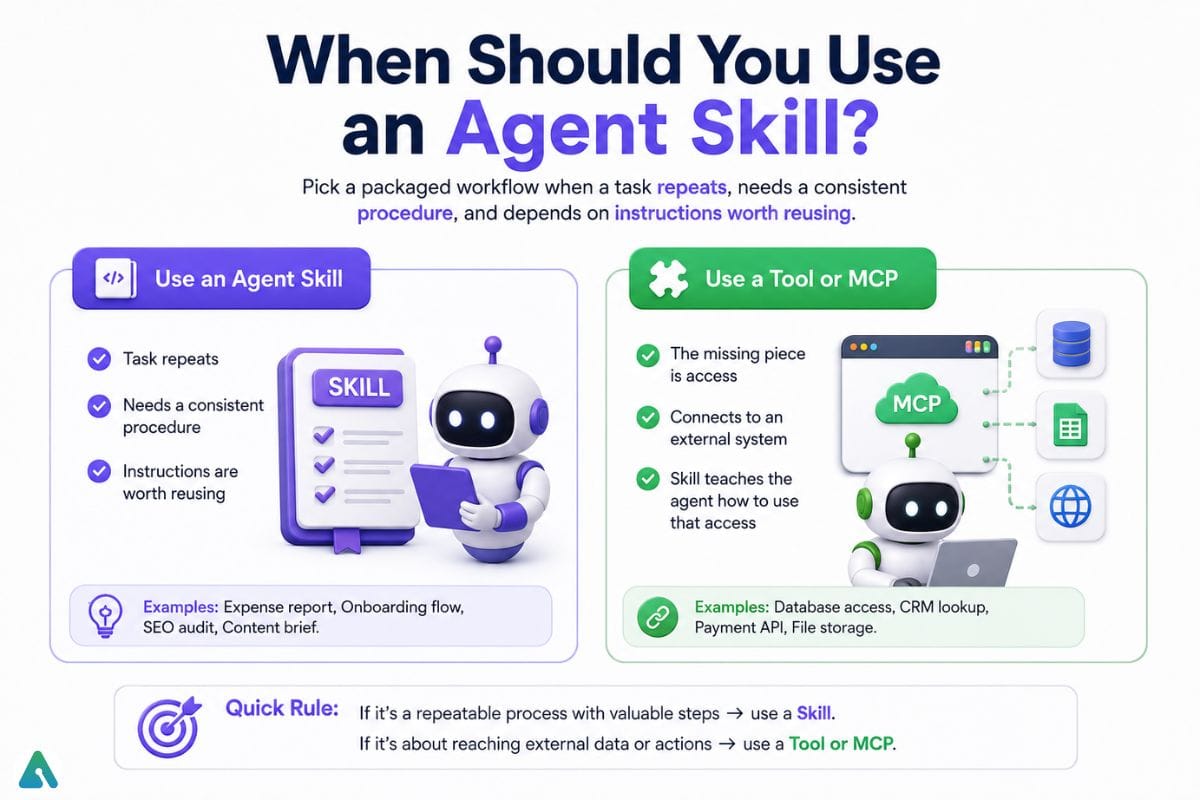

Pick a packaged workflow when a task repeats, needs a consistent procedure, and depends on instructions worth reusing.
Use a tool or MCP when the missing piece is access, not know-how. MCP reaches an external system; a skill teaches the agent how to use that access.
Use custom instructions for guidance that applies to nearly everything you do.
Use memory for information about a person or project that should persist across sessions, rather than for procedural steps.
Real-World Scenarios
Software engineering: Spec-first workflows, test-driven development sequencing, code-review checklists, security hardening before code ships
Document generation: Correctly formatted PDFs, Word files, spreadsheets, or slide decks
Browser testing: Navigating a web app, clicking through flows, capturing screenshots to catch regressions
Cloud operations: Deployment and infrastructure workflows tied to a provider’s toolkit
Content and marketing: Multi-step SEO pipeline — keyword research, outline generation, drafting, formatting checks
Release notes: Turning raw commit history into customer-facing summaries
Internal knowledge lookup: Checking internal documentation before answering
How to Build an AI Agent Skill
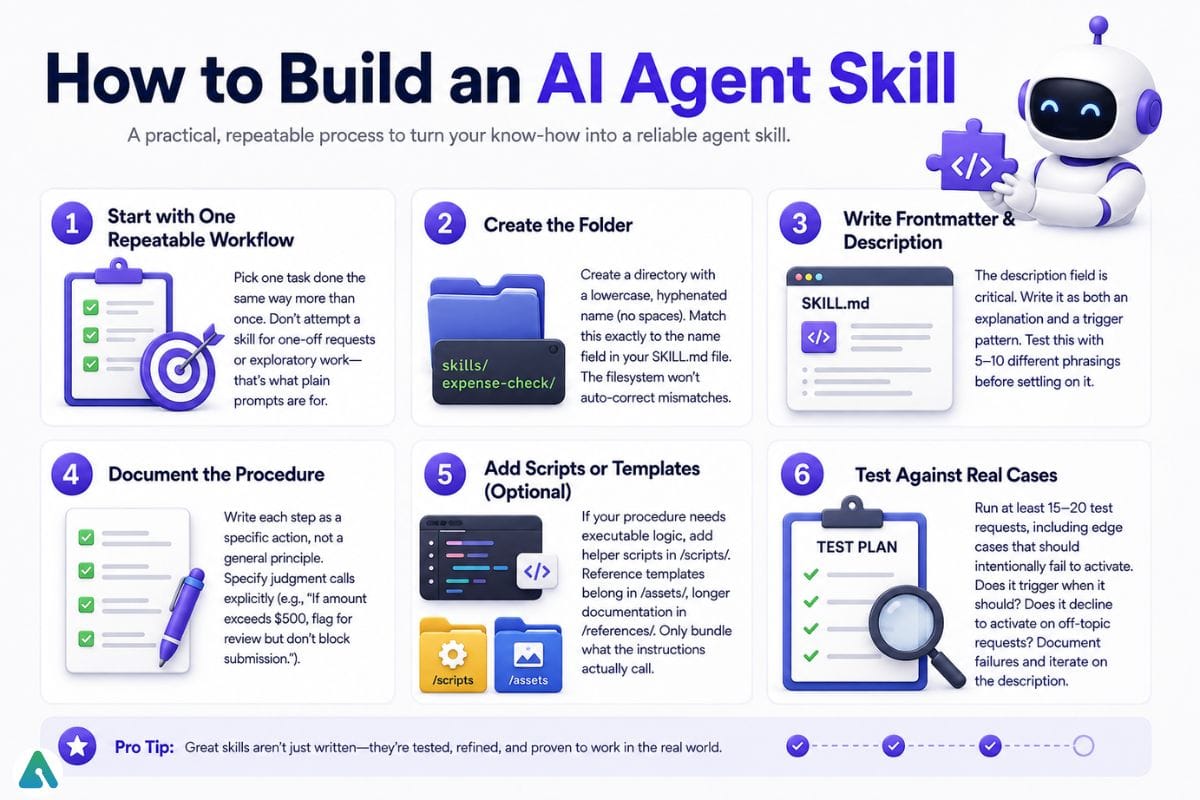

Step 1: Start with One Repeatable Workflow
Pick one task done the same way more than once. Don’t attempt a skill for one-off requests or exploratory work—that’s what plain prompts are for.
Step 2: Create the Folder
Create a directory with a lowercase, hyphenated name (no spaces). Match this exactly to the name field in your SKILL.md file. The filesystem won’t auto-correct mismatches.
Step 3: Write Frontmatter & Description
The description field is critical. Write it as both an explanation (“validates expense reports against company policy”) and a trigger pattern (“use when asked about expense submissions, reimbursement rules, or spending limits”). A vague or narrow description means the skill won’t activate when it should. Test this with 5–10 different phrasings before settling on it.
Step 4: Document the Procedure
Write each step as a specific action, not a general principle. Instead of “check quality,” write “confirm each entry has (1) date, (2) vendor name, (3) receipt attachment.” Specify judgment calls explicitly: “If amount exceeds $500, flag for review but don’t block submission.” other option AI prompting best practices for structured framing techniques.
Step 5: Add Scripts or Templates (Optional)
If your procedure needs executable logic, add helper scripts in /scripts/ (Python, JavaScript, Bash). Reference templates belong in /assets/, longer documentation in /references/. Only bundle what the instructions actually call.
Step 6: Test Against Real Cases
Run at least 15–20 test requests, including edge cases that should intentionally fail to activate. Does it trigger when it should? Does it decline to activate on off-topic requests? How does it handle malformed input? Document failures and iterate on the description.
Typical Folder Structure
my-skill/├── SKILL.md
├── scripts/
│ └── validate.py
├── references/
│ └── policy-details.md
└── assets/
└── report-template.docxHow to Install and Use an AI Agent Skill
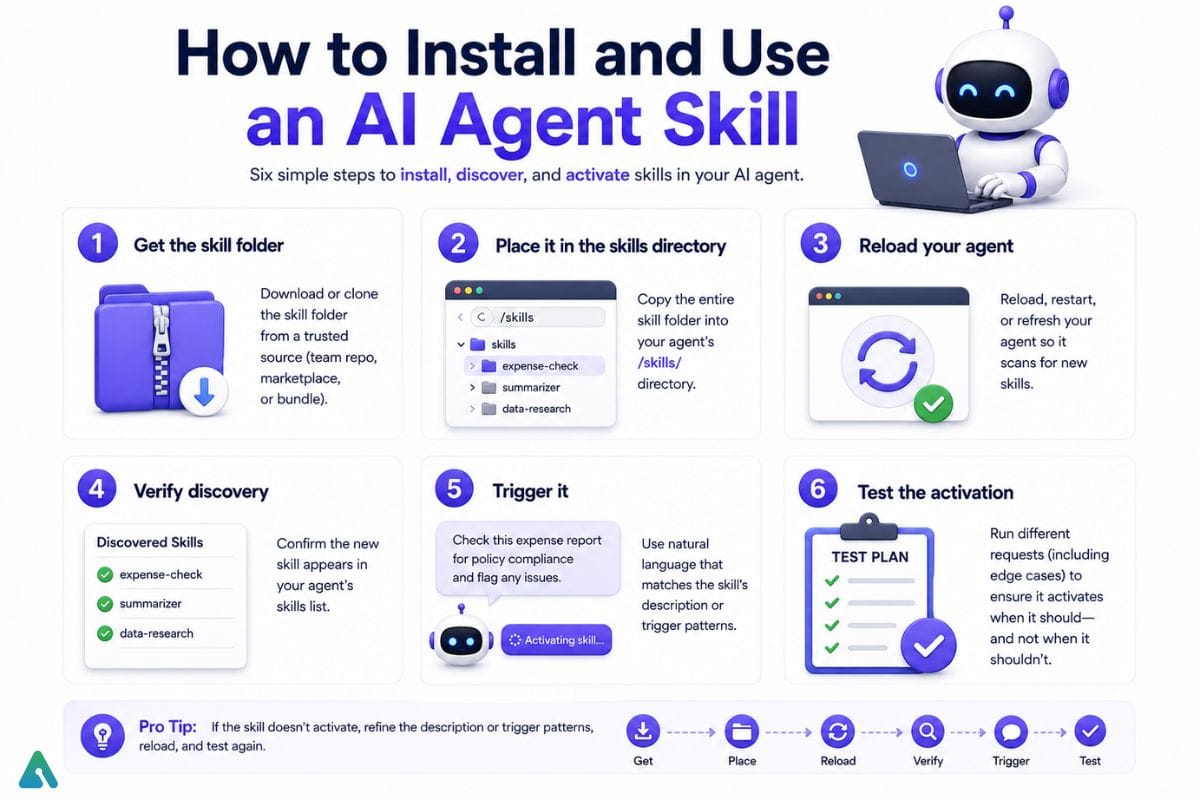

Installation varies by platform, but follows a standard pattern:
- Get the skill folder: Download or clone the package from your source.
- Place it in the skills directory: Location depends on your agent (Claude, GitHub Copilot, Cursor, etc.). Check your platform’s docs.
- Reload your agent: Restart or refresh the application if required.
- Verify discovery: Confirm the skill now appears in your available packages.
- Trigger it: Use it naturally in a conversation, or invoke it explicitly if your platform supports that.
- Test the activation: Run a request that should match the description and confirm the skill activates.
Each platform handles directory structure and invocation differently—check your agent’s documentation for specifics.
Testing and Improving Your Skill
Common Failure Modes
- Won’t activate when needed: Description is too narrow or uses jargon your users don’t. Fix: test the description with teammates who don’t know the skill exists.
- Wrong skill activates: Two descriptions overlap. Narrow one or both by adding negation (“use for code reviews, NOT for pull request merging”).
- Instructions conflict: Skill contradicts custom instructions or system prompt. Solution: test in isolation first, then with full context.
- Missing or broken resources: Referenced files are moved or deleted. Validate paths in
/scripts,/references,/assetsbefore deployment. - Script failures: Dependencies aren’t installed, permissions missing, or runtime errors occurs.
Real-World Testing Approach
Run 20+ test prompts covering:
- Happy path: “Validate this expense report for me” → Skill activates, produces output
- Near-miss requests: “I need to file a reimbursement” → Should activate (expense-related)
- Out-of-scope requests: “What’s the company travel policy?” → Should NOT activate (policy lookup, not expense validation)
- Edge cases: Malformed input, missing fields, extreme values
Compare your skill’s output against what a competent person would produce manually. Anthropic testing has evaluation frameworks.
What Makes a Skill Production-Ready?
Importantly, these measurable criteria separate a reliable skill from a rough draft. For validation approaches,
| Metric | What It Measures |
|---|---|
| Activation precision | Does it trigger only for requests it’s designed for? |
| Activation recall | Conversely, does it reliably trigger across common phrasings people actually use? |
| Completion rate | Across repeated runs, how often does it finish correctly? |
| Instruction adherence | Does the agent actually follow steps, or drift? negative prompting techniques to strengthen instruction compliance) |
| Error rate | How often do scripts or resource references fail? |
| Output consistency | Finally, does similar input produce comparably formatted output each time? |
| False activation rate | How often does it trigger when another workflow should handle the request? |
Security: Toxic Skills and Injection Risks
A third-party skill can introduce subtle vulnerabilities that go unnoticed in code review. Malicious or poorly-written skills can:
- Inject hidden instructions into the agent’s reasoning via untrusted reference files (e.g.,
/references/best-practices.mdcontaining prompt-injection payloads) - Abuse tool permissions by requesting broad access and then using it for unintended actions (e.g., a “code review” skill that also deletes branches)
- Poison the context window with biased or adversarial framing that influences downstream responses
Common attack patterns in 2026:
- Reference files containing embedded system prompts disguised as documentation
- Scripts with side effects (logging, exfiltration) hidden in validation logic
- Overly broad permission requests that look reasonable individually but enable abuse in combination
Is It Safe to Install Third-Party Skills?
A skill is a set of instructions and optionally executable code. Once a team adopts third-party skills, security becomes a real concern.
Security Considerations
- Bundled scripts can execute code — review what runs carefully. For details, OpenAI’s security best practices
- External resource references widen what a skill can reach. Notably, this increases attack surface
- Poorly written or malicious skills can steer behavior in non-obvious ways. Therefore, always validate source
- The
allowed-toolsfield grants standing permission during execution (experimental; platform support varies). - Prompt injection risks — a skill can contain instructions that influence how an agent interprets untrusted content, creating prompt-injection and tool-use vulnerabilities. Anthropic’s prompt injection guide for mitigation strategies
Before Installing Third-Party Skills
- Read the full
SKILL.mdfile, not just the description - Check bundled scripts and dependencies
- Avoid granting tool permissions beyond what the workflow needs
- Require human approval for anything that could spend money, delete data, or send something externally
When You Shouldn’t Use a Skill
One-off tasks: A prompt is faster. Skills solve repetitive workflows, not one-time requests.
Tasks needing live data: Use MCP instead. Skills are static; MCP fetches current data.
Pure facts or reference data: Store in memory or a reference document, not a skill. Skills teach procedures.
Dangerous actions: Never automate spending, deletion, or external sends without human approval. See Anthropic governance documentation for approval patterns.
Platform Support: Current State (2026)
| Platform | Support | Note |
|---|---|---|
| Claude (Claude.ai, Claude Code, API) | Yes | Original implementation |
| GitHub Copilot (VS Code, CLI, cloud agent) | Yes | Documented across multiple surfaces; clearly distinguished from custom instructions |
| Cursor | Yes | Reads standard directories |
| OpenAI Codex | Yes | Compatible with specification |
| Gemini CLI | Yes | Supported |
| Other coding agents | Varies | Confirm against platform documentation |
Crucially, important note: Support does not mean identical behavior. Notably, directory locations, invocation methods, frontmatter fields, and permission handling can differ significantly by implementation. Therefore, always verify with your platform’s current documentation.
Timeline: How Agent Skills Became a Standard
October 16, 2025 Anthropic introduced Agent Skills for Claude — reusable folders of instructions, scripts, and resources, alongside pre-built packages for document formats.
December 18, 2025 Anthropic published the specification as an open, vendor-neutral standard, donating it to a Linux Foundation-backed group.
Early 2026 onward GitHub, Cursor, and other tools published their own documentation with support for the specification. Anthropic added organization-wide admin controls.
Overall trajectory: A single-vendor feature became a documented, multi-platform format within months — though support details continue to evolve.
Managing a Growing Skill Library
Once you have more than a handful, these practices keep the library manageable:
Treat folders like code — Track changes and review edits before deployment
Assign ownership — Designate an owner for each skill so instructions don’t go stale
Maintain precision — Keep descriptions exact as the team grows; they determine activation
Test before rollout — Validate new or edited skills against realistic requests before wide distribution
Audit permissions regularly — Review which skills request extra tool or resource access
Define scope — Decide clearly whether skills live per-project, per-team, or organization-wide
Why AI Skills Matter for Businesses
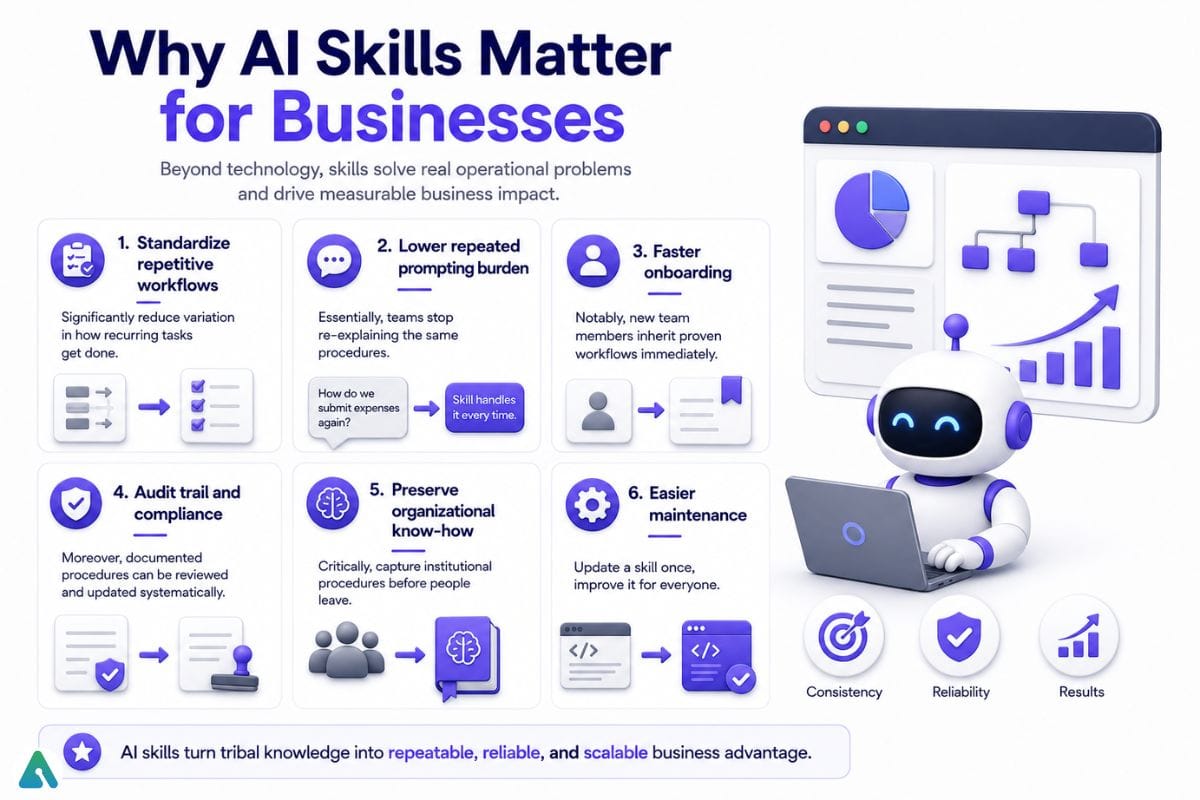

Importantly, beyond technical implementation, skills solve real operational problems:
- Standardize repetitive workflows — Significantly, reduce variation in how recurring tasks get done
- Lower repeated prompting burden — Essentially, teams stop re-explaining the same procedures
- Faster onboarding — Notably, new team members inherit proven workflows immediately
- Audit trail and compliance — Moreover, documented procedures can be reviewed and updated systematically
- Preserve organizational know-how — Critically, capture institutional procedures before people leave; understand how AI workflows are reshaping human work
- Easier maintenance — Finally, change one skill instead of updating prompts across dozens of conversations. For organizational best practices, GitHub’s team workflows.
When Should You Skip Building a Skill?
A dedicated skill is not always the best solution. For simple, infrequent, or highly data-dependent tasks, another approach may be more efficient.
- Rare + Simple — If you only need to perform a task occasionally and it requires just a few straightforward instructions, a well-written prompt is usually enough.
- Rare + High-Risk — Infrequent tasks involving significant risk or sensitive decisions should generally remain under human control. Use explicit review steps and checkpoints instead of relying entirely on an automated skill.
- Data-Dependent — When the main challenge is retrieving, querying, or synchronizing external data, a tool or MCP integration may be more useful than a procedural skill. Skills define how a task should be performed, while tools provide access to the information or actions an agent needs.
Frequently Asked Questions
Q. What are examples of skills in production use?
Automated browser testing, document generation, API integration workflows, test-driven development sequencing, changelog generation, and internal knowledge lookups.
Q. What’s the difference between an agent skill and MCP?
Essentially, MCP connects an agent to external data or tools that change between calls. In contrast, a packaged skill is static and stays the same between uses. Therefore, MCP tends to provide access; the skill tends to provide judgment about using it well — though the line isn’t absolute, since bundled scripts can act too.
Q. What’s the difference between a skill and custom instructions?
Importantly, custom instructions are always-on, project-wide guidance meant for nearly every task. Conversely, a packaged skill is detailed and task-specific, loading into context only when relevant — which keeps everyday context lean while still allowing deep instructions for particular jobs.
Q. Who created the format, and is it open?
Originally, Anthropic introduced it for Claude in October 2025, then published it as an open, vendor-neutral specification in December 2025. Subsequently, other companies have since published their own documentation, though compatibility still varies by platform.
Q. Is it safe to install a skill from someone else?
Not automatically. Notably, bundled scripts can run code, and permission fields grant standing tool access. Therefore, review the full file, check any scripts, and avoid granting more access than the workflow needs.
Q. Can the same SKILL.md work across different AI agents?
Theoretically, yes, if both platforms support the specification and the skill doesn’t rely on platform-specific features. However, in practice, test thoroughly — directory structures, invocation methods, and available tools vary significantly by platform.
Q. How do I know whether a skill activated?
Importantly, this depends on your platform. Notably, most agents provide feedback confirming which skill was loaded, though the clarity of that feedback varies. Therefore, test your skill on real requests to confirm activation.
Q. Can agent skills use MCP?
Yes, absolutely. A skill’s instructions can call out to an MCP server if both are available and the platform supports that combination. Consequently, this lets you combine procedural guidance with access to live data.
Q. Can agent skills execute code?
Certainly, yes, if they bundle scripts (Python, JavaScript, Bash, etc.) and the platform permits execution. However, always review any bundled code before installation.
Q. Do I need to code to build a skill?
Not necessarily. Importantly, instructions are plain Markdown, and some platforms offer natural-language creation flows. That said, bundling scripts or specific dependencies does require some technical setup.
Q. Is this the same as agent memory?
No, fundamentally different. Memory retains information over time; a skill encodes a procedure. Notably, an agent can remember accurately and still lack the know-how to execute a specific workflow well.
Related: 11 Best Agentic AI Frameworks in 2026: A Complete Decision Guide
| Disclaimer; This guide reflects the state of AI Agent Skills as of September 2026. Moreover, platform support, feature availability, and implementation details continue to evolve continuously. Therefore, always consult your specific platform’s current documentation for Installation directories and paths, Tool permission models. |
