
| The short version: Negative prompting tells AI what to avoid, not just what to produce. Works well. Works even better when paired with what you actually want. Used alone, it can loop back and reinforce the exact thing you’re trying to block. Three focused constraints beat twenty vague ones. And if you use Character AI or any companion platform, behavioral negatives fix bots faster than more backstory ever will. |
Stop treating AI prompts like a wish list. If you’re only telling ChatGPT, Claude, or Gemini what you want, you’re doing half the job.
Last month I ran the same editing brief — “make this clearer and more engaging” — through three models while polishing a long article. All three kept reaching for the same tired phrases. “Rapidly evolving landscape.” “Transformative potential.” “Innovative solutions.”
The models hadn’t misread the assignment. I’d never told them what to leave out.
That gap is negative prompting.
What Is Negative Prompting?
Telling an AI what it should not do when generating a response — not just what you want, but what you’re actively trying to avoid.
Basic prompt:
Write an article about AI companions.
Negative prompt version:
Write an article about AI companions. Avoid marketing buzzwords, repetitive phrasing, unsupported claims, and generic introductions.
The second version narrows the model’s options.
Think of it like briefing a freelance writer. “Write naturally” gets you one interpretation. “Write naturally — skip the corporate jargon and sales language” gets you something closer to what you meant.
AI responds the same way.
How Negative Prompting Improves AI Output Quality
Large language models predict likely continuations based on patterns in training data.
When a prompt is vague, models default to common habits, generic structures, and statistically popular phrases. That’s why you keep seeing “delve,” “tapestry,” and “game changer” in every output.
Negative prompts close off those lazy defaults.
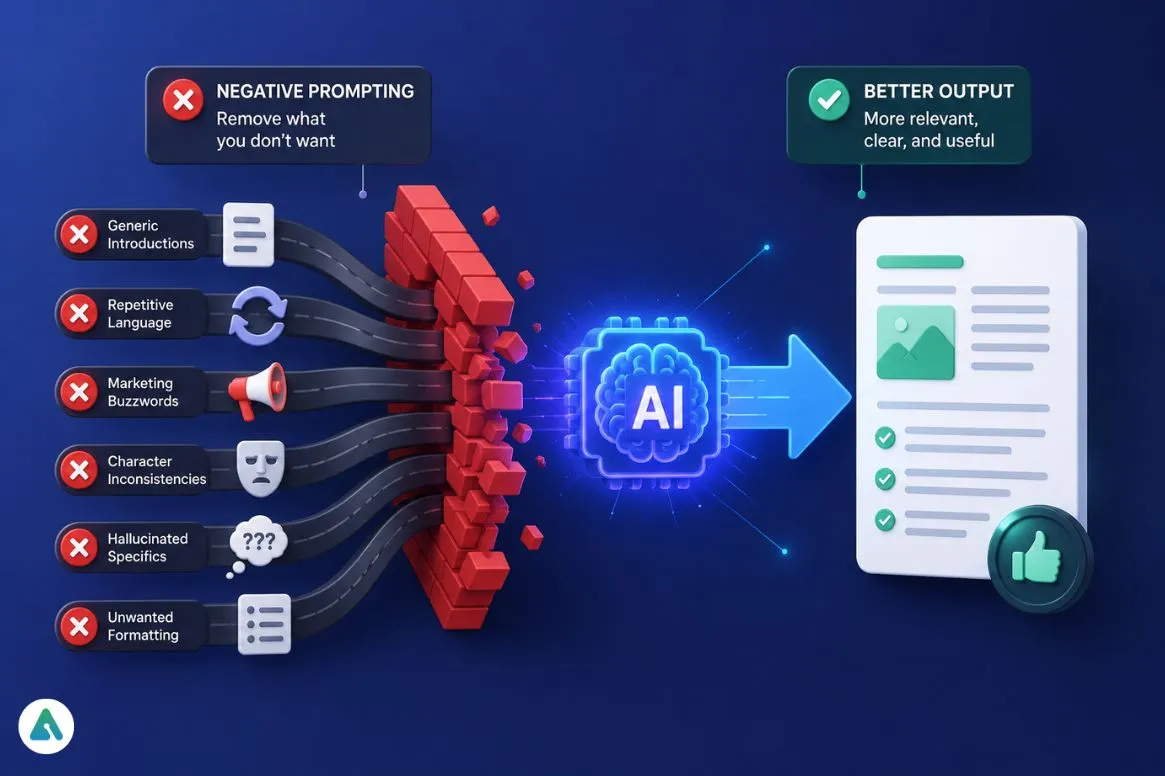
Done well, they reduce:
- Generic introductions
- Repetitive language
- Marketing buzzwords
- Character inconsistencies
- Hallucinated specifics
- Unwanted formatting
Negative prompting doesn’t force a single correct answer. It just removes the paths you didn’t want the model to take.
Why AI Ignores “Don’t” Instructions (The Pink Elephant Effect)
Here’s where most guides oversimplify. Negative prompts don’t work like an on/off switch.
Tell someone, “don’t think about a pink elephant” — they immediately picture one. This is a real, studied effect. Psychologist Daniel Wegner documented it in 1987 as ironic process theory: subjects told to suppress a thought fixated on it more, not less.
Language models hit a similar wall, though through a different mechanism.
When you write “do not use corporate jargon,” the model still has to process the tokens corporate and jargon to know what to avoid. Those concepts stay active. Anthropic’s own prompt engineers have flagged this — pushing Claude too hard on what not to do can nudge it toward the very behavior you’re blocking.
Their fix: pair the negative with a positive. Always.
What this looks like in practice:
❌ “Don’t use corporate jargon.”
✅ “Write in plain English with concrete examples. Avoid corporate jargon and buzzwords.”
The first version hits a wall and bounces back. The second gives the model somewhere to go.
If you’re using the OpenAI API (not the chat interface), there’s a more literal fix: the
logit_biasparameter lets you set a banned token to -100, mathematically removing it from the sampling pool. No prose required. Anthropic’s and Google’s APIs don’t expose an equivalent, so on Claude or Gemini, well-structured prompts are still your main lever.
The STOP Framework: A Simple Method for Better AI Prompt Control
Not an industry standard — just what I run negative prompts through after testing across Claude, ChatGPT, Gemini, and Grok. Take it or leave it.
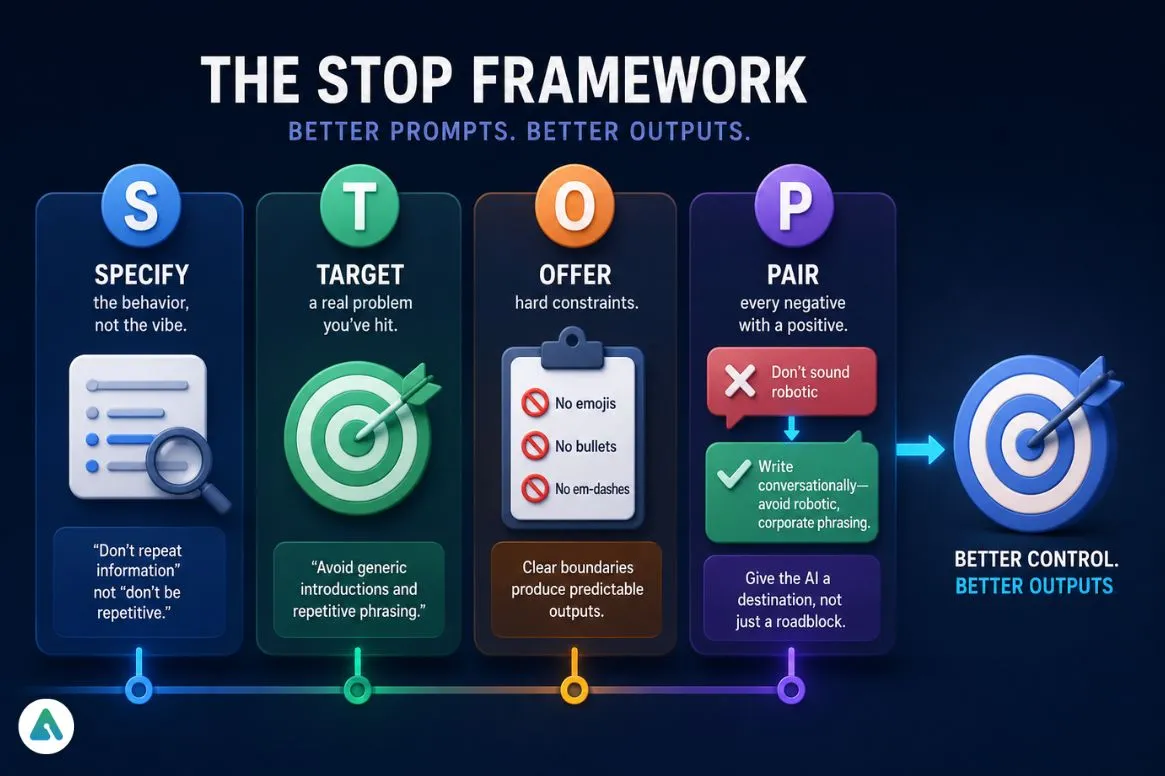
S — Specify the behavior, not the vibe. “Don’t repeat information” beats “don’t be repetitive.” The more concrete, the more useful.
T — Target a real problem you’ve actually hit. “Don’t be bad” tells the model nothing. “Avoid generic introductions and repetitive phrasing” tells it exactly what you’ve seen go wrong.
O — Offer hard constraints. No emojis. No bullet points and no em-dashes. Clean edges produce predictable outputs.
P — Pair every negative with a positive. This is the step people skip. “Don’t sound robotic” becomes “write conversationally — avoid robotic, corporate phrasing.” The AI now has a destination, not just a blocked road.
Common Negative Prompting Mistakes That Reduce Output Quality
Too many restrictions at once. Stack ten “don’ts” and the model spends so much attention tracking what to avoid that output quality drops. Three to five sharp constraints outperform twenty vague ones.
Contradictory instructions. “Be concise” and “cover every angle in detail” in the same prompt forces the model to guess which rule wins. It usually satisfies neither.
Vague negatives with no positive alternative. “Don’t sound like AI” is unenforceable. The model has no concrete target. Tell it what human-sounding looks like: shorter sentences, a specific voice, real examples.
Over-correcting after one bad output. One clunky response doesn’t mean you need five new restrictions. Often, the fix is one sharper instruction, not four more layered on a crowded prompt.
Before vs After: Real Examples of Strong vs Weak AI Prompts
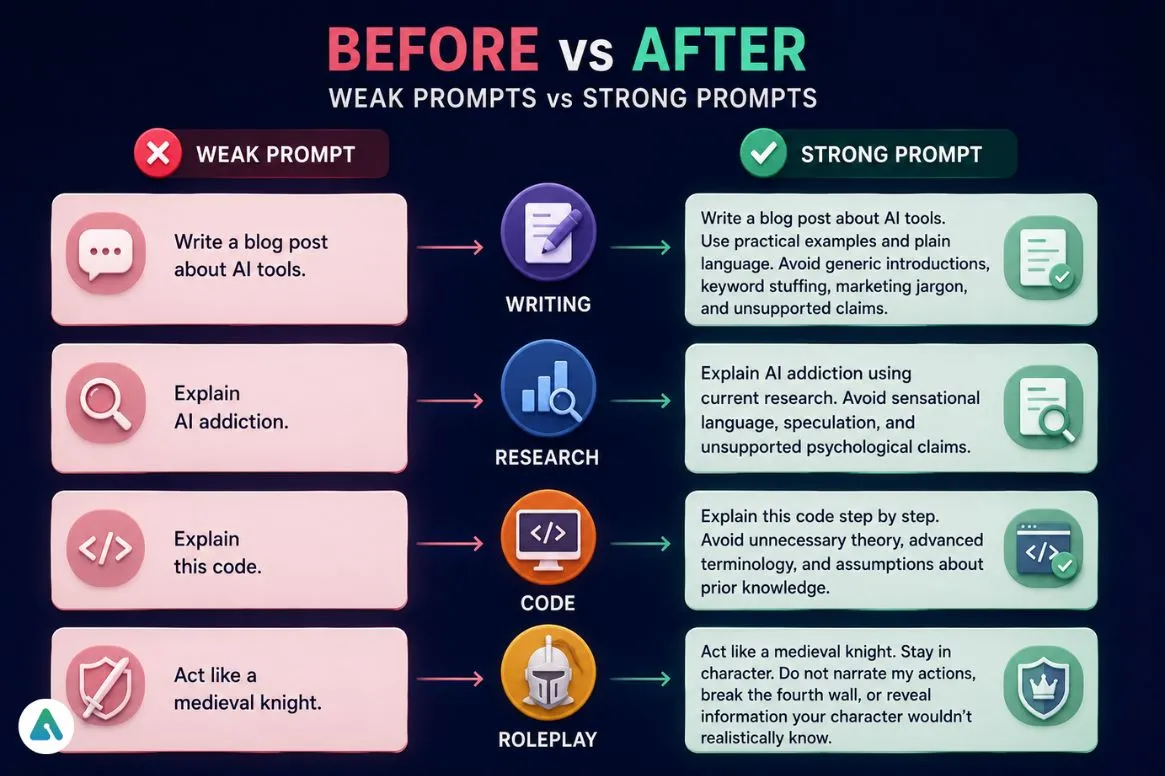
Writing:
- Weak: “Write a blog post about AI tools.”
- Strong: “Write a blog post about AI tools. Use practical examples and plain language. Avoid generic introductions, keyword stuffing, marketing jargon, and unsupported claims.”
Research:
- Weak: “Explain AI addiction.”
- Strong: “Explain AI addiction using current research. Avoid sensational language, speculation, and unsupported psychological claims.”
Code:
- Weak: “Explain this code.”
- Strong: “Explain this code step by step. Avoid unnecessary theory, advanced terminology, and assumptions about prior knowledge.”
Roleplay:
- Weak: “Act like a medieval knight.”
- Strong: “Act like a medieval knight. Stay in character. Do not narrate my actions, break the fourth wall, or reveal information your character wouldn’t realistically know.”
Negative Prompting for Character AI and Companion Bots
This is where the technique earns its keep.
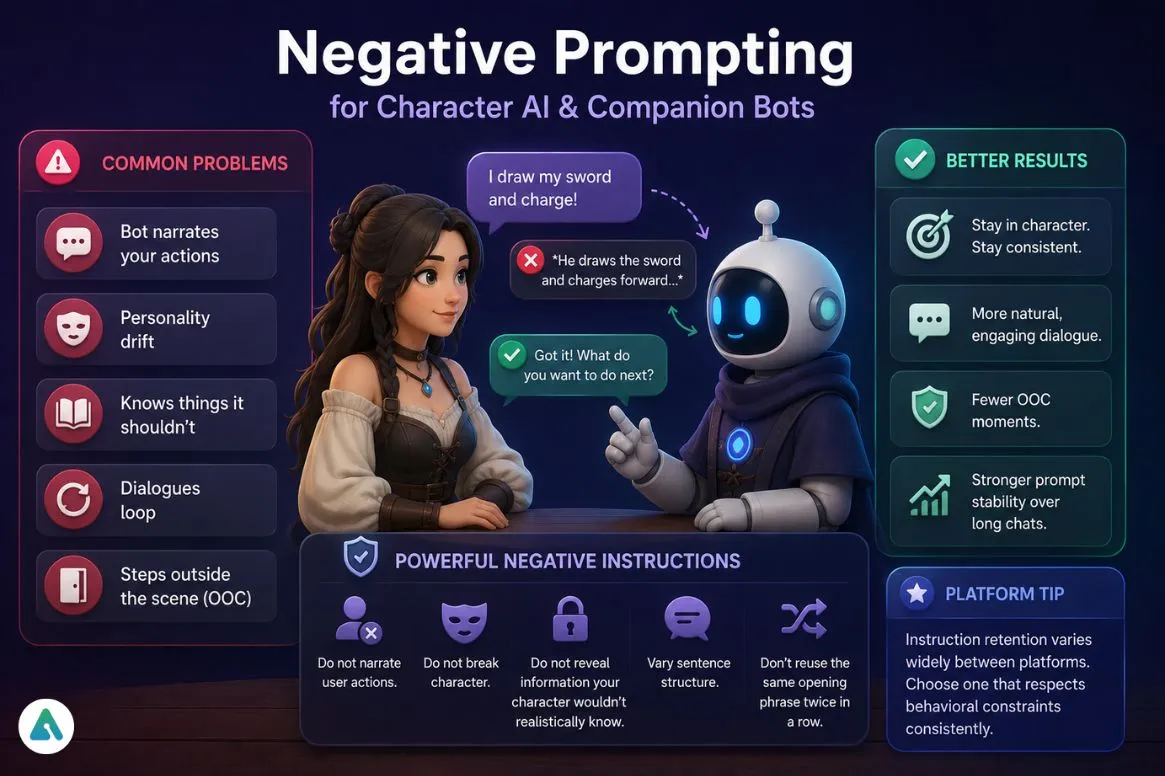
Anyone running character prompts on a roleplay or companion platform hits the same short list of problems: bots narrating user actions, personality drift mid-conversation, sudden knowledge the character shouldn’t have, and dialogue that loops.
Most people respond by adding more backstory, but that rarely solves the underlying problem. In many cases, a simple behavioral negative is more effective than hundreds of extra words of lore.
Instructions such as “Do not narrate user actions,” “Do not break character,” and “Do not reveal information your character wouldn’t realistically know” often have a bigger impact than an expanded character card.
The same principle applies when a bot gets stuck in repetitive dialogue. Rather than rewriting the entire prompt, adding a focused instruction like “vary sentence structure” or “don’t reuse the same opening phrase twice in a row” can quickly improve conversation quality.
Likewise, if a character frequently steps outside the scene, defining when OOC notation is appropriate—and when the bot should remain fully in-character—is usually a faster fix than rebuilding the prompt from scratch.
If you’re comparing platforms, instruction retention varies widely. Some AI roleplay chatbot handle behavioral constraints much better than others over long conversations, making prompt stability an important factor when choosing a platform.
Which AI Models Follow Negative Prompts Most Accurately?
The short answer: Claude and ChatGPT handle them most reliably — but how you write the instruction matters as much as which model you’re using.
| Model | How Well It Follows | Best Placement | What Actually Helps |
|---|---|---|---|
| Claude | Strong, light-touch | System prompt + structured tags | Anthropic warns against heavy-handed negatives; one sentence pairing restriction with a positive outperforms a standalone “don’t” |
| ChatGPT | Strong across long sessions | Custom Instructions | OpenAI’s instruction hierarchy means system-level rules survive longer than mid-chat ones |
| Gemini | Good when paired with an example | Explicit instructions + worked example | Responds better to “avoid X — instead do Y, like this” than to a bare rule |
| Grok | Good, but fades with long prose | Short bullet constraints | xAI publishes its own system prompts publicly, and they’re almost entirely short bullets — not explanatory paragraphs |
| Character AI / companions | Moderate, lore-dependent | Persona or character-definition field | Negatives in the persona card hold longer than ones typed mid-conversation |
Curious how Grok actually stacks up for everyday use? The Grok vs. ChatGPT breakdown covers more than just prompting.
Do Reasoning Models Follow Negative Prompts Better?
It’s tempting to think “thinking” models — OpenAI’s o-series, Gemini Thinking, Claude’s extended thinking — just solve the Pink Elephant problem by checking their own drafts against your rules.
They don’t. And the evidence goes the other direction.
A 2025 instruction-following study tested reasoning models on IFEval and ComplexBench — benchmarks built specifically around prompt constraints — and found that chain-of-thought reasoning produced a drop in constraint accuracy compared to standard outputs. More deliberation, worse rule-following. The likely reason: extended reasoning gives the model more room to improvise a path that satisfies its own logic while quietly drifting from your literal instruction.
Practical adjustment for reasoning models: state the constraint as a flat output boundary, not a process step. “The final answer must not mention pricing.” works. “First check if pricing is mentioned, then remove it if so.” Hand the model a script it may deviate from.
Negative Prompting in Image Generation
The concept didn’t start with chatbots — it started with image generation, where the mechanics are more literal.
Stable Diffusion has a dedicated negative prompt field, separate from the main prompt box. Terms you enter there — blurry, extra fingers, watermark, low quality — get suppressed at the sampling level. The model’s attention is actively steered away from those features during generation.
Midjourney works differently. No separate field — you append --no followed by the term you want removed, and the system assigns it negative weight. You can also go further with multi-prompt weighting, assigning a term a negative numerical value directly.
Both share the same goal, different mechanisms. If you’re used to Midjourney’s --no and try to port that habit to Stable Diffusion — or vice versa — the syntax and the underlying logic are different enough that it’s worth relearning.
Common AI Writing Clichés to Avoid (Keyword Block List)
These phrases have become common enough that a lot of writers and editors now ban them by name:
delve, tapestry, testament to, rapidly evolving landscape, transformative potential, unlock the power of, in today’s digital world, game changer, it’s important to note, navigate the complexities of
A prompt that works: “Avoid cliché AI writing phrases such as ‘rapidly evolving landscape,’ ‘transformative potential,’ and similar marketing language.” The difference in the next output is usually immediate.
Does Negative Prompting Reduce Hallucinations?
Yes — partially.
Anthropic’s own guidance on reducing hallucinations recommends explicitly permitting Claude to say “I don’t know.” Their position: that a single instruction alone can drastically cut false information. It’s a negative prompting aimed at suppressing the urge to guess, not just a word or phrase.
But it doesn’t fix why models hallucinate in the first place. Think of it as a useful layer — not a cure. The most reliable approach still combines good source material, clear instructions, manual fact-checking, and negative prompting as one guardrail among several.
System Prompt vs. Chat Prompt: Where Do Negative Instructions Go?
Not all instructions carry equal weight.
System-level (Custom Instructions, Project Instructions, character definitions, developer prompts) — sit at the top of the priority stack and persist across sessions.
User-level (chat messages, one-off requests) — live inside a single turn and often fade as a conversation grows long.
If you find yourself typing “avoid corporate jargon” at the start of every new chat, that’s the sign it belongs in a permanent system-level setting.
A Template You Can Copy Right Now
Task: [what you want]
Do: [the desired behavior, tone, or format]
Avoid: [specific behavior, phrase, or mistake to skip]
Style: [voice, length, formatting constraints]
Filling in all four lines — not just “Avoid” — is the difference between a negative prompt that actually changes output and one that just blocks a single word while the model improvises everywhere else.
FAQs
Q. What is negative prompting in AI?
Negative prompting means telling an AI what to avoid generating, not just what to produce. It helps reduce unwanted phrases, formatting, behaviors, and mistakes by setting clear boundaries around the output.
Q. Does negative prompting work with ChatGPT?
Yes. Negative prompting works best when paired with a positive instruction. For example, “Write in plain English and avoid corporate jargon” is usually more effective than simply saying “Don’t use corporate jargon.”
Q. Can negative prompting reduce AI hallucinations?
Partially. Instructions such as “If you’re unsure, say ‘I don’t know'” can reduce fabricated information. However, negative prompting cannot eliminate hallucinations.
Q. What is the Pink Elephant Problem?
The Pink Elephant Problem describes how AI still processes the concept you’re trying to avoid because those words remain in the prompt. Pairing a negative instruction with a positive alternative usually works better.
Q. Is negative prompting only for AI chatbots?
No. Negative prompting started in AI image generation and is now used with chatbots, coding assistants, AI companions, and writing tools.
Q. Can you overuse negative prompts?
Yes. Too many restrictions can reduce output quality and make responses feel rigid. In most cases, three to five specific constraints work better than long lists of rules.
Q. How do you write a negative prompt for Stable Diffusion?
Enter unwanted elements directly into the Negative Prompt field. Common examples include “blurry,” “watermark,” “low quality,” and “extra fingers.”
Q. How do you write a negative prompt for Midjourney?
Use the –no parameter followed by the element you want removed. For example, --no people tells Midjourney to avoid generating people.
Q. Does negative prompting help with code generation?
Yes. It helps define boundaries. Instructions like “Don’t introduce new dependencies” or “Don’t change the public API” often improve refactoring results.
Q. Can negative prompting be enforced through an API?
Sometimes. OpenAI’s API supports logit_bias, which can suppress specific tokens. Most other platforms rely primarily on prompt-based instructions.
Q. What’s the best way to use negative prompting?
Pair every negative instruction with a positive alternative. Instead of saying “Don’t sound robotic,” say “Write conversationally and avoid robotic language.”
The final thought
Most AI outputs that feel “close but not quite right” aren’t missing more instructions. They’re missing a boundary. Check what you told it to avoid before you add anything else.
Related: Claude’s 171 “Emotion Vectors” Are Real—And They’re Changing How AI Behaves
| Disclaimer: AI prompting is part technique, part experimentation. The examples, frameworks, and recommendations in this article are based on current platform documentation, published research, and real-world testing, but no prompt can guarantee identical results across every AI model or future update. Use these techniques as practical starting points, adapt them to your workflow, and always verify important AI-generated content before relying on or publishing it. |
